
Export settings and objects (admin addon)
Description
Soffid has the functionality that allows you to export configuration,configuration, Soffid objects, and objects from target systems in a ZIP file.
Every object or configuration will be downloaded into the ZIP in a binary file. This ZIP file could be imported into another Soffid tenant to be used.
For more information, you can visit the Import settings and objects page.page.
Once you open the Export settings and objects, you must select the configuration, objects, and target system objects you want to export. Then you only need to click the Generate export file button to download the ZIP that will contain all the previous information selected.
It is not allowed to export the basic configuration and configuration parameters of an agent for security reasons. You must create them manually and make sure you put the same names as in the source system if you are going to import accounts.
OverviewScreen overview
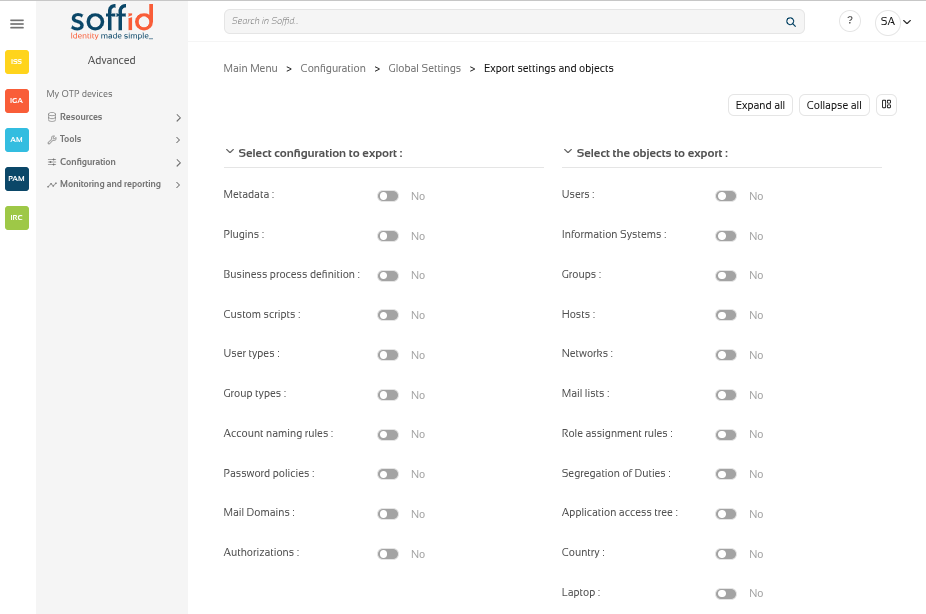
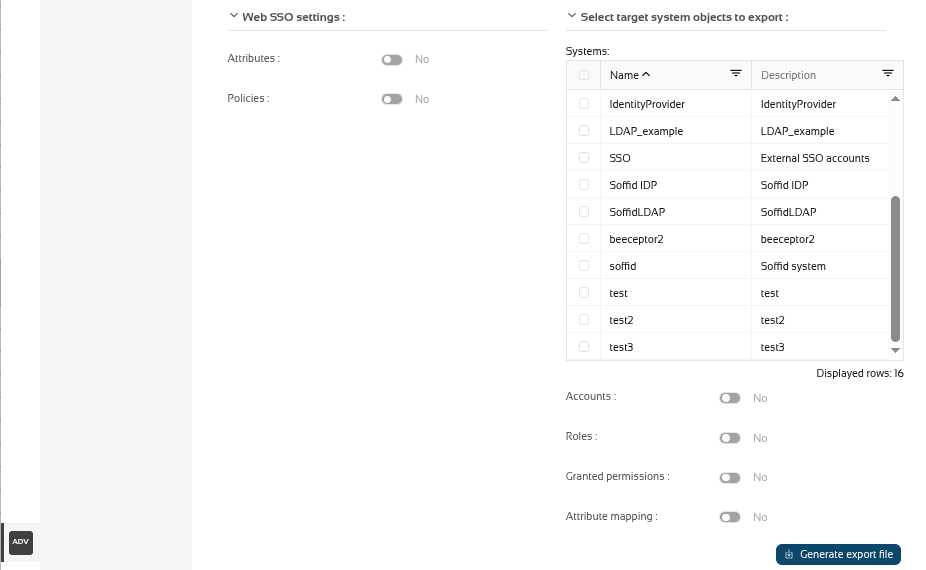
Related objects
Configuration
- Metadata
Plugins- Plugins
- Business process definition
- Custom
Scriptsscripts - User types
- Group types
- Account naming rules
- Password policies
- Mail
Domainsdomains - Authorizations
Objects
- Users
- Information
Systemssystems - Groups
- Hosts
- Networks
- Mail lists
- Role assignment rules
- Segregation of
Dutiesduties - Application access tree
- Custom objects : the custom objects created on the Metadata page
Web SSO settings
Target system objects
AccountsSystemsRolesAccountsGranted permissionsRolesAttributeGrantedmappingspermissionsSystems:Attributeif you select and target system object, you must also select the system.mappings
Actions
| Expand all | Displays all the attributes of the different blocks. |
| Collapse all | Hide all attributes of the different blocks. |
| "Types of views" | Change the view type: Classic view, Modern view, Compact design. |
|
Generate export file |
By clicking this button, Soffid will generate a ZIP file with the objects and configuration that you have selected and will download it to your computer. |
Others
Exporting and importing
You can export all the components you are using in your Soffid implementation, so you can use them as a backup in case something happens, or to generate a new test environment.
Once the zip file has been generated, you can import it on the Import settings and objects page, but do not worry about the exported objects. On the import screen itself, once the zip file has been uploaded, the screen will allow you to choose the objects you want to update in your Soffid instance.