Further information
Further information
- My Profile
- Soffid Objects (for agent mappings)
- Sample scripts
- Utility classes
- Beanshell vs Javascript
- Office 365 as External SAML identity provider
My Profile
Description
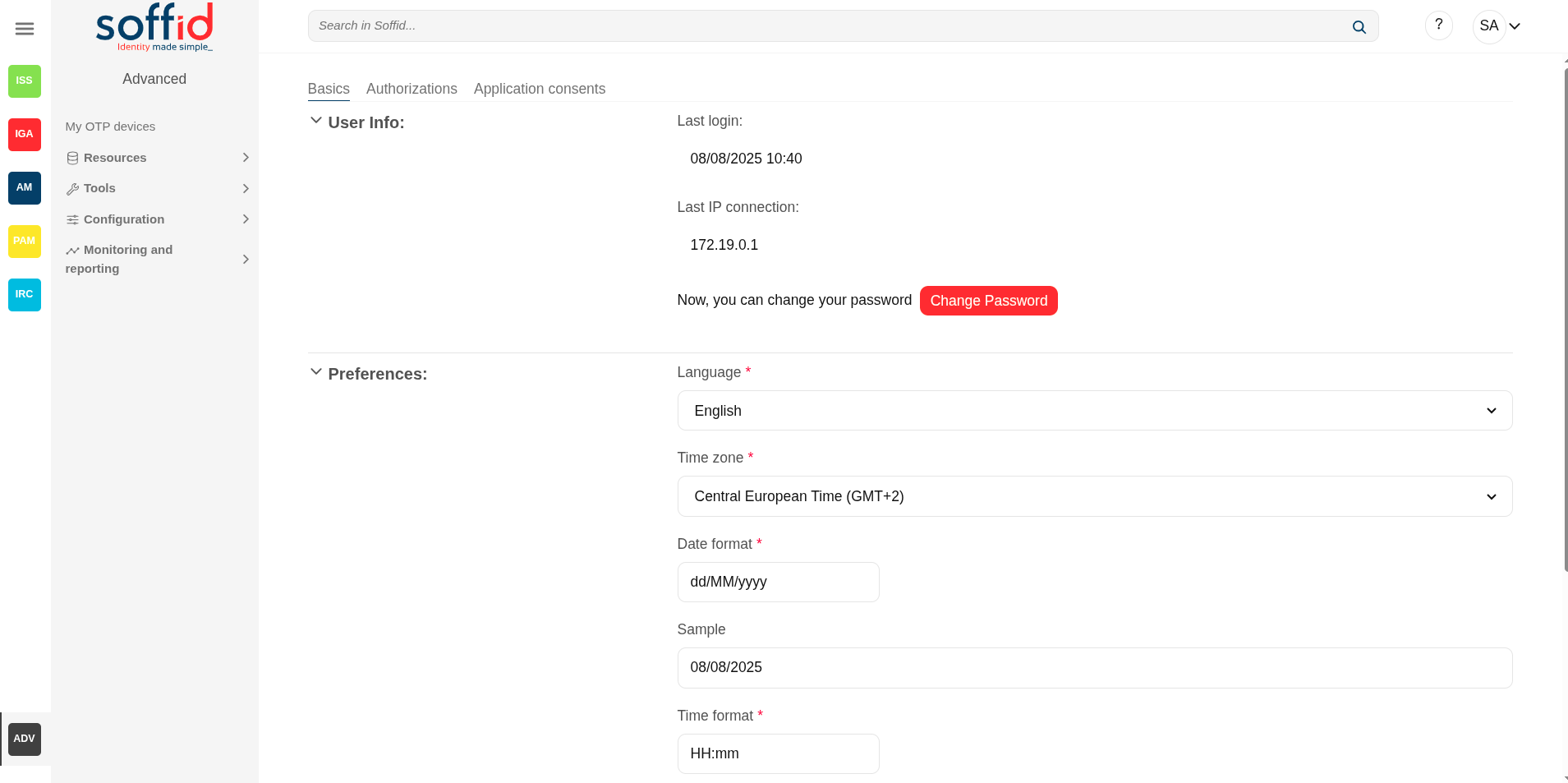
My Profile is a part of a the Identity self service that allows to end users config their own profile, update the user info and preferences, change their password, and recover questions.
To view My Profile, you must select the My Profile option that will be displayed when you click on the drop-down menu at the top right. Then Soffid displays a new window that will allow end users to configure their profiles.
Screen overview
Related objects
- Users : to display the roles granted to a user
- Roles : to display the roles
- Information systems : to display the roles throught the information systems
- Authorizations : to review the authorizations and manage the roles assigned
Standard attributes
Basic
User Info
- Last login: date and time of the user's last login.
- Last IP connection: IP of the user's last login.
- Change password: allows end-users to change their password.
- Password recovery questions: (only when addon retrieve passwords is configured) allows end-users to config their own questions to recover their passwords.
For more info about password recovery, you can visit the Password recovery questions page.
Preferences
- Language: allows end-users to select their preferred language.
- Time zone: allows end-users to select their time zone.
- Date format: allows end-users to select the format date.
- Sample: displays how the date will be displayed in Soffid Console
- Time format: allows end-users to select the format time
- Sample: displays how the time will be displayed in Soffid Console
- Enable desktop notifications in this browser: enable desktop notifications in this browser
- Display: Light (backgroud in white), dark (background in dark)
Authorizations
Display a list with the user authorizations.
Application consents
Displays a list of all the user's consents given, and the user can see all of them. Users can remove the consent at any time as well.
When the user connects to a new application, the IdP will indicate which data will be shared with this application. That information is defined in the Attribute sharing policies page of the Federation.
For more info about password recovery, you can visit the Attribute sharing policies page.
Actions
| Change pasword |
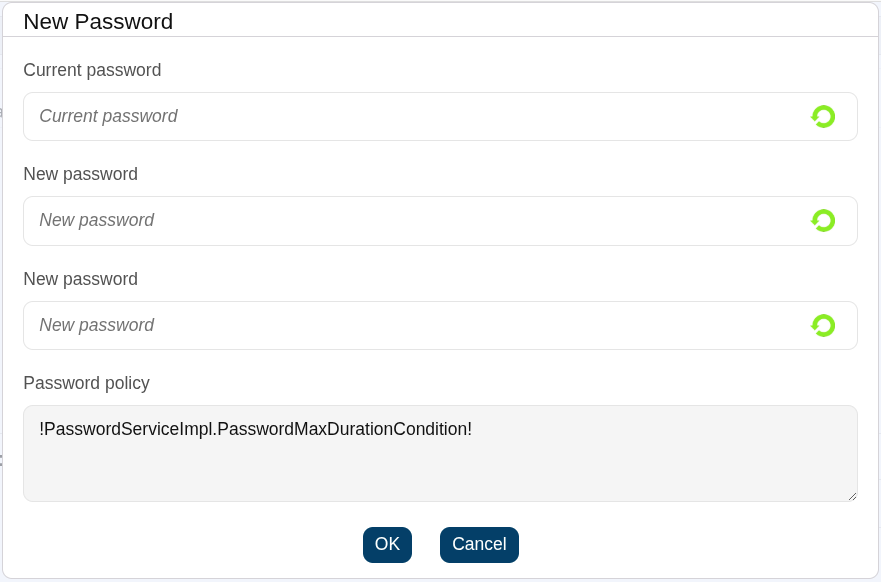
Allows the user to change their current password.
The pop-up will display the restrictions applied according to your password policy.
You must enter your current password. If you cannot remember it, it is best to use the password recovery option when logging in to the Console. This option is included in the password recovery add-on. |
| Undo | Allows you to undo any changes made. |
| Apply changes | Allows you to save the data. Once you apply changes, the details page will be closed. |
Soffid Objects (for agent mappings)
You can consult the list of Soffid attributes:
- User Object
- Account Object
- Group Object
- Role Object
- Grant Object
- Maillist Object
- Membership Object
- dispatcherService
- Authoritative change object
User object
A user objects are maps that hold the information belonging to a single user account.
|
Attribute
|
Type
|
Description
|
|---|---|---|
| id | Long | user id |
| accountId | Long | account id |
| accountName | String | account name |
| system | String | managed system (agent) name |
| accountDescription | String | account description |
| active | Boolean | true if user is active |
| accountDisabled | Boolean | true if account is diabled |
| mailAlias | String | blank separated mails |
| userName | String | user name |
| primaryGroup | String | user's primary group name |
| comments | String | user's comments |
| createdOn | Date | user creation date |
| modifiedOn | Date | user last modification date |
| mailDomain | Date | user mail domain ( email right side of @) |
| fullName | String | user full name |
| shortName | String | user mail name (email left side of @) |
| firstName | String | user first name |
| lastName | String | user last name |
| lastName2 | String | user second last name (when applicable) |
| mailServer | String | mail server host name |
| homeServer | String | home drive server host name |
| profileServer | String | roaming profile server host name |
| phone | String | user's phone number |
| userType | String | user type |
| createdBy | String | user name creator of this user |
| modifiedBy | String | user name modifier of this user |
| secondaryGroups | List<Map<String,Object>> |
list of groups the user belongs to, including primary group The attributes of the inner map are described later |
| attributes | Map<String,String> | additional user attributes |
| grantedRoles | List<Map<String,Object>> | list of grants directly granted to the user |
| allGrantedRoles | List<Map<String,Object>> | list of grants directly on indirectly granted to the user |
| granted | List<String> | list of role names and group names directly granted to the user |
| allGranted | List<String> | list of role names and group names directly or indirectly granted to the user |
Account object
An account object holds the information belonging to an account.
|
Attribute
|
Type
|
Description
|
|---|---|---|
| accountDescription | String | account description |
| accountDisabled | Boolean | true if account is diabled |
| accountId | Long | account id |
| accountName | String | account name |
| allGranted | List<String> | list of role names directly or indirectly granted to the user |
| allGrantedRoles | List<Map<String,Object>> | list of grants directly on indirectly granted to the user |
| attributes | Map<String,String> | additional account attributes |
| granted | List<String> | list of role names directly granted to the user |
| grantedRoles | List<Map<String,Object>> | list of grants directly granted to the user |
| lastLogin | Calendar | lastLogin |
| lastPasswordUpdate | Calendar | lastPasswordUpdate |
| lastUpdate | Calendar | lastUpdate |
| passwordExpiration | Calendar | passwordExpiration |
| passwordPolicy | String | password policy |
| system | String | managed system (agent) name |
| type | AccountType | "U"=user, "S"=shared, "P"=privileged, "I=ignored |
Group object
An group object holds the information belonging to a group.
|
Attribute
|
Type
|
Description
|
|---|---|---|
| groupId | Long | group id |
| name | String | group name |
| description | String | group description |
| parent | String | parent group name |
| server | String | home server host name |
| disabled | boolean | true if the group is disabled |
| accountingGroup | String | group accounting information |
| type | String | group type |
| driveLetter | String | home server letter to connect to |
| users | List<Map<String,Object>> | list of users belonging to this group |
| userNames | List<String> | list of user names belonging to this group |
| allUsers | List<Map<String,Object>> | list of users directly or indirectly belonging to this group |
| allUserNames | List<String> | list of user names either directly or indirectly grantee of this role |
| grantedRoles | List<Map<String,Object>> | list of roles granted to this group |
| grantedRoleNames | List<String> | list of role names granted to this group |
Role object
An role object holds the information belonging to a role.
|
Attribute
|
Type
|
Description
|
|---|---|---|
| roleId | Long | role id |
| system | String | managed system (agent) name |
| name | String | role name |
| application | String | application system name |
| category | String | role category |
| passwordProtected | boolean | true if role should be password protected (where applicable) |
| description | String | Role description |
| wfmanaged | boolean | true if role should be displayed in self service requests |
| domain | String | custom domain for this role: Use com.soffid.iam.api.DomainType constants or configured custom domain |
| ownedRoles | List<Map<String,Object>> | list of roles granted to this one |
| ownerRoles | List<Map<String,Object>> | list of roles grantee of this one |
| ownerGroups | List<Map<String,Object>> | list of groups grantee of this role |
| grantedAccountNames | List<String> | list of account names directly grantee of this role |
| grantedAccounts | List<Map<String,Object>> | list of users directly grantee of this role |
| allGrantedAccountNames | List<String> | list of account names either directly or indirectly grantee of this role |
| allGrantedAccounts | List<Map<String,Object>> | list of users either directly or indirectly grantee of this role |
| attributes | Map<String,Object> | role's custom attributes |
Grant object
Grant, grantedRole & allGrantedRoles
The objects grant, grantedRole and allGrantedRoles are used to assing roles to accounts and roles.
|
Attribute
|
Type
|
Description
|
|---|---|---|
| domainValue | String | grant value (if any) |
| grantedRole | String | granted role name |
| grantedRoleId | Long | granted role id |
| grantedRoleObject | role object | granted role |
| grantedRoleSystem | String | granted role managed system (agent) name |
| id | Long | grant id |
| ownerAccount | String | grantee account name |
| ownerAccountObject | account object | grantee account |
| ownerGroup | String | grantee group name |
| ownerRoleId | String | grantee role id |
| ownerRoleName | String | grantee role name |
| ownerSystem | String | grantee account or role managed system name |
| ownerUser | String | grantee user name |
Examples
Grant
Example to map a grant object (assign a role to an account):
|
System attribute
|
Direction
|
Soffid attribute
|
|---|---|---|
| role_name | => | grantedRole |
| account_name | => | ownerAccount |
GrantedRole
Example to map a grantedRole object (assign a role as a child of another role):
|
System attribute
|
Direction
|
Soffid attribute
|
|---|---|---|
| role_name | => | grantedRole |
| parent_role_name | => | ownerRoleName |
AllGrantedRoles
Example to map a allGrantedRoles object in a holderGroup (assign a role to an account in a specific group):
|
System attribute
|
Direction
|
Soffid attribute
|
|---|---|---|
| role_name | => | grantedRole |
| parent_role_name | => | ownerRoleName |
| group_code | => | domainValue |
| group_code | => | holderGroup |
| userName | => | ownerUser |
Maillist object
|
Attribute
|
Type
|
Description
|
|---|---|---|
| id | Long | internal mail list id |
| name | String | mail list name ( the initial part, before the @ sign) |
| domain | String | mail list domain ( the remaining part after the @ sign) |
| system | String | managed system (agent) name |
| description | String | mail list description |
| users | String array | user names that are bound to this mail list |
| groups | String array | group names thta are subscribed to this mai list |
| roles | String array | role names that grant access to this mail list |
| lists | String array | Nested mail lists |
| explodedUsers | String array | Names of the users that should be subscribed to this mail list, including the users that should be subscribed due to group or role membership |
| explodedUserAddresses | String array | Mail addresses of any exploded User |
Membership object
A membership object contains the user account information as well as the group the user belongs to.
|
Attribute
|
Type
|
Description
|
|---|---|---|
| userName | String | User name |
| user | Map<String,Object> | user object |
| groupName | String | Group name |
| group | Map<String,Object> | group object |
| attributes | Map<String,Object> | Membership custom attributes |
dispatcherService
dispatcherService is an object available from agents' attribute translation rules.
This object contains four methods:
|
method name
|
parameters
|
result type
|
comments
|
|---|---|---|---|
| soffidToSystem | ExtensibleObject soffidObject | ExtensibleObject |
Uses attribute translation tables to transform a soffid object to a target system object. Mind to fill-in objectType property to use the proper object mapping |
| systemToSoffid | ExtensibleObject systemObject | ExtensibleObject |
Uses attribute translation tables to transform a target system object to a Soffid object. Mind to fill-in objectType property to use the proper object mapping |
| search | ExtensibleObject exampleObject | ExtensibleObject |
Uses the exampleObject to perform a query by example on the target system. If the object exists on the target system, it is returned. Mind to fill-in objectType property with the desired system object type |
| invoke |
String verb String action Map parameters |
List of Map |
This method allows arbitrary executions on the target system, but it semantics can change depending on the connector used. For instance, it can be used to perform a GET on the target system in REST connector, can issue an LDAP query on ActiveDirectory connector, can execute a SELECT sentence on a SQL connector, or can execute an operating system command in Shell connector. The results are returned as a list of objects (map). |
Examples
Snippet to query the sys_id attribute for a grant owner
System.out.println("Searching id for "+ownerRoleName);
com.soffid.iam.sync.intf.ExtensibleObject eo = new com.soffid.iam.sync.intf.ExtensibleObject();
eo.setObjectType("ROLE");
eo{"name"} = ownerRoleName;
eo = dispatcherService.search(eo);
System.out.println("FOUND "+eo{"sys_id"});
return eo{"sys_id"};
Snippet that performs a REST query to get group to role assignments in ServiceNow
list = dispatcherService.invoke ("GET",
  "https://arxusdev.service-now.com/api/now/table/sys_group_has_role?sysparm_exclude_reference_link=true&sysparm_display_value=all&sysparm_fields=role%2Cgroup&sysparm_query=group="+sys_id,
  null).
  get(0).get("result")

r = new java.util.LinkedList();
for ( d: list)
{
  grant = new java.util.HashMap();
  grant{"grantedRole"} = d.get("role").get("display_value");
  grant{"grantedRoleSystem"} = "ServiceNow";
  grant{"ownerRoleName"} = name;
  grant{"ownerSystem"} = "ServiceNow";
  r.add  (grant);
}
return r;
Snippet of invoke usage on a relational database
// Table ITREPRT
role = source{"granted"}.size() == 0 ? "" : source{"granted"}.get(0);
System.out.println ("************** ROLE "+role);
args = new java.util.HashMap();
args.put("user", source{"accountName"}.toUpperCase());
if (role.equals ("Receptores PR") || role.equals("Jefes_Personal")) {
  r = dispatcherService.invoke("select", "* from ITREPRT where IDUSER=:user", args);
  if (r.size() == 0) {
    dispatcherService.invoke("insert", "into ITREPRT(IDUSER,NOMECO) values (:user, 1)", args);
  }
} else {
  dispatcherService.invoke("delete", "from ITREPRT where IDUSER=:user", args);
}
// TABLE MRGEUCT
cc = source{"attributes"}{"dominio"};
if ( source{"userType"} .equals ("T")) {
  cc = source{"userName"}.substring(1);
}
while (cc != null && cc.startsWith("0")) cc = cc.substring(1);
System.out.println ("************** COST CENTER "+cc);
if (cc != null && ! cc.trim().isEmpty())
{
  args = new java.util.HashMap();
  args.put("user", source{"accountName"}.toUpperCase());
  args.put("cc", cc);
  r = dispatcherService.invoke("SELECT", "* from MRGEUCT where IDUSER=:user and MOARPR=:cc", args);
  if (r.size() == 0) {
    dispatcherService.invoke("INSERT", "into MRGEUCT(MOARPR,CENTRA, IDUSER, NOTIFI ) "+
                             "values ('II', :cc, :user, 'S')", args);
    dispatcherService.invoke("INSERT", "into MRGEUCT(MOARPR,CENTRA, IDUSER, NOTIFI ) "+
                             "values ('BM', :cc, :user, 'S')", args);
    dispatcherService.invoke("DELETE", "FROM MRGEUCT WHERE CENTRA!=:cc AND IDUSER=:user", args);
  }
}
return true;
Snippet of invoke usage on a Active Directory I
hashMap = new java.util.HashMap();
list = serviceLocator.getDispatcherService().invoke("AD soffid.pat",
                                                    "select",
                                                    "(&(objectClass=user))",
                                                    hashMap);
out.println("** list.size -- " + list.size());
Snippet of invoke usage on a Active Directory II
ACC = source{"accountName"};
la = dispatcherService.invoke("AD soffid.pat", "(&(objectClass=user)(sAMAccountName=userName))", new java.util.HashMap());
Authoritative change object
A user objects are maps that hold the information belonging to a single user account
|
Attribute
|
Type
|
Description
|
|---|---|---|
| id | Long | user id |
| accountId | Long | account id |
| accountName | String | account name |
| system | String | managed system (agent) name |
| accountDescription | String | account description |
| active | Boolean | true if user is active |
| accountDisabled | Boolean | true if account is diabled |
| mailAlias | String | blank separated mails |
| userName | String | user name |
| primaryGroup | String | user's primary group name |
| comments | String | user's comments |
| createdOn | Date | user creation date |
| modifiedOn | Date | user last modification date |
| mailDomain | Date | user mail domain ( email right side of @) |
| fullName | String | user full name |
| shortName | String | user mail name (email left side of @) |
| firstName | String | user first name |
| lastName | String | user last name |
| lastName2 | String | user second last name (when applicable) |
| mailServer | String | mail server host name |
| homeServer | String | home drive server host name |
| profileServer | String | roaming profile server host name |
| phone | String | user's phone number |
| userType | String | user type |
| createdBy | String | user name creator of this user |
| modifiedBy | String | user name modifier of this user |
| secondaryGroups | List<Map<String,Object>> |
list of groups the user belongs to, including primary group The attributes of the inner map are described in the link |
| secondariGroups2 | List<Map<String,Object>> |
list of user memberships, excluding primary group The attributes of the inner map are described link |
| attributes | Map<String,String> | additional user attributes |
| grantedRoles | List<Map<String,Object>> | list of grants directly granted to the user |
| allGrantedRoles | List<Map<String,Object>> | list of grants directly on indirectly granted to the user |
| granted | List<String> | list of role names and group names directly granted to the user |
| allGranted | List<String> | list of role names and group names directly or indirectly granted to the user |
Sample scripts
Introduction
Note that Soffid supports different scripting languages, you can configure it in the Smart engine settings screen. Soffid 4 configures the smart engine with Javascript scripting language as the default.
Additionally, in the initial configuration of the container, we can configure the SOFFID_TRUSTED_SCRIPTS environment variable to allow the use of insecure classes. You can find this information visiting the Installing IAM Console page.
Custom scripts page
The following examples of custom scripts can be run directly on the Custom script page.
These scripts can also be used in any other Soffid script component.
The scripts have been generated for the Javascript engine.
Identity scripts
Recover a user for userName
var u = serviceLocator.getUserService().findUserByUserName("admin");
out.print("User: " + u.firstName);
Print some attributes
var u = serviceLocator.getUserService().findUserByUserName("test");
out.println("UserName: " + u.userName);
out.println("Name: " + u.firstName);
out.println("LastName: " + u.lastName);
Print by user the email
var u = serviceLocator.getUserService().findUserByUserName("test");
out.print("Email: " + u.shortName + "@" + u.mailDomain);
Print by user some additional data
llistaDadesUsuari = serviceLocator.getUserService().findUserDataByUserName("test");
for (var i=0; i<llistaDadesUsuari.size(); i++) {
  var dadaUsuari = llistaDadesUsuari.get(i);
  out.println("Atributs " + dadaUsuari.attribute + " = " + dadaUsuari.value);
}
Recover users from a json query with AI
/** Print on screen the names of all users whose username contains the letter a
 **/
var userService = serviceLocator.getService("com.soffid.iam.base.service.UserService");
var query = new com.soffid.zkdb.api.Query();
query.setFilter('userName co "a"'); // SCIM filter for username containing 'a'

var pagedResult = userService.findUsers(query);
var users = pagedResult.getResources();

if (users && users.size() > 0) {
  out.println("Users whose username contains 'a':");
  for (var i = 0; i < users.size(); i++) {
    var user = users.get(i);
    out.println(user.userName);
  }
} else {
  out.println("No users found with 'a' in their username.");
}
Create a new identity
var newUser = new com.soffid.iam.base.api.User();

newUser.userName = "jkepler";
newUser.firstName = "Johannes";
newUser.lastName = "Kepler";
newUser.userType = "I";
newUser.primaryGroup = "world";
newUser.active = true;

serviceLocator.getUserService().create(newUser);
out.println("Created "+newUser.userName);
Update an identity
var  u = serviceLocator.getUserService().findUserByUserName("jkepler");
u.userType = "E";
u = serviceLocator.getUserService().update(u);
out.println("Updated "+u.userName);
Delete an identity
var u = serviceLocator.getUserService().findUserByUserName("jkepler");
if (u!=null) {
  serviceLocator.getUserService().delete(u);
  out.println("Deleted "+u.userName);
} else {
  out.println("User not found");
}
Account scripts
Recover accounts of users in Soffid 3
la = serviceLocator.getAccountService().findAccountByJsonQuery("users.user.userName eq \"02\" ");
for(a:la) {
  out.println("Cuenta: " + a.name);
  out.println("ID: " + a.id);
  out.println("System: " + a.system + "\n");
}
Recover accounts of users in Soffid 4 with AI with pagination
/** search all account whose owner's userName contains the letter 'd' and print the name of the account and the system by the screen
 **/
var query = new com.soffid.zkdb.api.Query();
query.filter = "users.user.userName co \"a\"";
query.pageSize = 2;
query.startIndex = 0;

var pagedResult;
do {
    pagedResult = serviceLocator.getAccountService().findAccounts(query);
    var accounts = pagedResult.resources;

    for (var i = 0; i < accounts.size(); i++) {
        var account = accounts.get(i);
        out.println("Account: " + account.name + ", System: " + account.system);
    }

    query.startIndex += query.pageSize;
} while (query.startIndex < pagedResult.totalResults);
Remove attribute values of a metadata in Soffid 3
public void removeUnAttributeValues(String attribute, String system) {
  la = serviceLocator.getAccountService().findAccountByJsonQuery("system eq \""+system+"\"");
  for (a : la) {
    laa = serviceLocator.getAccountService().getAccountAttributes(a);
    for (aa : laa) {
      if (aa.attribute.equals(attribute)) {
        if (aa.value!=null) {
          out.print("accountName: "+accountName+", attribute.value: "+aa.value);
          serviceLocator.getAccountService().removeAccountAttribute(aa);
          out.println(" ---> removed");
        }
      }
    }
  }
}
removeUnAttributeValues("manager","AD");
Remove attribute values of a metadata in Soffid 4
function removeUnAttributeValues(attribute, system) {
  var query = new com.soffid.zkdb.api.Query();
  query.filter = "system eq \"" + system + "\"";

  var pagedResult = serviceLocator.getAccountService().findAccounts(query);
  var la = pagedResult.getResources();

  for (var i = 0; i < la.size(); i++) {
    var a = la.get(i);
    var laa = serviceLocator.getAccountService().getAccountAttributes(a);
    for (var j = 0; j < laa.size(); j++) {
      var aa = laa.get(j);
      if (aa.attribute == attribute) {
        if (aa.value != null) {
          out.print("accountName: " + a.name + ", attribute.value: " + aa.value);
          serviceLocator.getAccountService().removeAccountAttribute(aa);
          out.println(" ---> removed");
        }
      }
    }
  }
}
removeUnAttributeValues("manager", "AD");
Role scripts
Recover roles of a user
user = serviceLocator.getUserService().findUserByUserName("Ivan");
out.println("Usuari: " + user.userName + "\n");
rolsUser = serviceLocator.getUserService().findUserRolesHierachyByUserName(user.userName);
for(listrRolsUser:rolsUser){
  out.println("Nombre: " + listrRolsUser.name);
  out.println("Descripcion: " + listrRolsUser.description);
  out.println();
}
Print the associated roles for each account
var queryUsuaris = new com.soffid.zkdb.api.Query();
queryUsuaris.filter = "userName eq \"david.gomez\"";
var pagedUsuaris = serviceLocator.getUserService().findUsers(queryUsuaris);
var llistaUsuaris = pagedUsuaris.getResources();

for (var i = 0; i < llistaUsuaris.size(); i++) {
  var usuari = llistaUsuaris.get(i);

  var queryComptes = new com.soffid.zkdb.api.Query();
  queryComptes.filter = "users.user.userName eq \"" + usuari.userName + "\"";
  var pagedComptes = serviceLocator.getAccountService().findAccounts(queryComptes);
  var llisstacuentas = pagedComptes.getResources();

  for (var j = 0; j < llisstacuentas.size(); j++) {
    var cuenta = llisstacuentas.get(j);
    out.print("   Cuenta : " + cuenta.name);

    var llistaRole = serviceLocator.getApplicationService().findRoleAccountByAccount(cuenta.id);
    for (var k = 0; k < llistaRole.size(); k++) {
      var role = llistaRole.get(k);
      out.print("      Role: " + role.roleName + "\n");
    }
  }
}
Print for an account the roles and applications for each of them
var queryUsuaris = new com.soffid.zkdb.api.Query();
queryUsuaris.filter = "userName eq \"david.gomez\"";
var pagedUsuaris = serviceLocator.getUserService().findUsers(queryUsuaris);
var llistaUsuaris = pagedUsuaris.getResources();

for (var i = 0; i < llistaUsuaris.size(); i++) {
  var usuari = llistaUsuaris.get(i);

  var queryComptes = new com.soffid.zkdb.api.Query();
  queryComptes.filter = "users.user.userName eq \"" + usuari.userName + "\"";
  var pagedComptes = serviceLocator.getAccountService().findAccounts(queryComptes);
  var llisstacuentas = pagedComptes.getResources();

  for (var j = 0; j < llisstacuentas.size(); j++) {
    var cuenta = llisstacuentas.get(j);
    out.print("   Cuenta : " + cuenta.name);
    out.println("   ID: " + cuenta.id);

    var llistaRole = serviceLocator.getApplicationService().findRoleAccountByAccount(cuenta.id);
    for (var k = 0; k < llistaRole.size(); k++) {
      var role = llistaRole.get(k);
      out.print("      Role: " + role.roleName + "\n");
      out.println("          Aplicacion: " + role.informationSystemName);
    }
  }
}
Print the roles associated with each account
var query = new com.soffid.zkdb.api.Query();
query.filter = "";
var paged = serviceLocator.getUserService().findUsers(query);
var usuCuenta = paged.getResources();

for (var i = 0; i < usuCuenta.size(); i++) {
  var listaUsuCuenta = usuCuenta.get(i);

  out.println("Usuario: " + listaUsuCuenta.userName);
  out.println("Nombre: " + listaUsuCuenta.firstName);

  var rolsUser = serviceLocator.getUserService().findUserRolesHierachyByUserName(listaUsuCuenta.userName);
  for (var j = 0; j < rolsUser.size(); j++) {
    var listaRolsUser = rolsUser.get(j);
    out.println("Nombre del Rol: " + listaRolsUser.name);
    out.println("Descripcion: " + listaRolsUser.description);
    out.println();
  }
}
Create a new role
try {
  var newRol = new com.soffid.iam.iga.api.Role();
  newRol.name = "Rol_New_Script";
  newRol.description = "Rol Script";
  newRol.informationSystemName = "SOFFID";
  newRol.system = "soffid";
  serviceLocator.getApplicationService().create(newRol);
  out.println("Created: " + newRol.name);

} catch(e) {
    out.println("Error: " + e);
}
Update a role
var query = new com.soffid.zkdb.api.Query();
query.filter = "name eq \"Rol editado por script\" and informationSystemName eq \"APPLICATION01\"";

var pagedResult = serviceLocator.getApplicationService().findRoles(query);
var editRole = pagedResult.getResources();

for (var i = 0; i < editRole.size(); i++) {
    var role = editRole.get(i);
    out.println(role.name);
    role.name = "ROL01";
    try {
        role = serviceLocator.getApplicationService().update(role);
        out.println(role.name);
    } catch(e) {
        out.println("Error: " + e.message);
        out.println("Stack: " + e.stack);
    }
}
Delete a role
try {
  var editRole = serviceLocator.getApplicationService().findRoleById(16576);
  serviceLocator.getApplicationService().delete(editRole);
} catch(e) {
    out.println("Error: " + e.message);
}
List the roles of an application
var query = new com.soffid.zkdb.api.Query();
query.filter = "informationSystemName eq \"SOFFID\"";

var pagedResult = serviceLocator.getApplicationService().findRoles(query);
var list = pagedResult.getResources();

for (var i = 0; i < list.size(); i++) {
    var role = list.get(i);
    out.println(role.name);
}
Mail scripts
Send a simple email
serviceLocator.getMailService().sendTextMail("user@domian.com", "Test", "Hello world!");
out.println("Mail sent!");
Send emails with attached files
import javax.mail.BodyPart;
import javax.mail.internet.MimeBodyPart;
import javax.activation.DataHandler;
import javax.activation.FileDataSource;
import java.util.ArrayList;
path = "/tmp/";
name = "file.txt";
BodyPart att = new MimeBodyPart();
att.setDataHandler(new DataHandler(new FileDataSource(path+name)));
att.setFileName(name);
to = "aretha@soffid.com";
cc = "etaylor@soffid.com";
subject = "This is an email with attachment ";
body = "In this email you can see an attachment.";
mimeBodyParts = new ArrayList();
mimeBodyParts.add(att);

serviceLocator.getMailService().sendHtmlMail(to, subject, body, mimeBodyParts);
serviceLocator.getMailService().sendHtmlMail(to, cc, subject, body, mimeBodyParts);
serviceLocator.getMailService().sendTextMailToActors(new String[]{"aretha"}, subject, body, mimeBodyParts);
serviceLocator.getMailService().sendTextMailToActors(new String[]{"aretha"}, cc, subject, body, mimeBodyParts);
out.println("Mails sent!");
Event Sample scripts
On grant permission
Update a user attribute when assigning a specific permission
if (grant.roleName.equals("RS002")) {
  user = serviceLocator.getUserService().findUserByUserName(grant.user);
  if (user != null) {
    attributes = serviceLocator.getUserService().findUserAttributes(user.userName);
    if (attributes == null) {
        attributes = new HashMap();
    }
    attributes.put("language", "Spanish");
    serviceLocator.getUserService().updateUserAttributes(user.userName, attributes);
  }
}
On user change
Run a Python script when the user has assigned an specific role
if (user != null) {
  roleGrantList = serviceLocator.getApplicationService().findEffectiveRoleGrantByUser(user.id);
  for(roleGrant:roleGrantList){
    if (roleGrant.roleName.equals("SOFFID_TEST")) {
      // RUN SCRIPT
      String command = "python3 /opt/soffid/iam-console-3/conf/exampleScript.py > /opt/soffid/iam-console-3/conf/resultscript01.txt";
      Process process = Runtime.getRuntime().exec(command);
      user.comments = "ADD comments";
      user = serviceLocator.getUserService().update(user);
    }
  }
}
Agent scripts
User full name
return firstName + lastName;Create mainDomain if it doesn't exit
var mailDomain = "exampledomain";
if (mailDomain != null && mailDomain.contains("@")) {
    var mailTokens = email.split("@");
    mailDomain = mailTokens[1];
}

var service = serviceLocator.getMailListsService();
var domain = service.findMailDomainByName(mailDomain);

if (domain == null) {
    domain = new com.soffid.iam.iga.api.MailDomain();  // ← iga.api
    domain.setCode(mailDomain);
    domain.setDescription(mailDomain);
    domain.setObsolete(new java.lang.Boolean(false));
    domain = service.create(domain);
}

return mailDomain;
Recover active agents
var llistaAgents = serviceLocator.getDispatcherService().findAllActiveDispatchers();
for (var i = 0; i < llistaAgents.size(); i++) {
    var agent = llistaAgents.get(i);
    out.println("Nom: " + agent.name);
    out.println("Class Name: " + agent.className + "\n");
}
Show by a user the agents that have associates
var queryUsuaris = new com.soffid.zkdb.api.Query();
queryUsuaris.filter = "userName eq \"admin\"";
var pagedUsuaris = serviceLocator.getUserService().findUsers(queryUsuaris);
var llistaUsuaris = pagedUsuaris.getResources();

for (var i = 0; i < llistaUsuaris.size(); i++) {
    var usuari = llistaUsuaris.get(i);
    out.println("Usuario: " + usuari.userName);

    var queryComptes = new com.soffid.zkdb.api.Query();
    queryComptes.filter = "users.user.userName eq \"" + usuari.userName + "\"";
    var pagedComptes = serviceLocator.getAccountService().findAccounts(queryComptes);
    var llisstacuentas = pagedComptes.getResources();

    for (var j = 0; j < llisstacuentas.size(); j++) {
        var cuenta = llisstacuentas.get(j);
        out.print("   Cuenta : " + cuenta.name);
        out.println("   ID: " + cuenta.id);

        var llistaRole = serviceLocator.getApplicationService().findRoleAccountByAccount(cuenta.id);
        for (var k = 0; k < llistaRole.size(); k++) {
            var role = llistaRole.get(k);
            out.print("      Role: " + role.roleName + "\n");
            out.println("          Aplicacion: " + role.informationSystemName);
            out.println("             Agente: " + role.system);
        }
    }
}
Utility classes
Crypt
Crypt allows to encrypt text with different algorithms and verify the resulting hash.
To use this class: com.soffid.iam.crypt.Crypt
All methods are static:
hash(String algorithm, String text) -> String
pBKDF2Sha256(String text, String utf8Salt, int iterations) -> String
pBKDF2Sha256(String text, byte []salt, int iterations) -> String
pBKDF2Sha1(String text, String utf8Salt, int iterations) -> String
pBKDF2Sha1(String text, byte []salt, int iterations) -> String
genSaltBytes() -> byte[] // 8 bytes
genSaltBytes(int size) -> byte[]
genSalt() -> String // 8 bytes
genSalt(int size) -> String
verify(String algorithm, String text, String hash) -> boolean
The algorithms allowed are:
- bcrypt
- pBKDF2Sha256
- pBKDF2Sha1 (or pBKDF2)
- Base64 (used by default is the algorithm is not in the previous list)
One example:
String myText = "abcd";
String myAlgorithm = "bcrypt";
String myHash = com.soffid.iam.crypt.Crypt.hash(myAlgorithm, myText);
boolean isVerified = com.soffid.iam.crypt.Crypt.verify(myAlgorithm, myText, myHash);
if (isVerified) {
    return myHash;
} else {
    return null;
}
CalendarConverter
CalendarConverter allows to covert Calendar into String.
To use this class: com.soffid.iam.json.CalendarConverter
The methods (non static):
toString(Calendar instance) -> String
fromString(final String text) -> Calendar
One example:
out.println(new com.soffid.iam.json.CalendarConverter().toString(date));Beanshell vs Javascript
Description
Soffid 4 configures the smart engine with Javascript scripting language as the default. See Smart engine settings.
Previously, the default engine was Beanshell, and many scripts will need to be adapted.
This page lists these differences.
Related objects
- Smart engine settings : where the engine is configured.
- Where we can use scripts:
- Agents : properties, mappings and triggers
- Custom scripts : all the scripts
- Account naming rules : script to validate and set name
- Role assignment rules : script to validate
- BPM editor : visualization, triggers, transitions
- Password policies : optional script
Table of differences
| Topic | Beanshell | Javascript |
| variable | s = "text"; |
// The use of var should be mandatory, //but it almost always works without using it. var s = "text";
or
s = "text"; |
| function | public void doSomething(String system) { ... } doSomething("APP_USERS"); |
function doSomething(system) { ... } doSomething("APP_USERS"); |
| for |
for (user : listOfUsers) { ... } |
for (var i=0; i<listOgUsers.size(); i++) { ... } |
| equals |
user == null |
user === null |
| equals |
userName.equals("myName") |
userName === "myName" |
| java class |
es.caib.seycon.ng.comu.AccountType |
Java.type("es.caib.seycon.ng.comu.AccountType")
// We can also generate objects without Java.type query = new com.soffid.zkdb.api.Query();
or
Query = Java.type("com.soffid.zkdb.api.Query"); query = new Query(); |
| catch / printStackTrace |
} catch(Exception e) { } |
} catch(e) { } |
|
e.printStackTrace(out) |
out.println(e.message) + out.println(e.stack) |
Search in Soffid 4
In Soffid 4 the findObjectByJsonQuery method no longers exits, it has been replaced by findObjects with or without pagination.
List users
q = new com.soffid.zkdb.api.Query();
pr = serviceLocator.getUserService().findUsers(q);
lu = pr.getResources();
for (i=0; i<lu.size(); i++) {
  u = lu.get(i);
  out.println(u.userName);
}
List users with pagination
us = serviceLocator.getUserService();
q = new com.soffid.zkdb.api.Query();
q.startIndex = 0;
q.pageSize = 2;
do {
  out.println("Searching...");
  pr = us.findUsers(q);
  lu = pr.getResources();
  for (i=0; i<lu.size(); i++) {
    u = lu.get(i);
    out.println("   "+u.userName);
  }
  q.startIndex = q.startIndex+pr.itemsPerPage;
} while (q.startIndex<pr.totalResults);
Office 365 as External SAML identity provider
Introduction
Steps to configure Office 365 as External SAML identity provider.
Step-by-Step
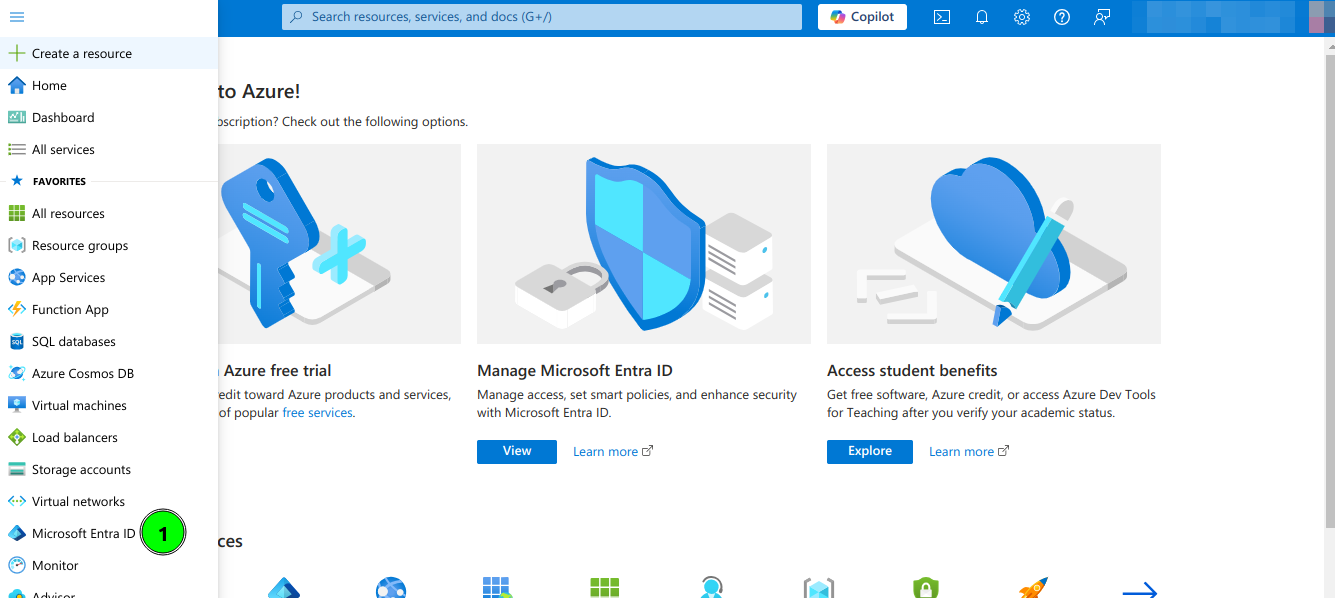
1. Open a https://portal.azure.com
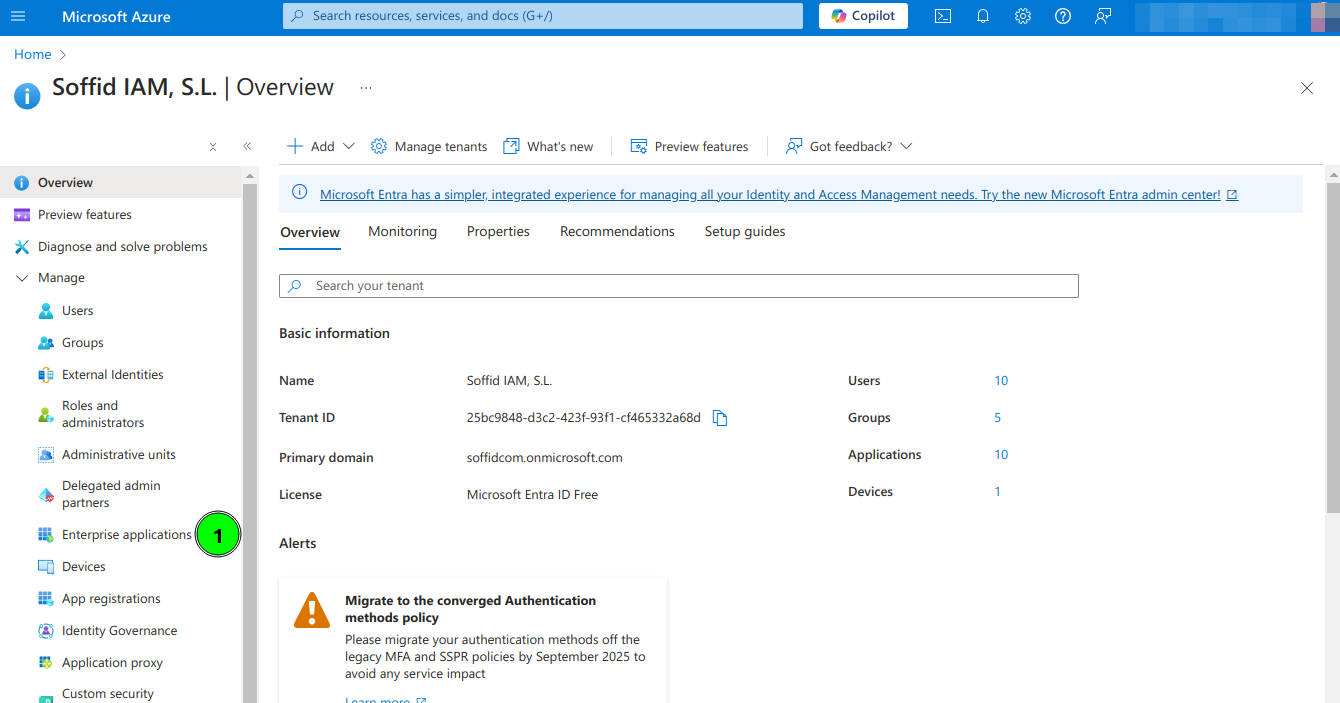
2. Open Microsoft Entra ID and then select Enterprise applications option
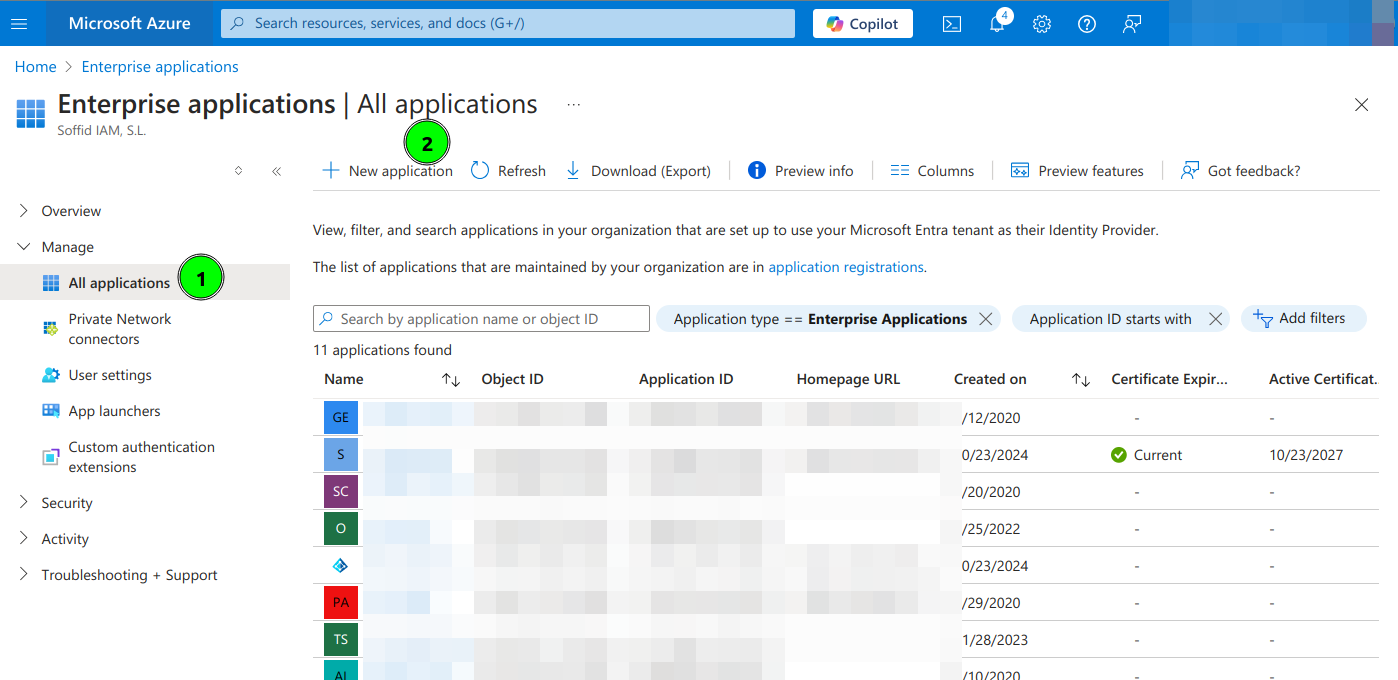
3. Select All applications and click New Application
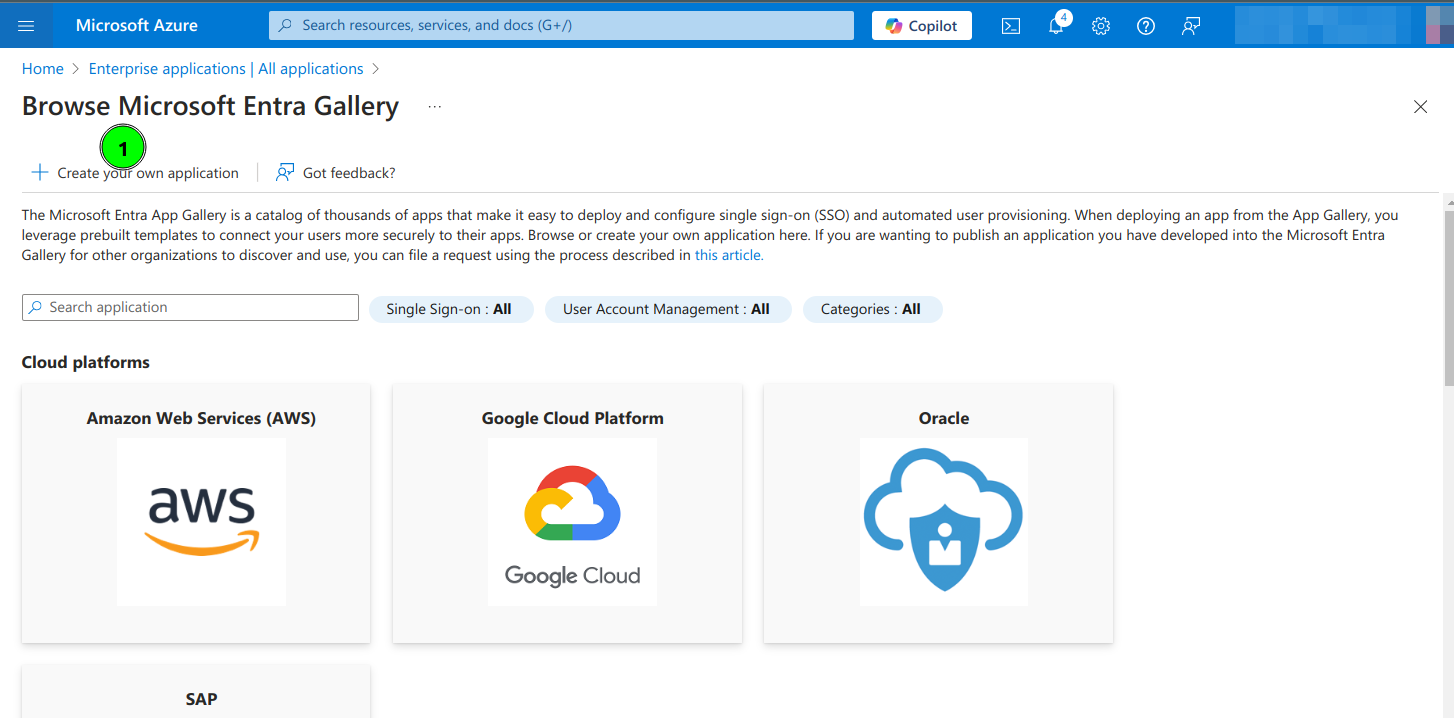
4. Select Create your own application
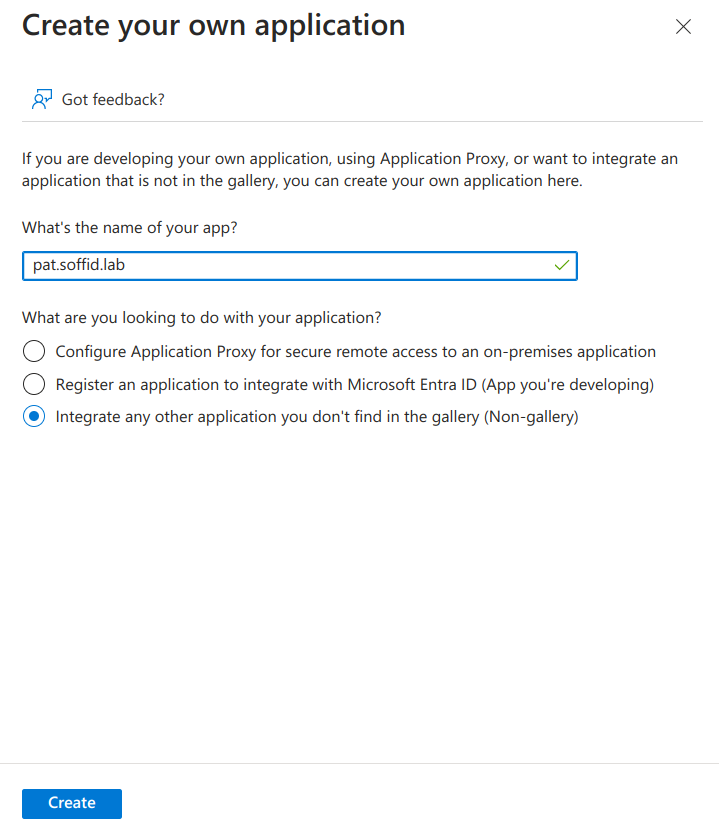
5. Type the name of your app and select the "Integrate any other application you don't find in the gallery (Non-gallery)" option
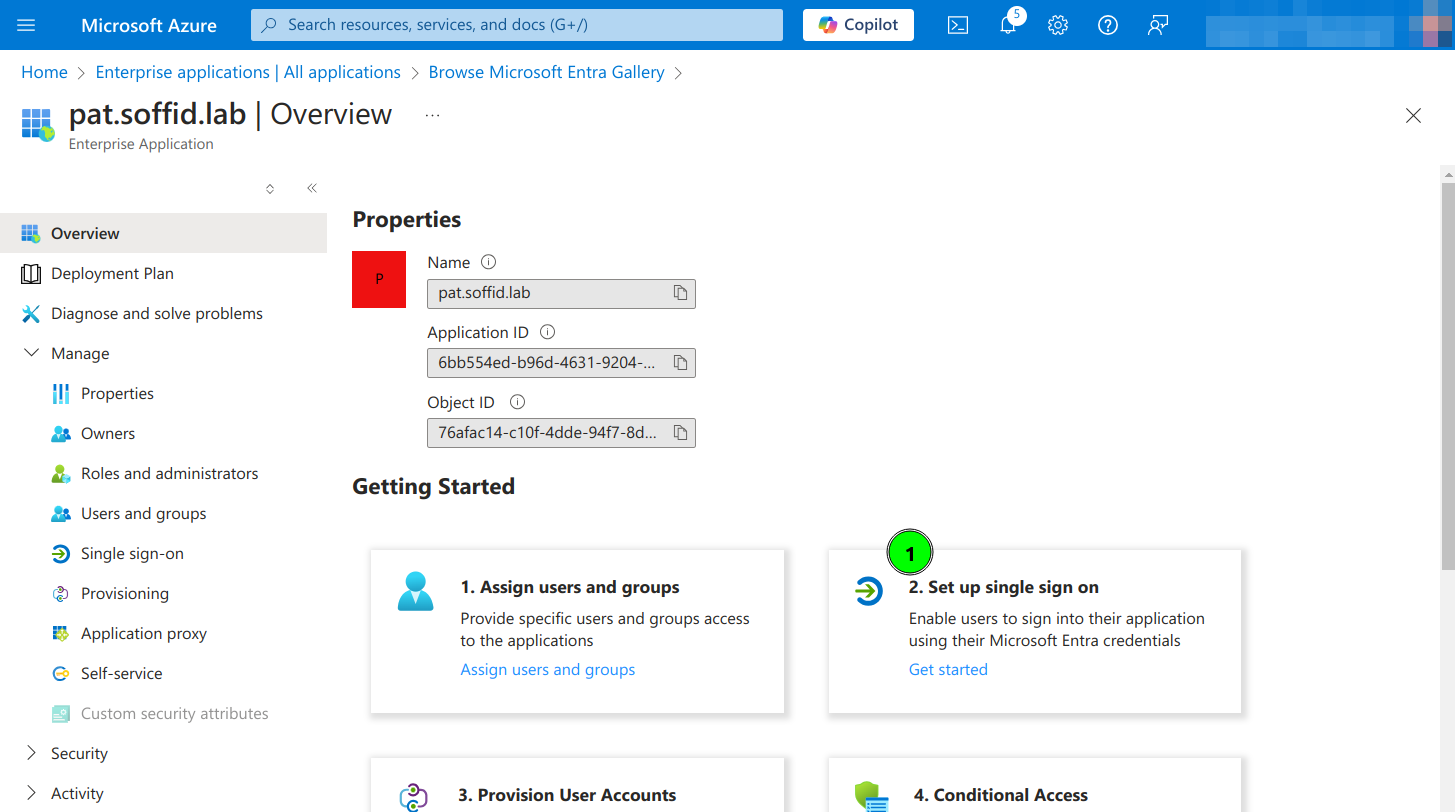
6. Click on Set up single sign on
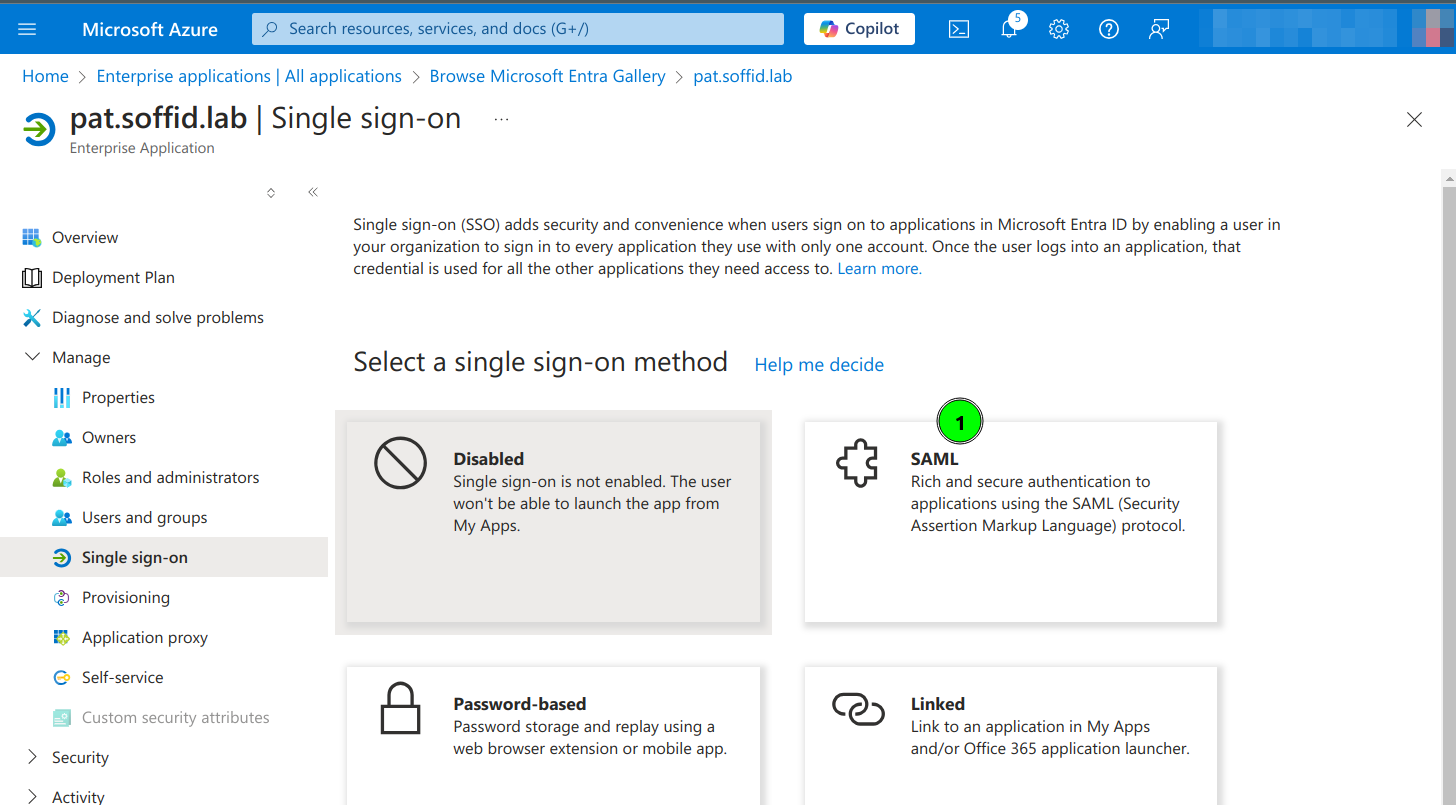
7. Click the SAML option
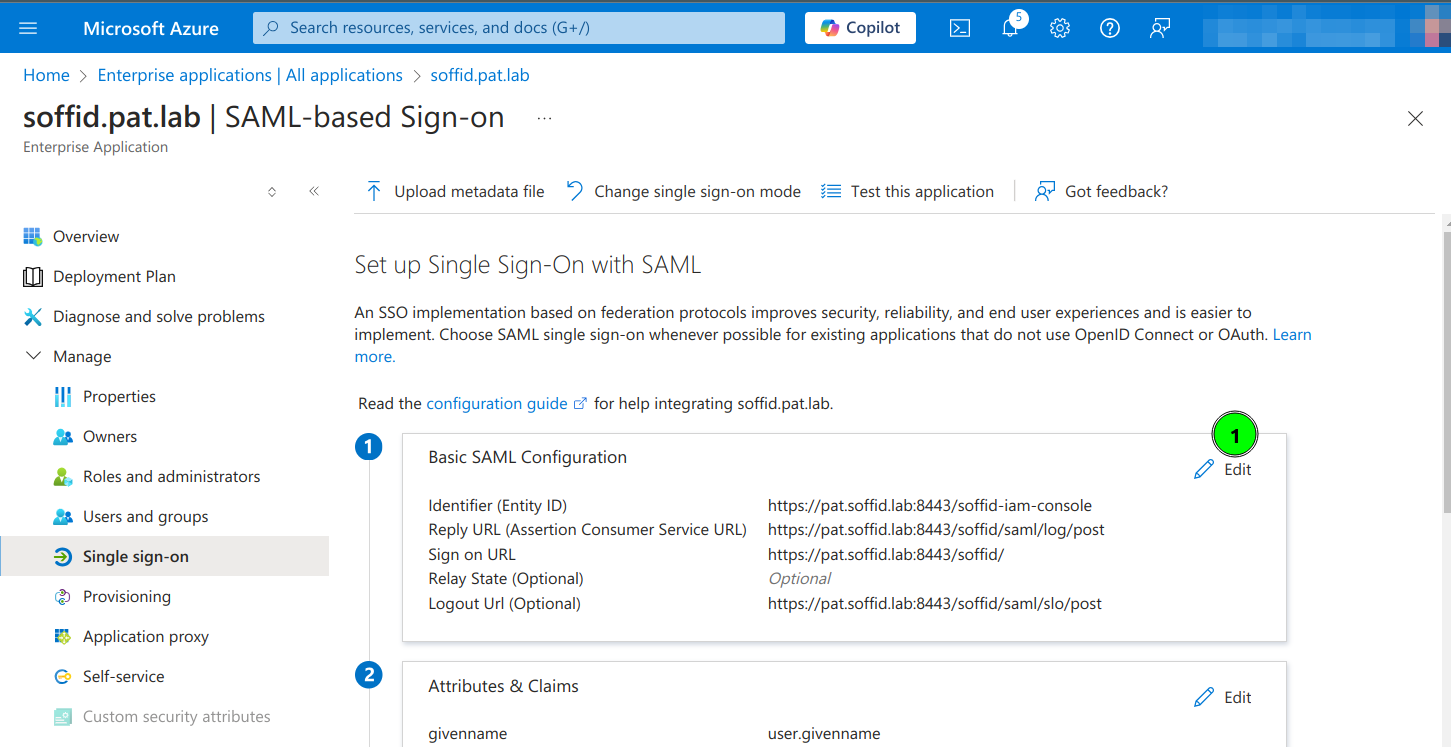
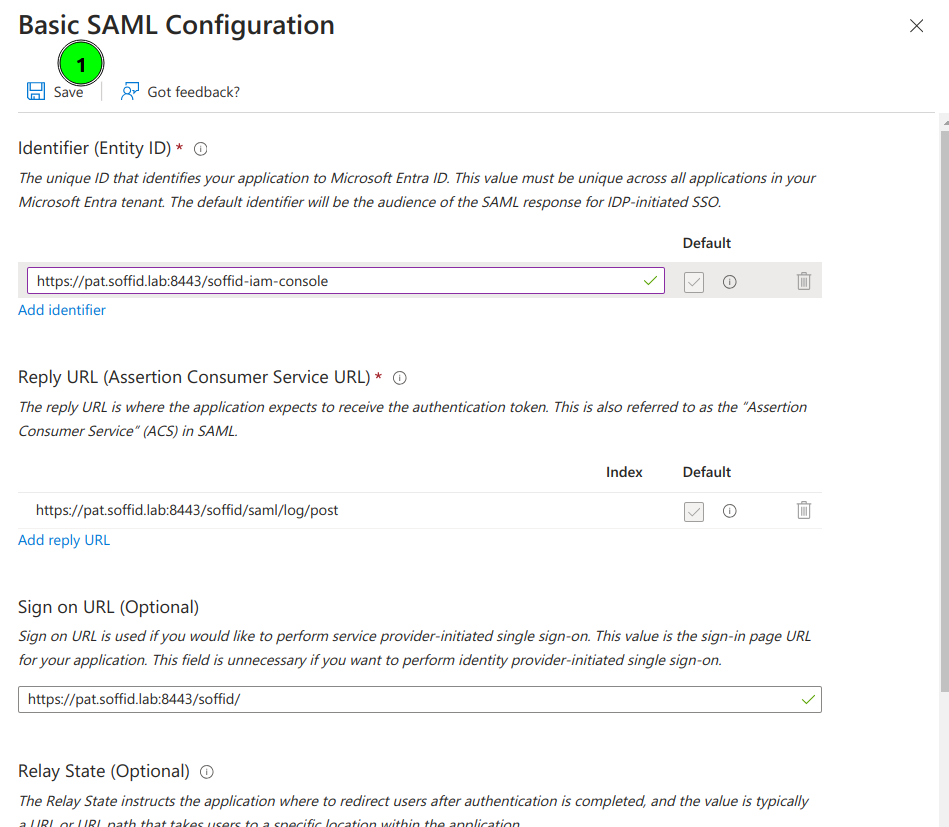
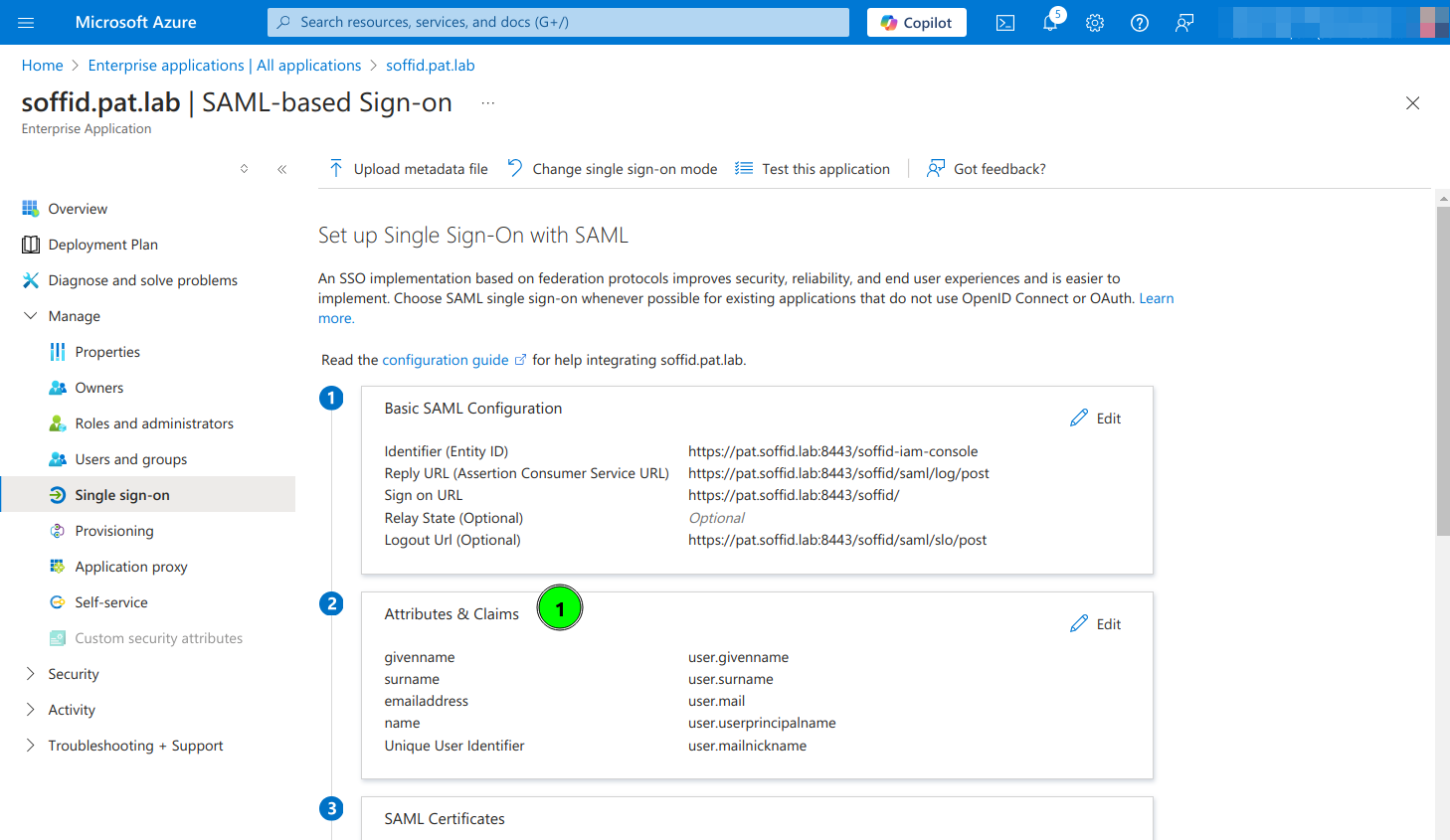
8. Enter the Basic SAML Configuration and Save:
- Identifier: https://<YOUR-SERVER>/soffid-iam-console
- Reply URL: https://<YOUR-SERVER>/soffid/saml/log/post
- Sign on URL: https://<YOUR-SERVER>/soffid/
- Logout URL: https://<YOUR-SERVER>/soffid/saml/slo/post
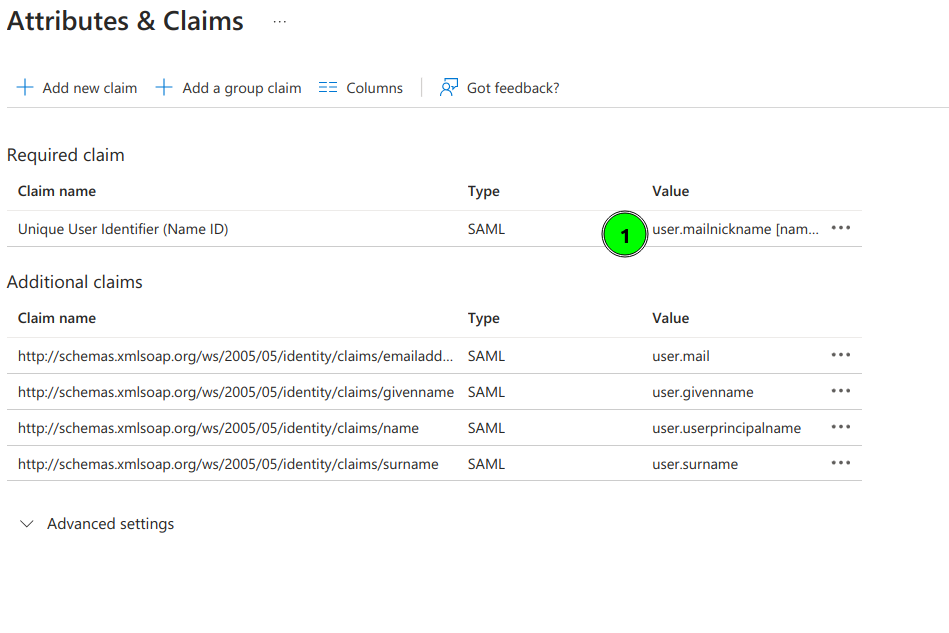
9. Configure Attributes & Claims and change the attributes and claims to send the mailnickname as the user identifier (nameid)
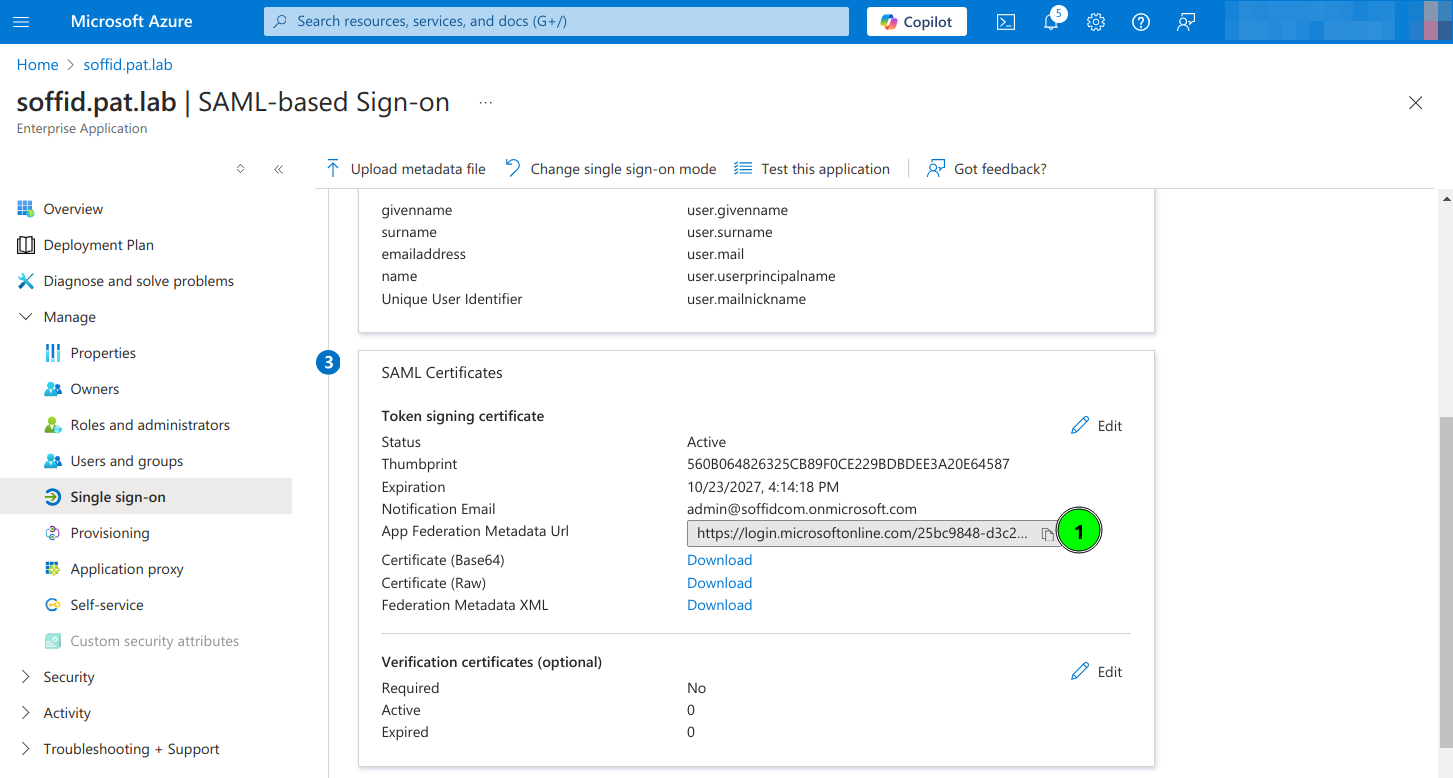
10. Copy the App Federation Metadata Url
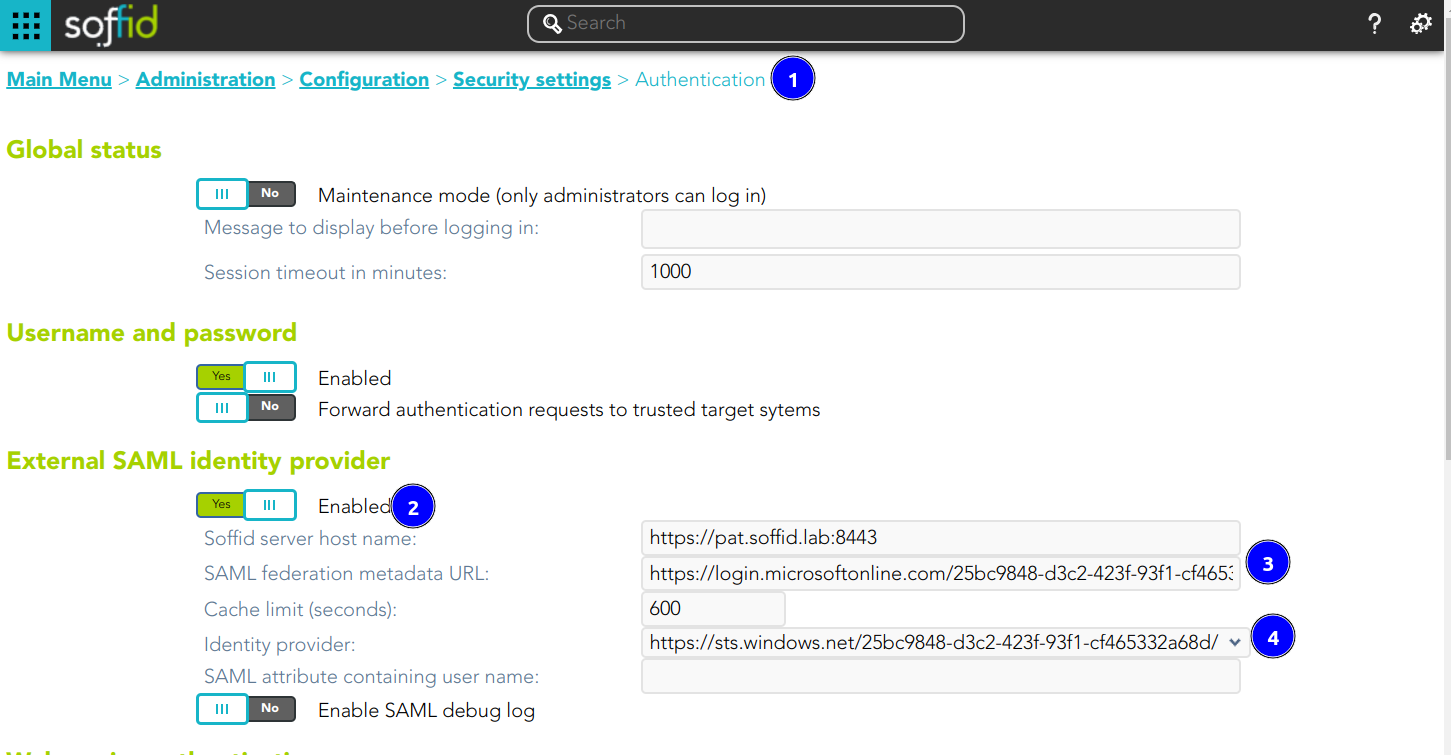
11. Configure the External SAML identity Provider in the Soffid Console Authentication page
12. Optional, enable any user to login