
Installing Soffid
Prerequisites
- Docker compose
- 8GB RAM
- > 10GB disk space (50GB recomended)
Installation
docker-compose.yaml / compose.yaml
version: "3.8"
services:

  mariadb:
    image: mariadb:11.4
    environment:
      MYSQL_ROOT_PASSWORD: XXXXXXXXX
      MYSQL_DATABASE: soffid01soffid
      MYSQL_USER: soffid
      MYSQL_PASSWORD: XXXXXYYYY
    healthcheck:
      test: "/usr/bin/mariadb --user=root --password=XXXXX --execute \"SHOW DATABASES;\""
      interval: 2s
      timeout: 20s
      retries: 10
    command: --max_allowed_packet=128M --innodb_log_file_size=256M --character-set-server=utf8mb4 --collation-server=utf8mb4_general_ci
    ports:
      - "3306:3306"
    networks:
      - network
    volumes:
      - mariadb_data:/var/lib/mysql

  console:
    image: soffid/europe-docker.pkg.dev/soffid-docker-images/private/iam-console:4.0.0-beta-80
    environment:
      DB_URL: jdbc:mariadb://mariadb/soffid01soffid
      DB_USER: soffid
      DB_PASSWORD: XXXXXYYYY
      JAVA_OPT: -Xmx4096m
    ports:
      - 8080:8080
    networks:
    - network
    healthcheck:
      test: bash -c "(echo 'GET /soffid/anonymous/logo.svg HTTP/1.1' >&0; echo >&0; cat >&2;) <> /dev/tcp/localhost/8080"
      interval: 10s
      timeout: 20s
      retries: 10
      start_period: 40s
    volumes:
      - console_trust:/opt/soffid/iam-console-4/trustedcerts
      - console_conf:/opt/soffid/iam-console-4/conf
      - console_logs:/opt/soffid/iam-console-4/logs
      - console_index:/opt/soffid/iam-console-4/index
    depends_on:
      mariadb:
        condition: service_healthyservice_started

  sync-server:syncserver:
    image: soffid/europe-docker.pkg.dev/soffid-docker-images/private/iam-sync:4.0.0-beta-20
    hostname: sync-serversyncserver
    environment:
      SOFFID_PORT: 1760
      SOFFID_HOSTNAME: sync-server.netcomposesyncserver.network
      SOFFID_MAIN: yes
      DB_URL: jdbc:mysql://mariadb/soffid01soffid
      DB_USER: soffid
      DB_PASSWORD: XXXXXYYYY
    networks:
      - network
    volumes:
      - sync_conf:/opt/soffid/iam-sync/conf
    depends_on:
      mariadb:
        condition: service_healthy
      console:
        condition: service_healthyservice_started

networks:
  network:
    name: netcomposenetwork
    driver: bridge

volumes:
  mariadb_data:
    name: compose_mariadbdatasoffid4_mariadbdata
  console_trust:
    name: compose_console_trustedcertssoffid4_console_trustedcerts
  console_conf:
    name: compose_console_conf
  console_logs:
    name: compose_console_logssoffid4_console_conf
  console_index:
    name: compose_console_indexsoffid4_console_index
  sync_conf:
    name: compose_sync_confsoffid4_sync_conf
Ubuntu commands
Bear in mind, that the name of the YAML file must be docker-compose.yaml And you must execute the docker compose action inside the folder where this file is located.
cd /.../.../soffidApply the YAML:
sudo docker compose up -d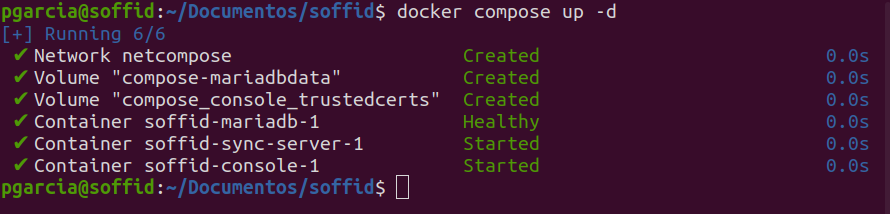
Check containers
sudo docker compose psView the console log
sudo docker compose logs -f consoleView the Sync Server log
sudo docker compose logs -f sync-serverWhen the console is created, the password for the user admin will be changeit and it will be valid for 24 hours.
Now you can connect to Soffid Console http://localhost:8080/soffid The first thing you must do is to change the admin user password changeit.
Upgrade
You can update the version in the yaml file
docker compose up -d