Attribute sharing policies (addon federation)
Description
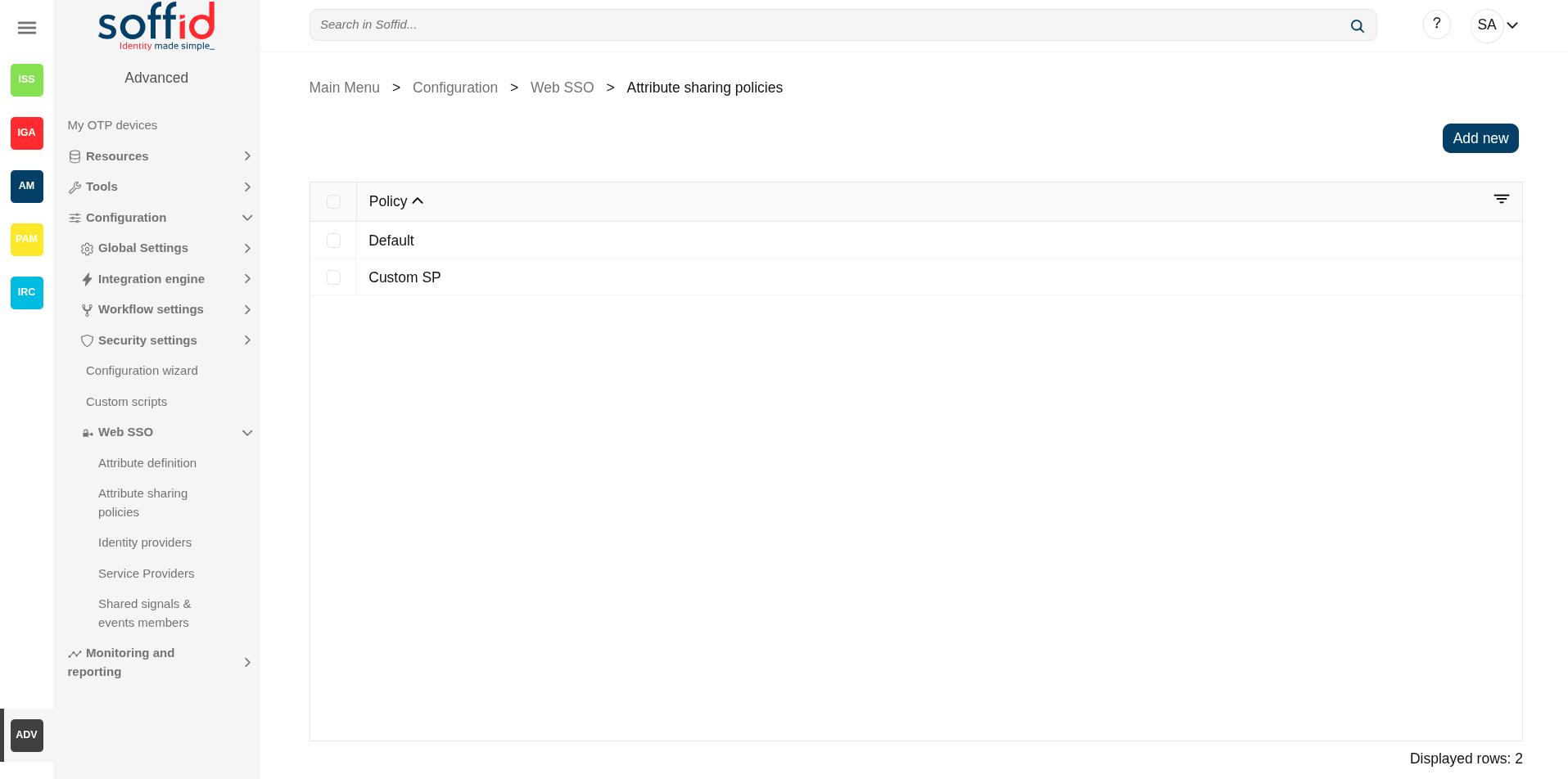
Soffid allows you to define security rules as policies that apply to any attribute that should be delivered from identity providers to service providers.
Please note that at least one policy must be created to return attributes to service providers. If there is no policy, or none is met, no attributes will be sent.
When logging in with a service provider, all policies are validated and more than one may be applied. In this case, the sum of all attributes contained in those policies will be returned.
Please note that this screen is available in the federation addon.
Screen overview
Related objects
- Attribute definition : where the list of possible attributes to be returned in the IdP response is defined
- Attribute sharing policies : where policies are defined with the attributes to be sent according to the authenticated service provider
- Identity providers : configuration of the identity providers
- Service providers : configuration of the service providers
- Metadata : where user attributes are defined
Standard attributes
Table attributes
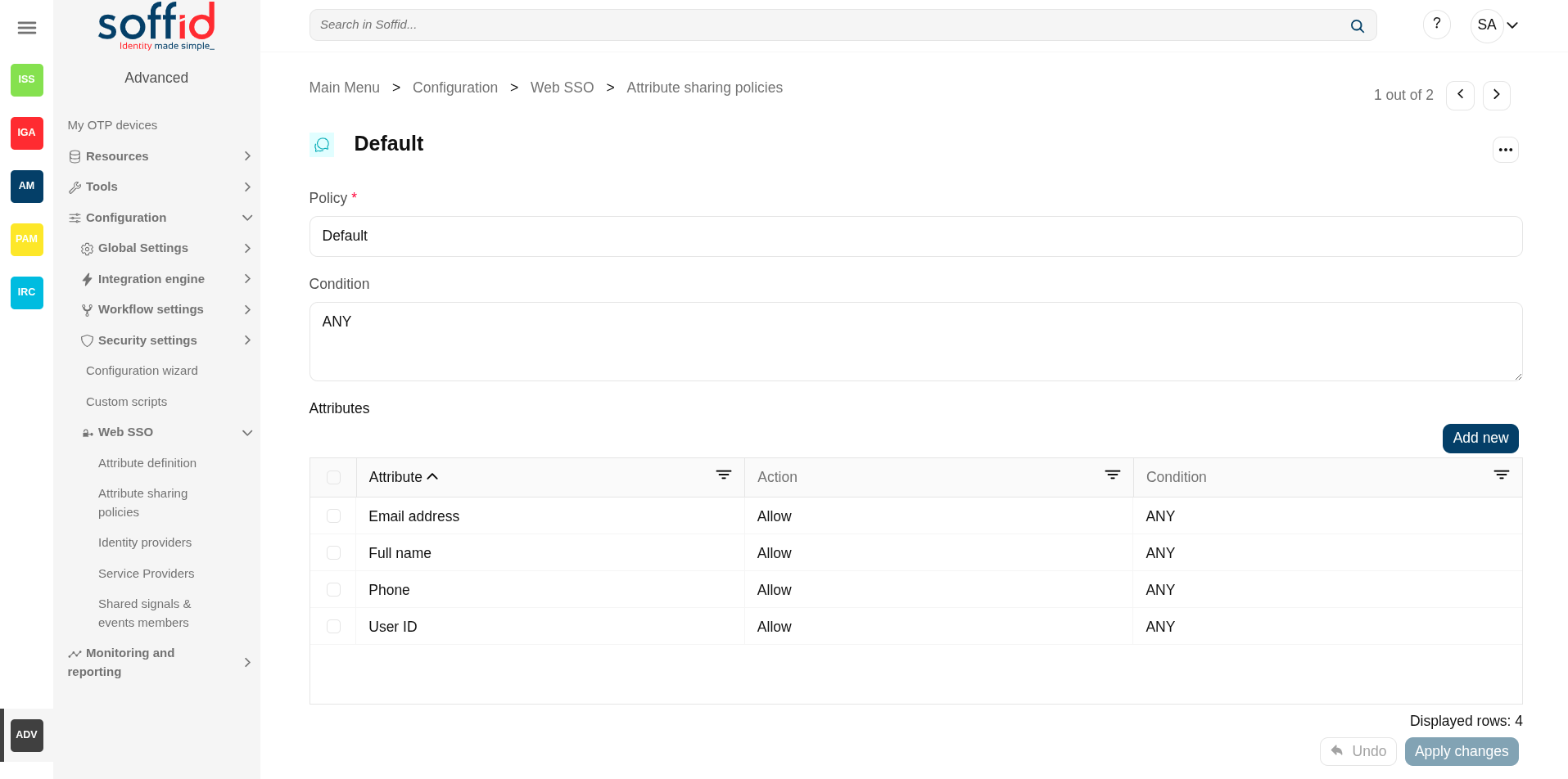
- Policy: policy name.
Policy attributes
- Policy: policy name.
- Condition (policy): a boolean expression that will be evaluated first. If this expression evaluates to false, the rule is completely ignored. It is used to evaluate to which applies the policy.
- Attributes: allows you to add attributes with the proper condition for each one.
- Attribute: allows you to select an attribute from the attribute list. Those attributes are defined at the Attribute definition page.
- Allow: if selected value is Yes, the attribute will be shared when the condition was true. If selected value is No, the attribute will no be shared.
- Condition (shared attributes): a boolean expression to be evaluated. Allows you to customize a condition to evaluated and decide if the attribute should or not be delivered
Condition attributes
It is a boolean expression to be evaluated. The condition will be evaluatuated when the Allow value was yes. You can use the conditions to configure the conditions policy and to configure the shared attributes.
Type: the boolean operator are the follow:
- Not: yes or not
- Type: the boolean operator are the follow
- ANY: the result will always be true.
- OR: the result will be true if any of its subexpressions are true
- AND: the result will be true if all of its subexpressions are true.
- Attribute requester: the result will be true if the service provider public id equals the specified value. Optionally, the ignore case checkbox will ignore upper and lower case differences.
- Attribute Issuer: the result will be true if the identity provider public id equals the specified value. Optionally, the ignore case checkbox will ignore upper and lower case differences.
- PrincipalName: the result will be true if the principal name equals the specified value. Optionally, the ignore case checkbox will ignore upper and lower case differences. Mind that some service providers want to use the email address as PrincipalName. Some others use the account name or X.509 subject name.
- Authentication Method: the result will be true if the used authentication method equals the specified value. Optionally, the ignore case checkbox will ignore upper and lower case differences. Some useful values are:
- When using SAML, it contains the standard SAML identifier corresponding to the used authentication method. When multifactor authentication is used, it contains the strongest one:
- urn:oasis:names:tc:SAML:2.0:ac:classes:PasswordProtectedTransport password authentication (using SSL)
- urn:oasis:names:tc:SAML:2.0:ac:classes:PreviousSession already authenticated using previous session
- urn:oasis:names:tc:SAML:2.0:ac:classes:X509 user has a X.509 certificate
- urn:oasis:names:tc:SAML:2.0:ac:classes:TLSClient X.509's public key has been verified using TLS protocol
- urn:oasis:names:tc:SAML:2.0:ac:classes:TimeSyncToken time synchronized token.
- urn:oasis:names:tc:SAML:2.0:ac:classes:unspecified unspecified protocol. This tag is used when Soffid IDP relies on third party identity providers that don't give information about the authentication method used, such as oAuth or OpenId.
-
When using OpenID connect, the value can be any of:
-
P: Password
-
PO: Password + OneTimePassword
-
PC: Password + Certificate
-
PE: Password + External identity provider
-
K: Kerberos token
-
KO: Kerberos token + OneTimePassword
-
KC: Kerberos token + Certificate
-
KE: Kerberos token + External identity provider
-
E: External identity providers
-
EO: External identity provider + One time password
-
EC: External identity provider + Certificate
-
O: One time password
-
OC: One time password + Certificate
-
C: Certificate
-
- When using SAML, it contains the standard SAML identifier corresponding to the used authentication method. When multifactor authentication is used, it contains the strongest one:
- Attribute value: the result will be true if the related attribute has a specific value.
- Attribute requester (regex): the result will be true if the service provider public id matches the specified regular expression.
- Attribute issuer (regex): the result will be true if the identity provider public id matches the specified regular expression.
- Principal name (regex): the result will be true if the principal name matches the specified regular expression. Mind that some service providers want to use the email address as PrincipalName. Some others use the account name or X.509 subject name.
- Authentication method (regex): the result will be true if the used authentication method matches the specified regular expression.
- Attribute value (regex): the result will be true if the related attribute has a specific value.
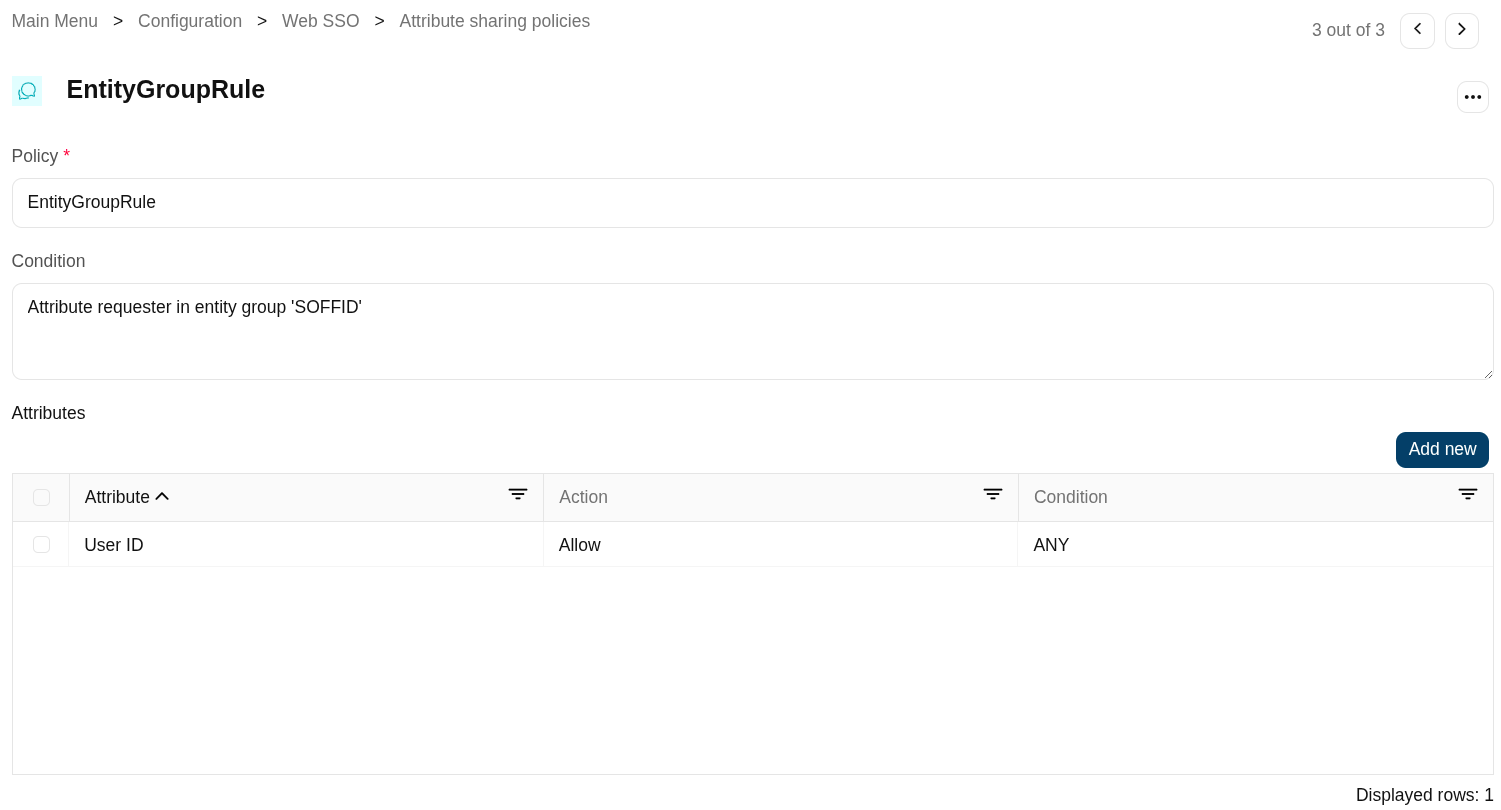
- Attribute requester in entity group: the result will be true if the service provider belongs to the specified group.
- Attribute issuer in entity group: the result will be true if the identity provider belongs to the specified group.
- Attribute issuer nameID format: the result will be true if the identity provider supports a specified identifier format.
- Issuer entity attribute: the result will be true if the identity provider metadata contains a specified attribute name and value.
- Issuer entity attribute (regex): the result will be true if the identity provider metadata contains an attribute name and value that matches the specified regular expression.
- Requester entity attribute:the result will be true if the service provider metadata contains a specified attribute name and value.
- Requester entity attribute (regex):the result will be true if the service provider metadata contains an attribute name and value that matches the specified regular expression.
- Attribute requester nameID format: the result will be true if the service provider supports a specified identifier format.
Actions
Table actions
| Add new |
Allows you to add a new policy in the system. To add a new it is necessary to fill in the required fields. |
| Delete policy |
Allows you to remove one or more policies by selecting one or more records and next clicking this button. To perform that action, Soffid will ask you for confirmation, you could confirm or cancel the operation. |
Policy actions
| Delete policy | Allows you to save the data of a new Attribute sharing policy or to update the data of a specific Attribute sharing policy. To save the data it will be mandatory to fill in the required fields. |
| Add new | Allows you to add a new shared attribute in the policy. To add a new it is necessary to fill in the required fields. |
| Delete attribute | Allows you to remove one or more shared attribute by selecting one or more records and next clicking this button. To perform that action, Soffid will ask you for confirmation, you could confirm or cancel the operation. |
| Undo | Allows you to quit without applying any changes made. |
| Apply changes | Allows you to save the data of a new Metada object or to update the data of a specific Metadata object. To save the data it will be mandatory to fill in the required fields. |
Attributes actions
| Close | Allows you to close the popup window. Please note that the changes have not been saved, you must click Apply changes button. |
Examples
Examples for defining conditions in an attribute sharing policy.
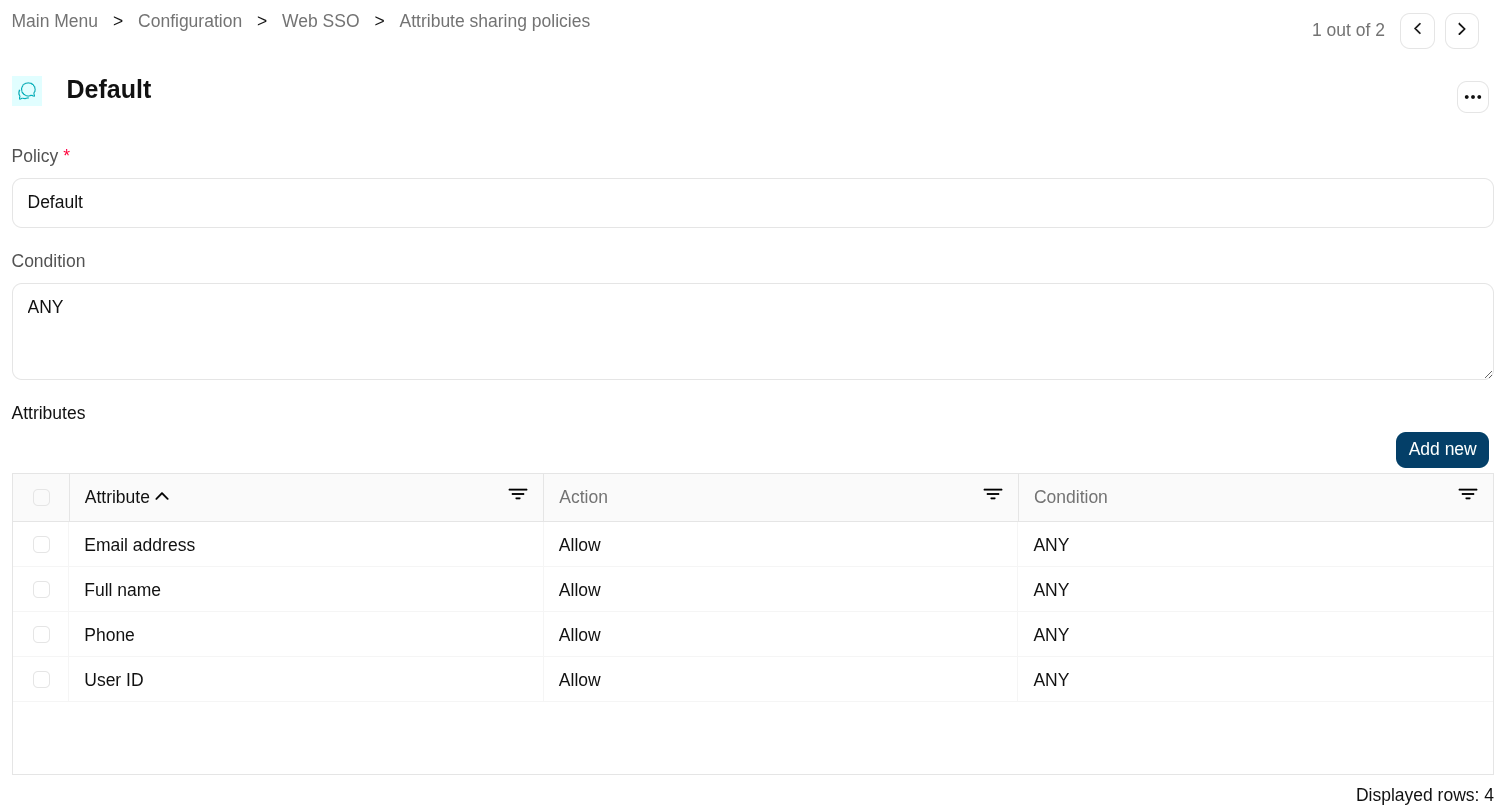
Example 1
Return a list of attributes for any trusted service provider.
Example 2
Rule that applies to all the service providers belonging to the "SOFFID" entity group.
Example 3
Rule that only applies to the service provider ‘TestSP’.