Process search
Description
A process is a series of actions, connected by transitions. An action could be either an automatic action or a manual task. A process is what we commonly refer to as a workflow in Soffid.
Soffid console is concerned about task delegation and workflow management. Any user is able to create new processes or any user can be assigned as an actor for a task belonging to a process.
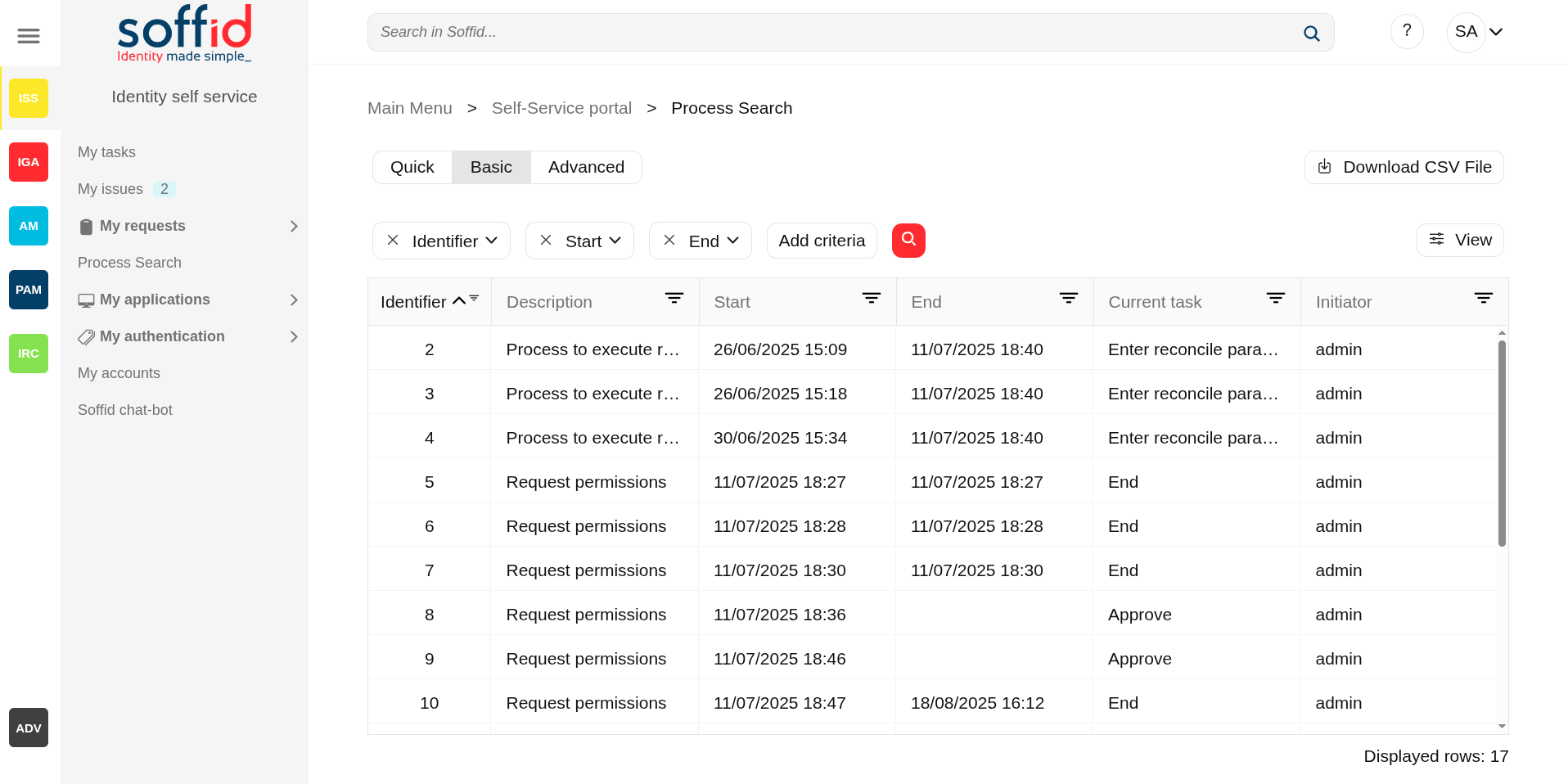
Process Search page allows users to search process by different criteria, to view the process details and to perform the proper actions depending on the user roles.
In order to view a task, a security constraint must be accomplished. The user must have granted the observer or administrator role on the specific project version or has been assigned as a potential actor of it at some time.
Screen overview
Related objects
- Configure Workflow engine : where the workflow engine is configured
- Business process definition : where workflows are published
- BPM editor : where to create or modify workflows
-
My tasks : pending workflows where the user has to perform an action in order to continue their workflow.
-
My requests : The workflows that the user can initiate are listed here.
-
My requests > Query request status : to search for all processes started by oneself
-
Process Search : to search for all processes
- Metadata : to add attributes to display in the search tables
- Scheduled jobs : shows active workflows pending asynchronous tasks
Standard attributes
Table
The search and the view table can be performed by setting certain parameters, which are as follows:
- Search text: search by a certain text, as user name or application, etc (only for Quick search)..
- Identifier: all the processes have an assigned an identifier.
- Start: allows you to establish a date range when the process was started.
- End of the process. These filters will be available if you check the Include completed option.
- Current task: task in which the workflow is being executed.
- Initiator: user who has started the workflow.
Process
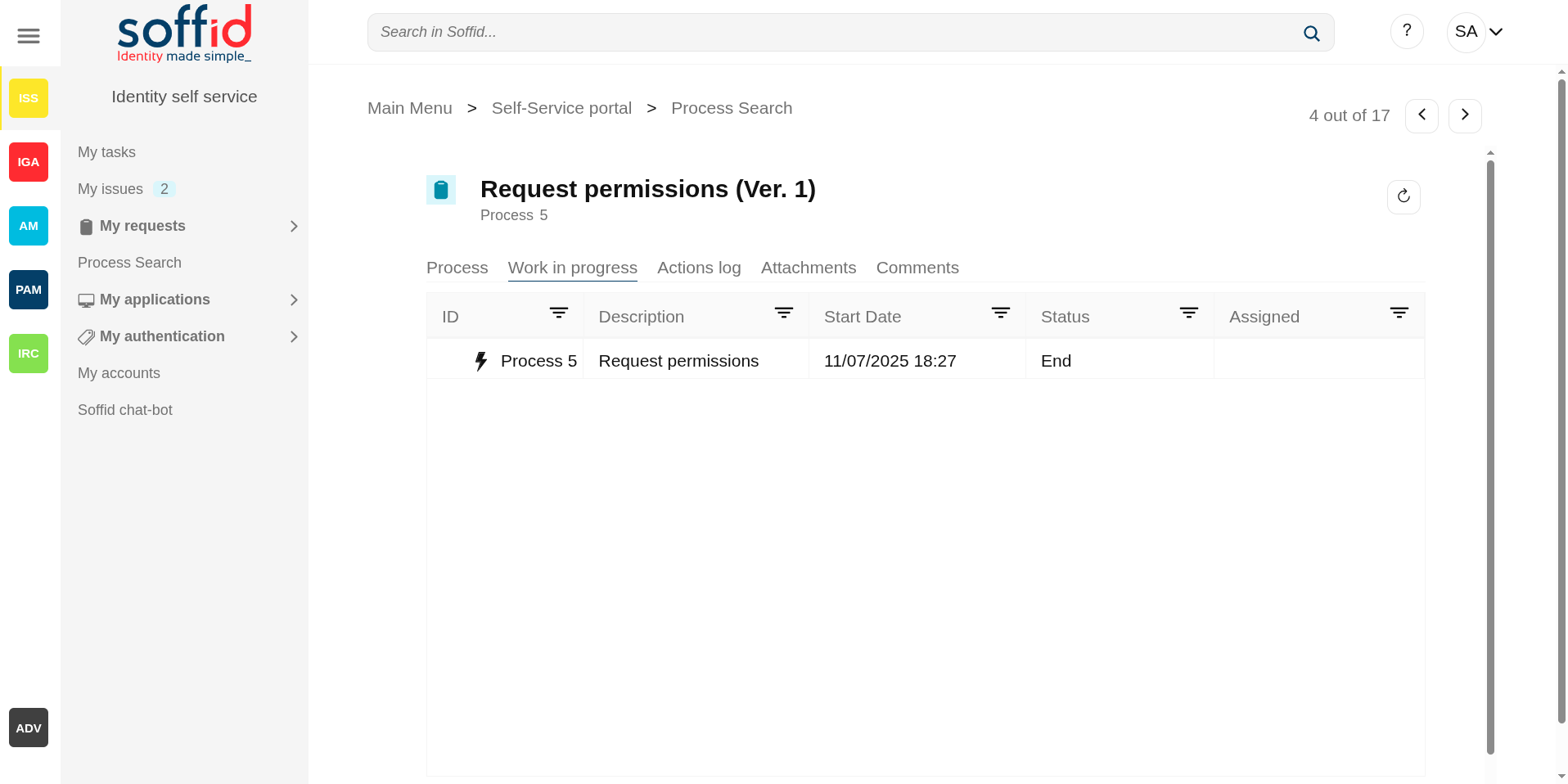
Each process has commons attributes and specific attributes depending on the business process definition.
You can find documentation about the business processes on BPM Editor Book
Commons process attributes
- Name: shows process name and the versión of the addon you are using.
- Process: each proces has an unique identifier
Other process information
- Specific process attributes: these attributes depend on the process definition.
- Work in progress: details the specific point in which the process and associated tasks are. You can find information about the process ID, the job description for each one of them, the start date and time, and the current status. The users with the proper roles could view the task details, browse and perform actions by clicking on it.
- Actions log: summary of all the successive phases through which the process has passed, providing information on the start date and time of the phase, the user (task manager) assigned, and the action that was done.Also when it is defined, the diagram of the workflow is diplayed.
- Attachments: in some cases, for example in massive user upload processes using a CSV file, files are attached to the process so that it can be executed. These files can be consulted, by downloading or opening them directly, from this page. Additionally, if needed, it is possible to see the certificates used by the process owner.
- Comments: displays the comments added by the user who initializes or performs actions on the process.
Actions
Table
Actions to be performed on the process list:
|
Search (quick, basic, advanced) |
Allows you to query the processes with the indicated parameters. |
|
Download CSV file |
Allows you to download a CSV file with the list of processes. You can open the hamburger icon and Download CSV File. |
|
View |
Allows you to add or remove columns to the table. It is also possible to change the order of the columns. |
|
"Open task" |
By clicking on a record, the task detail will be shown. |
Detail
Each process has a specific action defined on the business process definition.
You can find documentation about the business processes on BPM Editor Book
The most commons actions are below:
|
Close |
Allows you to close the process detail page and return to the previous page. |
|
Reload |
Allows you to reload all process data with the updated data. |
|
Take ownership |
Allows you to take the ownership to approve o deny the process. |
|
Approve |
Allows you to approve the process and perform the actions defined for that process. |
|
Deny |
Allows you to reject the process. |
Work in progress actions
|
Edit task |
Allows you to edit a task by clicking on the record. When you click the task, you will browse to the task detail and it will be allowed to perform actions defined to users with the proper permissions. |
Attachments
|
Download |
Allows you to download the available attached files. |