The OTP settings allow the administrator users to configure the available OTP options. Soffid provides six different OTP implementations.
This page is available if you have previously installed the Soffid **OTP addon**.
Configure these options as a second authentication factor in the Soffid **identity provider**. Remember that this functionality is found in the **federation addon**.
## Screen overview [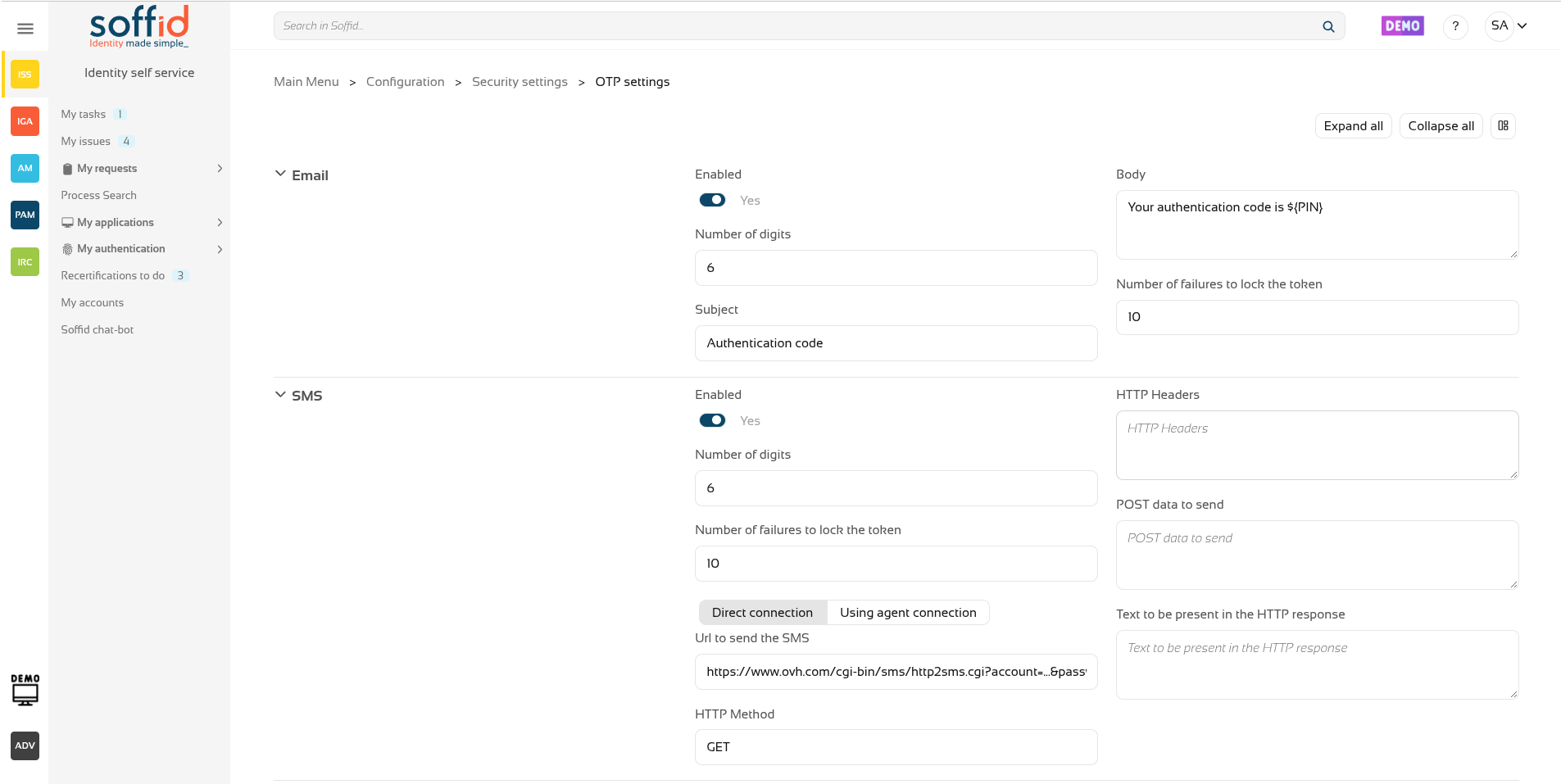](https://bookstack.soffid.com/uploads/images/gallery/2026-11/YxYWOnzJkYVq5Ynf-image.png) [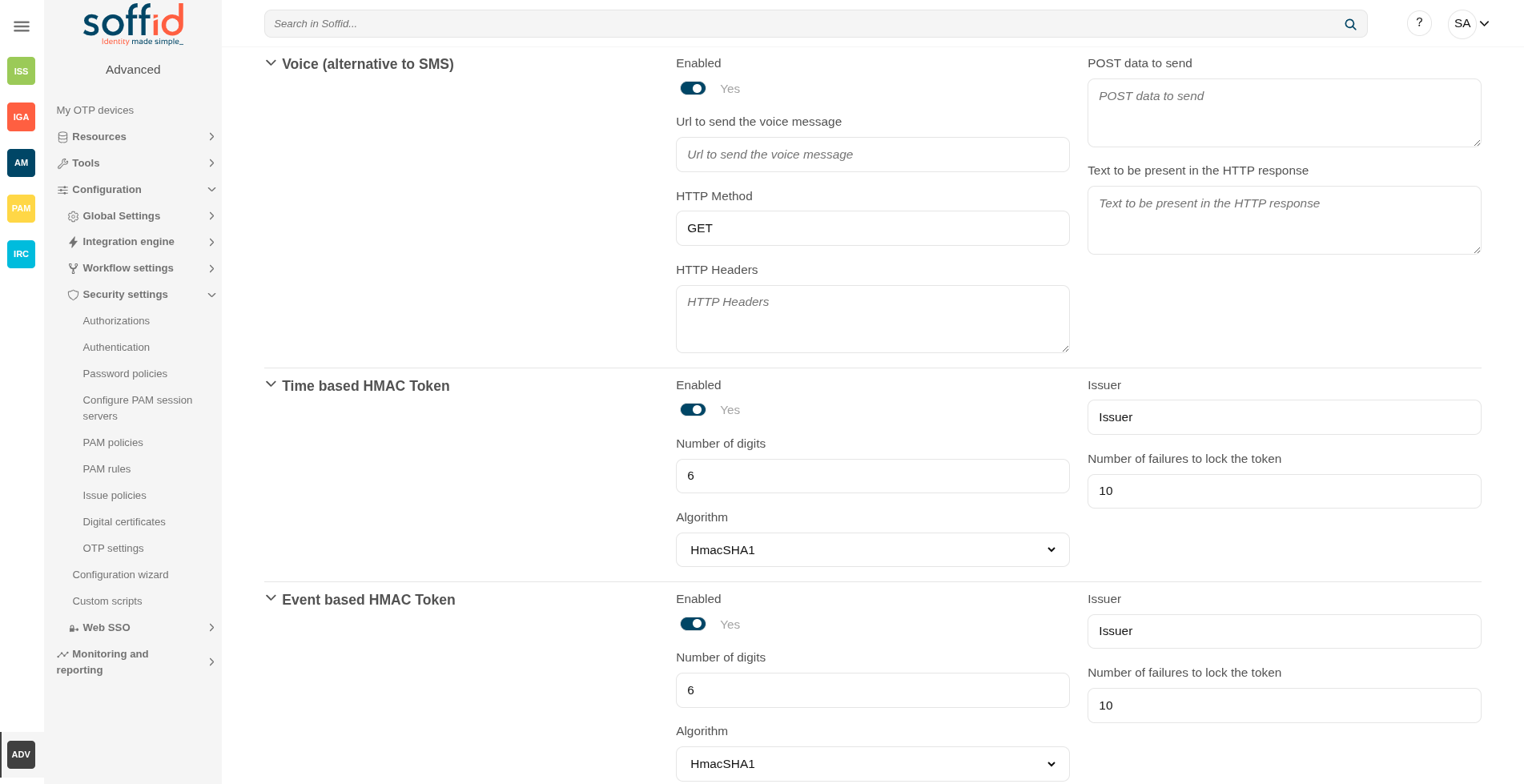](https://bookstack.soffid.com/uploads/images/gallery/2025-08/W7vD52qU9ExxF1Ox-image.png) [](https://bookstack.soffid.com/uploads/images/gallery/2025-08/x9pIfly0qf21xXSI-image.png) ## Related objects - [My certificates and FIDO tokens](https://bookstack.soffid.com/books/soffid-4-reference-guide/page/my-authentication-my-certificates-and-fido-tokens-addon-federation) : to autoconfigure certificates and FIDO tokens - [My OTP devices](https://bookstack.soffid.com/books/soffid-4-reference-guide/page/my-authentication-my-otp-devices-addon-otp) : to autoconfigure certificates and FIDO tokens - [Authentication](https://bookstack.soffid.com/books/soffid-4-reference-guide/page/authentication) : OTP settings for Console - [Identity providers](https://bookstack.soffid.com/books/soffid-4-reference-guide/page/identity-providers-addon-federation "Identity providers") : to enable OTP options as second factors of authentication - [Agents](https://bookstack.soffid.com/books/soffid-4-reference-guide/page/agents "Agents"): to set a REST agent for the SMS option. ## Standard attributes ### Email - **Enabled**: allows you to enable or disable a PIN sent by the Email implementation. - **Number of digits**: number of digits of the PIN code that will be generated. - **Subject**: subject of the email - **Body**: body of the email - **Number of failures to lock the token**: upon reaching the configured number of failures, the token will no longer be usable.To **send an email**, you must register a **mail server**. To this purpose, Soffid has a set of **parameters** that you can find on the [Soffid parameters](https://bookstack.soffid.com/books/soffid-4-reference-guide/page/soffid-parameters "Soffid parameters") page.
### SMS - **Enabled**: allows you to enable or disable a PIN sent by the SMS implementation. - **Number of digits**: number of digits of the PIN code that will be generated. - **Number of failures to lock the token**: upon reaching the configured number of failures, the token will no longer be usable. Direct connection: - **URL to send the SMS**: enter the URL of your SMS provider rest service ``` https://www.xxxxxxx.com/cgi-bin/sms/http2sms.cgi?account=sms-bg490971-1&password=XXXXXXt&login=user&from=SOFFID&to=${PHONE}&message=This is your access PIN: ${PIN}&noStop&contentType=application/json&class=0 ``` - **HTTP Method**: enter POST or GET depending on your provider documentation - **HTTP Header**: optionally, you can add any HTTY header, including Basic or Bearer authentication tokens. The header must include the header name and header value. For instance: `Authorization: Basic dXNlcjpwYXNzd29yZA==` - **POST data to send** Enter the body of the HTTP request - **Text to be present in the HTTP response**: Soffid will check the response from your SMS Provider contains this text ``` "status":100 ``` The URL and POST data to be sent, the administrator can use some tags that will be replaced by some target user attributes: - ${PHONE}: The target phone number - ${PIN}: The one-time password to be entered by the user - ${userAttribute}: Any of the standard or custom user attributes, like ${fullName} or ${userName}Soffid does not offer any SMS services, this service must be provided by the customer.
Using agent connection: - **Agent:** name of the agent on which we have configured the REST service. - **Agent method**: the name of the object, followed by a point and the name of the operation we have chosen (objectName.operation).For further information, please see the [new feature for configuring SMS via a web service](https://bookstack.soffid.com/books/soffid-4-reference-guide/page/2026-10-31-new-feature-send-otp-from-sms-via-webservice "2026-10-31 New feature: send OTP from SMS via webservice").
### Voice (alternative to SMS) - **Enabled**: allows you to enable or disable a PIN sent by the voice implementation. - **URL to send the SMS**: enter the URL of your voice call provider rest service - **HTTP Method**: enter POST or GET depending on your provider's documentation - **HTTP Header**: optionally, you can add any HTTY header, including Basic or Bearer authentication tokens. The header must include the header name and header value. For instance: ``` Authorization: Basic xxxxxxxxxxxxxxOUVCRS1DMzE0LTI3MzAtQkY0Qy05RDgwRTMyQUQ4OUY= Content-Type: application/json Accept: application/json ``` - **POST data to send** Enter the body of the HTTP request. ``` Text to be present in the HTTP response: Soffid will check the response from your SMS Provider contains this text ``` - **Text to be present in the HTTP response**: Soffid will check the response from your SMS Provider contains this text ``` "status":100 ``` The POST data to be sent, the administrator can use some tags that will be replaced by some target user attributes: - - ${PHONE}: The target phone number - ${PIN}: The one-time password to be entered by the userSoffid does not offer any voice service, this service must be provided by the customer.
### Time based HMAC Token - **Enabled**: allows you to enable or disable an OTP Time based HMAC Token implementation. - **Number of digits**: number of digits of the PIN code that will be generated. - **Algorithm**: allows you to select an HMAC algorithm. - **Issuer**: name of the issuer of the PIN. - **Number of failures to lock the token**An additional application is required to load the OTP generation settings. You may use any of the following: Google Authenticator, Microsoft Authenticator, FreeOTP Authenticator.
### Event based HMAC Token - **Enabled**: allows you to enable or disable an OTP Event based HMAC Token implementation. - **Number of digits**: number of digits of the PIN code that will be generated. - **Algorithm**: allows you to select an HMAC algorithm. - **Issuer**: name of the issuer of the PIN. - **Number of failures to lock the token**: upon reaching the configured number of failures, the token will no longer be usable.An additional application is required to load the OTP generation settings. You may use any of the following: Google Authenticator, Microsoft Authenticator, FreeOTP Authenticator.
### Security PIN - **Enabled**: allows you to enable or disable the Security PIN implementation. - **Minimum PIN length**: minimum number of digits that the PIN has to have. - **Number of digits from the PIN to ask**: number of digits that Soffil will ask to verify the identity. - **Number of failures to lock the token**: upon reaching the configured number of failures, the token will no longer be usable. ## Actions| **Expand all** | Displays all the attributes of the different blocks. |
| **Collapse all** | Hide all attributes of the different blocks. |
| **"Types of views"** | Change the view type: Classic view, Modern view, Compact design. |
| **Confirm changes** | Allows you to save the updates and quit the page. |