Soffid has the functionality that allows you to **import configuration**, Soffid objects, and objects from target systems from a ZIP file.
This ZIP file must be generated by the export action from another Soffid tenant.For more information, you can visit the [Export settings and objects](https://bookstack.soffid.com/books/soffid-4-reference-guide/page/export-settings-and-objects-admin-addon "Export settings and objects (admin addon)") page.
Once you **pick the file to import**, Soffid will display all the objects and configurations that you can load. You must select the proper objects and settings to import or enable the Load everything option. And finally, you must click the Proceed buttons to launch the import process. Once the process is finished, Soffid will display the result and allows you to download the log file.It is not allowed to import the basic configuration and configuration parameters of an agent for security reasons. You must create them manually and make sure you put the same names as in the source system if you are going to import accounts.
## Screen overview [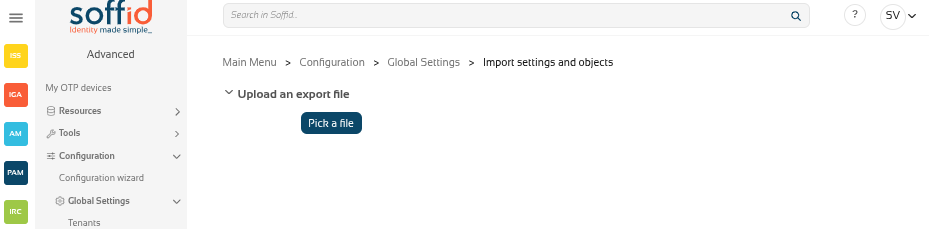](https://bookstack.soffid.com/uploads/images/gallery/2025-12/SkppodKgmSSTs14S-image.png) [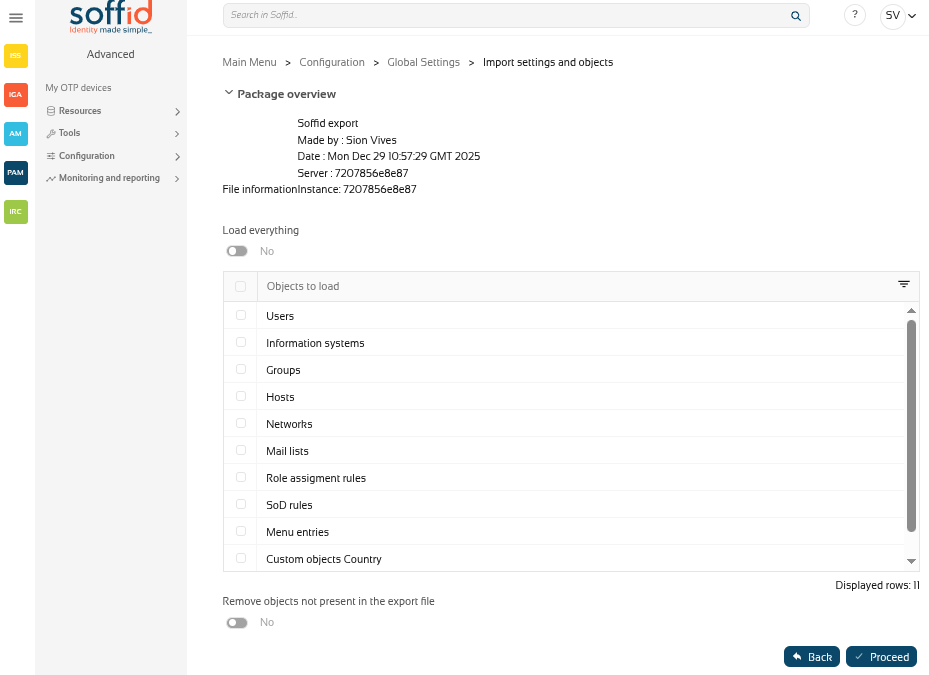](https://bookstack.soffid.com/uploads/images/gallery/2025-12/6obcjZdoEbNz6ZbI-image.png) [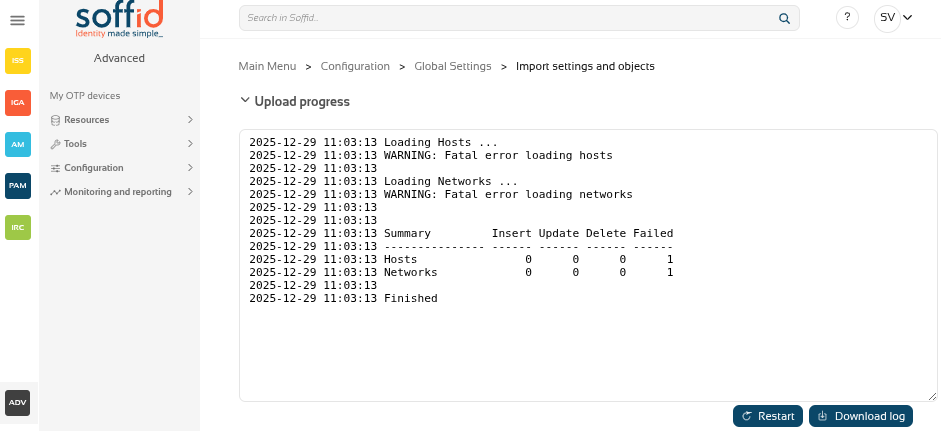](https://bookstack.soffid.com/uploads/images/gallery/2025-12/KhgglS0osEMdjUtQ-image.png) ## Related objects #### Configuration - [Metadata](https://bookstack.soffid.com/books/soffid-4-reference-guide/page/metadata "Metadata") - [Plugins](https://bookstack.soffid.com/books/soffid-4-reference-guide/page/license-and-plugin "License and plugin") - [Business process definition](https://bookstack.soffid.com/books/soffid-4-reference-guide/page/business-process-definition "Business process definition") - [Custom scripts](https://bookstack.soffid.com/books/soffid-4-reference-guide/page/custom-scripts-addon-admin "Custom scripts (addon admin)") - [User types](https://bookstack.soffid.com/books/soffid-4-reference-guide/page/user-types "User types") - [Group types](https://bookstack.soffid.com/books/soffid-4-reference-guide/page/group-types "Group types") - [Account naming rules](https://bookstack.soffid.com/books/soffid-4-reference-guide/page/account-naming-rules "Account naming rules") - [Password policies](https://bookstack.soffid.com/books/soffid-4-reference-guide/page/password-policies "Password policies") - [Mail domains](https://bookstack.soffid.com/books/soffid-4-reference-guide/page/mail-domains "Mail Domains") - [Authorizations](https://bookstack.soffid.com/books/soffid-4-reference-guide/page/authorizations "Authorizations") #### Objects - [Users](https://bookstack.soffid.com/books/soffid-4-reference-guide/page/users "Users") - [Information systems](https://bookstack.soffid.com/books/soffid-4-reference-guide/page/information-systems "Information systems") - [Groups](https://bookstack.soffid.com/books/soffid-4-reference-guide/page/groups "Groups") - [Hosts](https://bookstack.soffid.com/books/soffid-4-reference-guide/page/hosts "Hosts") - [Networks](https://bookstack.soffid.com/books/soffid-4-reference-guide/page/networks "Networks") - [Mail lists](https://bookstack.soffid.com/books/soffid-4-reference-guide/page/mail-lists "Mail Lists") - [Role assignment rules](https://bookstack.soffid.com/books/soffid-4-reference-guide/page/role-assignment-rules "Role assignment rules") - [Segregation of duties](https://bookstack.soffid.com/books/soffid-4-reference-guide/page/segregation-of-duties "Segregation of Duties") - [Application access tree](https://bookstack.soffid.com/books/soffid-4-reference-guide/page/application-access-tree "Application access tree") - [Custom objects](https://bookstack.soffid.com/books/soffid-4-reference-guide/page/custom-objects "Custom objects") : the custom objects created on the Metadata page #### Web SSO settings - [Attributes](https://bookstack.soffid.com/books/federation/page/attribute-definition "Attribute definition") - [Policies](https://bookstack.soffid.com/books/soffid-4-reference-guide/page/attribute-sharing-policies-addon-federation "Attribute sharing policies (addon federation)") #### Target system objects - [Systems](https://bookstack.soffid.com/books/soffid-4-reference-guide/page/agents "Agents") - [Accounts](https://bookstack.soffid.com/books/soffid-4-reference-guide/page/accounts "Accounts") - [Roles](https://bookstack.soffid.com/books/soffid-4-reference-guide/page/roles "Roles") - [Granted permissions](https://bookstack.soffid.com/books/soffid-4-reference-guide/page/roles "Roles") - [Attribute mappings](https://bookstack.soffid.com/books/soffid-4-reference-guide/page/agents "Agents") ## Actions #### Pick up page| **Pick a file** | Select the backup's file |
| **Load eveything** | Enable it if you want to load all the backup, disable it if you want to select the object to import |
| **Remove objects not present in the export file** | Remove the Soffid objects not present in the export file, enable it if you want the exact image of the source system, disable it if you want to keep the object that only exist in this Soffid instance |
| **Back** | Go back to "Pick a file" |
| **Proceed** | Allows you to start the import process. |
| **Restart** | Go back to the configuration page |
| **Download log** | Allows you to download a log with the details of the importation |