Soffid's Look & feel page allows you to adjust the Console styles to your organization.
In this configuration page, the customization of three sections is allowed: - You can change the colors of the Soffid components and text. - You can change the image of the logo that appears on the login page. - You can change the image of the logo that appears in the header. - Changes made on this page affect the entire Console.Some changes may require updating the browser several times because some items are in the browser's cache.
## Overview [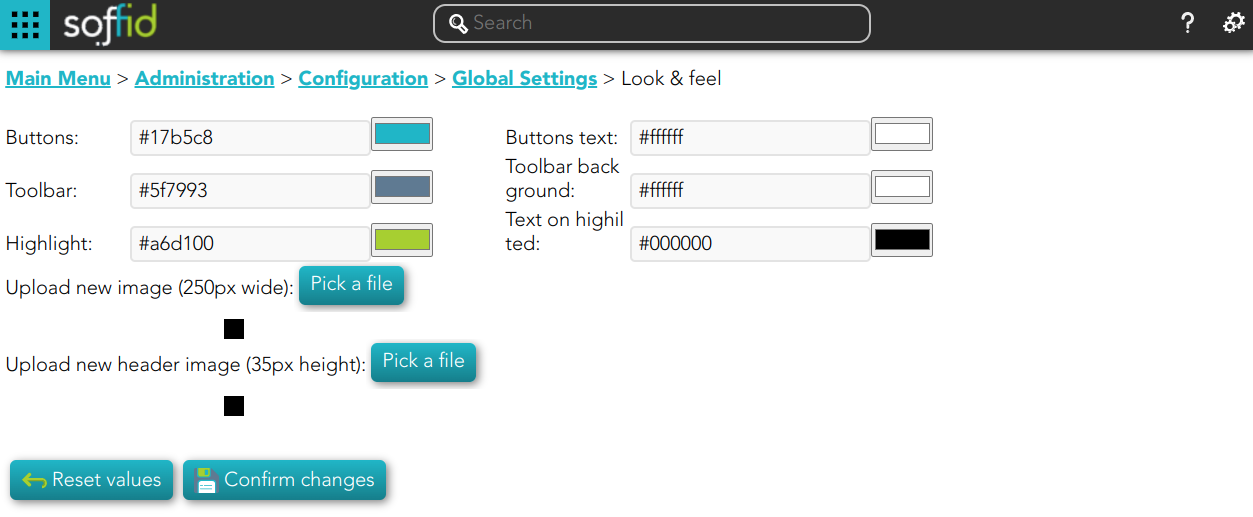](https://bookstack.soffid.com/uploads/images/gallery/2022-11/image-1669823122561.png) ## Actions| **Reset values** | Allows you to return to the default Soffid values. |
| **Confirm changes** | Allows you to apply the changes made. |
| **Pick a file** | Allows you to pick a file to load. The file must have a specific configuration |