# Step 6.2. Create Password policy
How to define a new password policy for the previous user type created.
## Step-by-step
1. First of all, you must access the Password policies page, the path to access is the following:
`Main Menu > Administration > Configure Soffid > Security settings > Password policies`
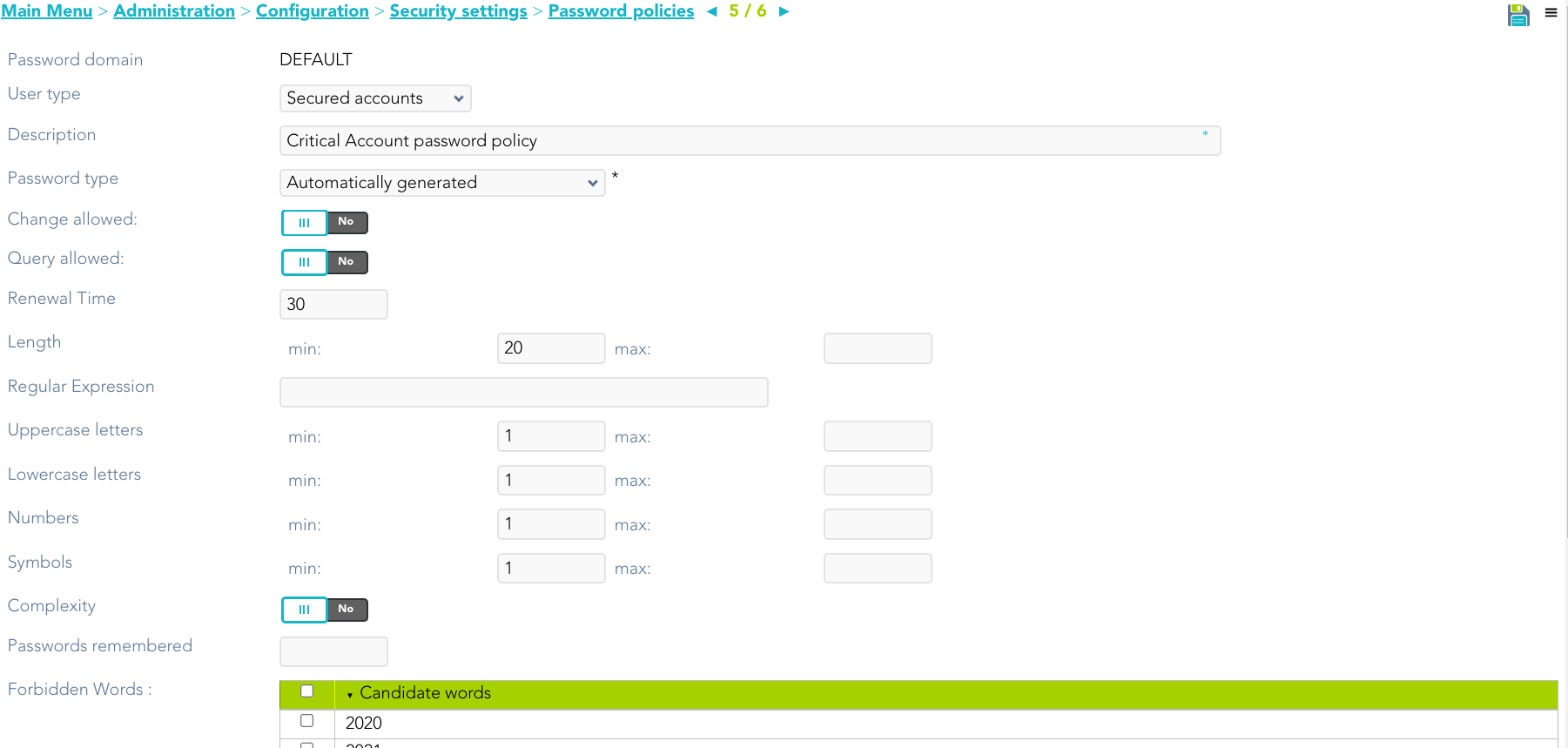
2. Once you are located on the Password policies page, you must click the "Add password policy", at the proper domain, to add a new Password policy type. Then Soffid will display a new empty page to fill in the data.
You must fill, at least the required fields (fields with an asterisk) to create a password policy.
- You must select the **User type** created in the previous step.
- The **Description** should be a brief description about the password policy.
- The **Password type** you must select the option **Automatically generated.**
Other fields you could configure
{{@64#bkmrk-password-domain%3A-use-2}}
3. Once you have filled in all those fields, you must apply changes, by clicking on the "Apply changes" button to create the new user type.
4. When you apply changes:
4.1. If all the required information is correct, Soffid will save the new user type, close the page and show the user types list with all the user types created on the system, including the last one created.
4.2. If the information filled in is not correct, Soffid will show an alert on the fields which have errors. You must correct the mistakes and save the user type again.
## Screen overview
[](https://bookstack.soffid.com/uploads/images/gallery/2023-07/image-1688998161328.png)