# Connecting Radius client

## Introduction

The Radius protocol (Remote Authentication Dial-In User Service) is a networking protocol that authorizes and authenticates users who access a remote network.

## Register a Radius client

<span style="color: #a6d100; font-weight: bold; font-size: 18px;">1.</span> Open the **Identity &amp; Service Provider** page.

`<span class="link" id="bkmrk-main-menu">Main Menu</span><span id="bkmrk-%C2%A0%3E%C2%A0"> > </span><span class="link" id="bkmrk-administration">Administration</span><span id="bkmrk-%C2%A0%3E%C2%A0-0"> > </span><span class="link" id="bkmrk-configure-soffid">Configure Soffid</span><span id="bkmrk-%C2%A0%3E%C2%A0-1"> > </span><span class="link" id="bkmrk-web-sso">Web SSO</span><span id="bkmrk-%C2%A0%3E%C2%A0-2"> > </span><span id="bkmrk-identity-%26-service-p">Identity & Service providers</span>`

<span style="color: #a6d100; font-weight: bold; font-size: 18px;">2.</span> To add a new service provider, click the **Add Service Provider** button.

<p class="callout info">Be in mind that you can configure more than one Entity Group and you could add new service providers in each one.</p>

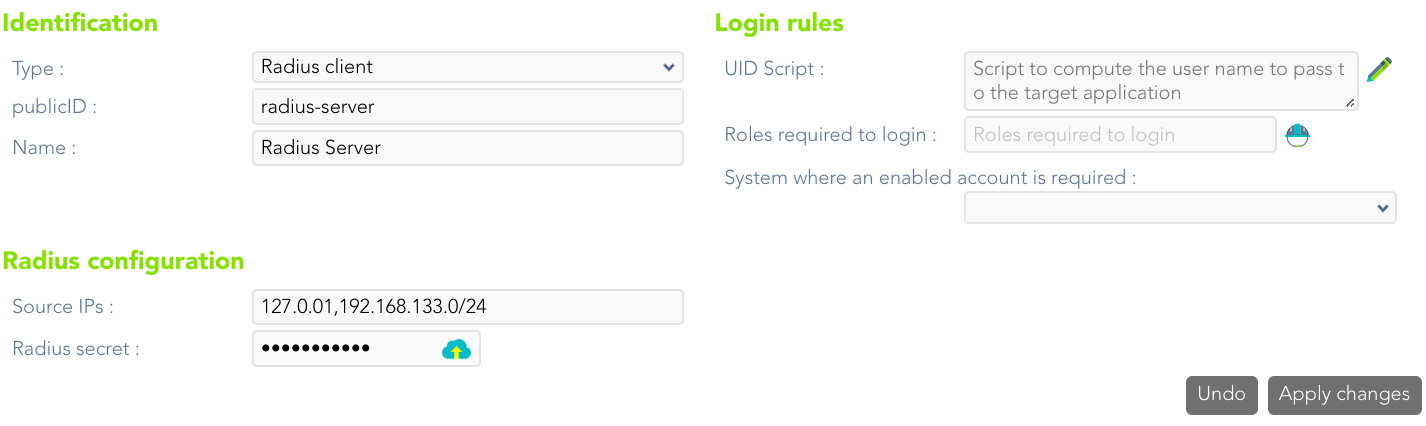
<span style="color: #a6d100; font-weight: bold; font-size: 18px;">3.</span> Then, you must fill in the required fields. Also, you need to provide the identity provider metadata. You can either copy it from the Soffid federation page or instruct the service provider to download the federation metadata by itself.

[![image-1689336949656.png](https://bookstack.soffid.com/uploads/images/gallery/2023-07/scaled-1680-/image-1689336949656.png)](https://bookstack.soffid.com/uploads/images/gallery/2023-07/image-1689336949656.png)
<p class="callout info">For more information about the attributes, you can visit [the Radius detailed info.](https://bookstack.soffid.com/link/392#bkmrk-radius-client)</p>