# Connecting an OpenID Connect service
## Introduction
There are three basic OpenID flows, depending whether the service name must be authenticated using its client secret or not:
### OpenID flow
> **Implicit flow**
>
> - The Service Provider sends the user to the IdP.
> - The IdP authenticates the user.
> - The user returns control to the Service Provider along an OpenID token and an OAuth token.
>
> **Client credentials flow**
>
> - The Service Provider sends the user to the IdP.
> - The IdP authenticates the user.
> - The user returns control to the Service Provider along an authorization code.
> - The Service Provider gets the OpenID token and OAuth token from the IdP by presenting the authorization code, and its client secret. This request is using a direct connection between them.
>
> **Password authentication flow**
>
> - The Service Provider asks for a user name and password.
> - The Service Provider gets the OpenID token and OAuth token from the IdP by presenting the user's name and password, and optionally its client secret. This request is using a direct connection between them.
## Register an OpenId Connect Service Provider
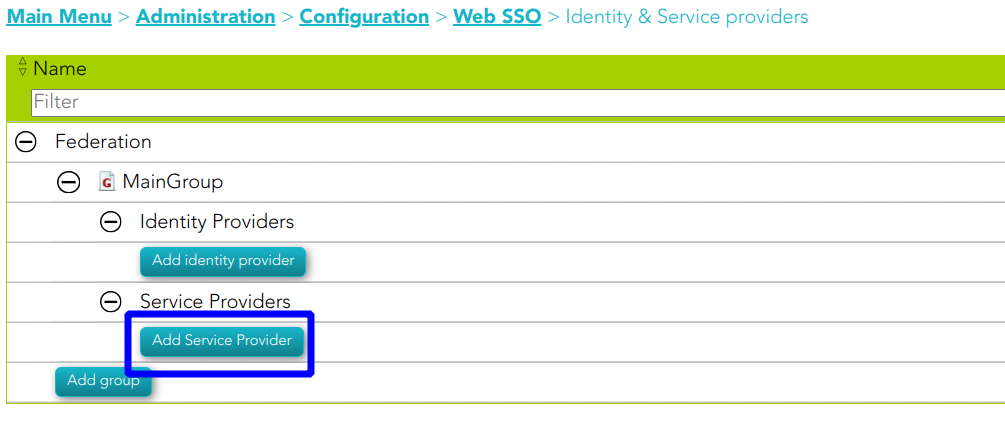
1. To register an OpenId Connect service provider, open the federation page:
`Main Menu > Administration > Configuration > Web SSO > Identity & Service providers`
2. Then, select an Entity Group and the branch Service Providers and click on the **Add Service Provider** button.
[](https://bookstack.soffid.com/uploads/images/gallery/2023-07/image-1689235669464.png)
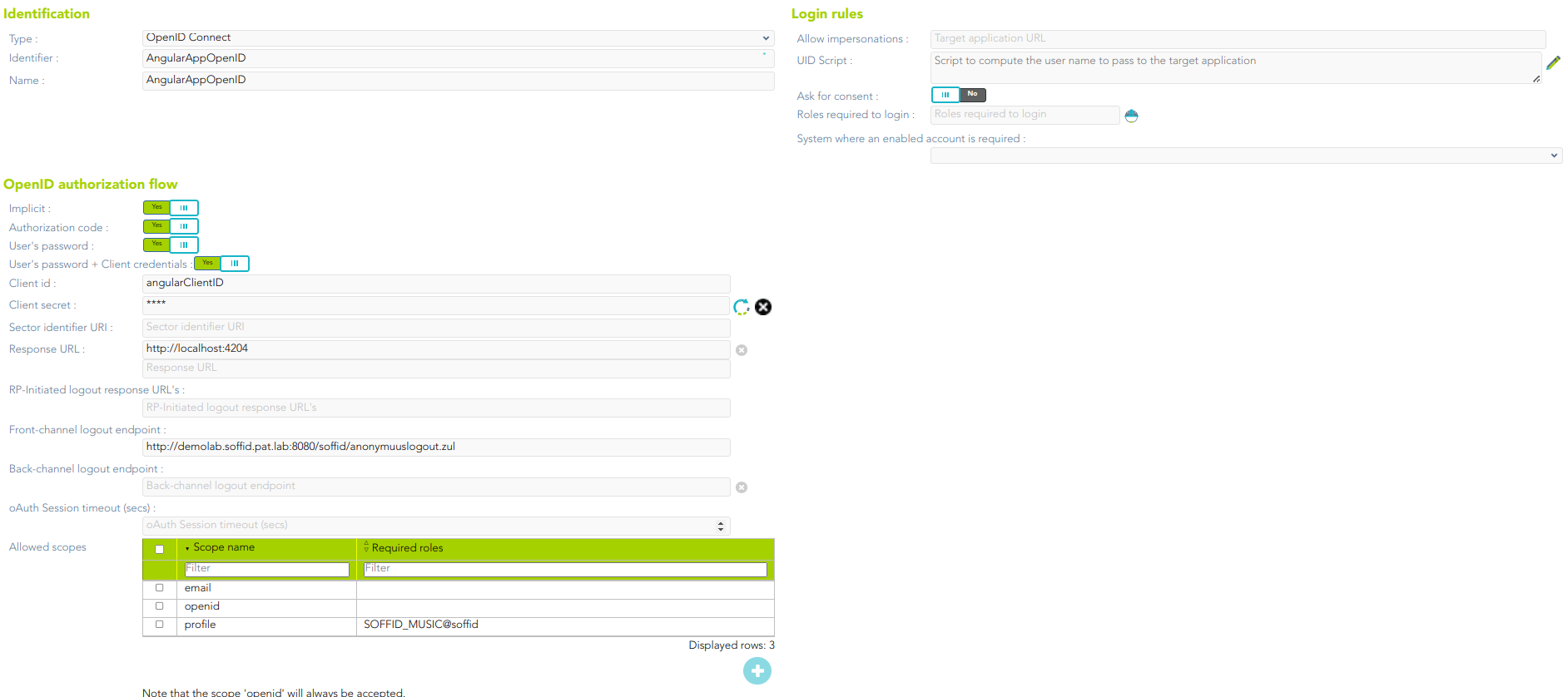
3. Soffid will display the following window:
[](https://bookstack.soffid.com/uploads/images/gallery/2023-07/image-1689236053673.png)
For more information about the attributes, you can visit [the OpenID Connect detailed info](https://bookstack.soffid.com/link/392#bkmrk-openid-connect).
4. Finally, you must apply changes.
## Examples
### 1. Authorization code flow
The client application creates a random String, named nonce, and sends to the user the following URL
#### Request
| https://[youridentityprovider:2443](https://soffid.bubu.lab:2443/token)/**authorization**?
**redirect\_uri**=https://<serviceprovider>/response&
**client\_id**=MYCLIENT&
**nonce**=12345679801234567890&
**scope**=openid+test+other&
**response\_type**=code
|
Then, the user will be asked for a username and password, or any other means of authentication. After authenticating the user, the browser will be redirected to the URL configured in the service provider page, adding a one-time authorization code.
| https://<serviceprovider>/response/?
code=XXXXXXXXXXXXXXX&
nonce=12345679801234567980
|
Once the service provider has received the one-time authorization code, it can connect to the identity provider to retrieve the oAuth token, as well as the OpenID token.
#### Request
| **POST** [https://youridentityprovider:2443/**token**](https://soffid.bubu.lab:2443/token)
*HEADERS*
**Accept**: application/json
**Authorization**: Basic dGVzdDp0ZXN0
**Content-Type:** application/x-www-form-urlencoded
*BODY PARAMS*
**grant\_type**=authorization\_code&
**code**=XXXXXXXXXXXX
|
##### Parameters
- **Authorization**: contains, coded in base 64, the **client id** and the **client secret**, as it would have been sent for a standard Basic authentication header. The identity provider will match these against the stored credentials.
- **grant\_type**: should be authorization\_code.
- **code**: should be the one-time authorization code received in the previous requested.
#### Response
| {
"access\_token":"8bDP2P...",
"refresh\_token":"gjLmSW...",
"id\_token":"eyJra.eyJ.LQ\_XtHKr.RY3A4...",
"token\_type":"Bearer",
"expires\_in":11998
}
|
- The *id\_token* tag contains the OpenId token.
- The *access\_token* tag contains the oAuth token.
Before the number of seconds specified om *expires\_in* are elapsed, the token can be renewed by invoking again the token endpoint changing the grant\_type:
#### Request
| **POS****T** [https://](https://soffid.bubu.lab:2443/token)[youridentityprovider:2443](https://soffid.bubu.lab:2443/token)[/**token**](https://soffid.bubu.lab:2443/token)
*HEADERS*
**Accept**: application/json
**Authorization**: Basic dGVzdDp0ZXN0
**Content-Type**: application/x-www-form-urlencoded
*BODY PARAMS*
**grant\_type**=refresh\_token&
**refresh\_token**=gjLmSW...
|
##### Parameters
- **Authorization**: contains, coded in base 64, the **client id** and the **client secret**, as it would have been sent for a standard Basic authentication header. The identity provider will match these against the stored credentials.
- **grant\_type**: should be refresh\_token.
- **refresh\_code**: should be refresh code received in the previous requested.
#### Response
| {
"access\_token":"8bDP2P...",
"refresh\_token":"gjLmSW...",
"id\_token":"eyJra.eyJ.LQ\_XtHKr.RY3A4...",
"token\_type":"Bearer",
"expires\_in":11998
}
|
### 2. User’s password + client credentials flow
The application asks the user for the user name and password. Then, it connects to the token endpoint to get an access token:
#### Request
| **POST** [https://](https://soffid.bubu.lab:2443/token)[youridentityprovider:2443](https://soffid.bubu.lab:2443/token)[/**token**](https://soffid.bubu.lab:2443/token)
*HEADERS*
**Accept**: application/json
**Authorization**: Basic dGVzdDp0ZXN0
**Content-Type**: application/x-www-form-urlencoded
*BODY PARAMS*
**grant\_type**=password&
**username**=USER&
**password**=PASSWORD&XXXXXXXXXXXX
|
##### Parameters
- **Authorization**: contains, coded in base 64, the client id and the client secret, as it would have been sent for a standard Basic authentication header. The identity provider will match these against the stored credentials
- **grant\_type**: should be password
- **username**: must be the user name entered by the user.
- **password**: must be the password entered by the user.
#### Response
| {
"access\_token":"8bDP2P...",
"refresh\_token":"gjLmSW...",
"id\_token":"eyJra.eyJ.LQ\_XtHKr.RY3A4...",
"token\_type":"Bearer",
"expires\_in":11998
}
|
- The *id\_token* tag contains the openid token.
- The *access\_token* tag contains the oAuth token.
Before the number of seconds specified in expires\_in are elapsed, the token can be renewed by invoking again the token endpoint:
#### Request
| **POST** [https://](https://soffid.bubu.lab:2443/token)[youridentityprovider:2443](https://soffid.bubu.lab:2443/token)[/**token**](https://soffid.bubu.lab:2443/token)
*HEADERS*
**Accept**: application/json
**Authorization**: Basic dGVzdDp0ZXN0
**Content-Type:** application/x-www-form-urlencoded
*BODY PARAMS*
**grant\_type**=refresh\_token&
**refresh\_token**=gjLmSW...
|
##### Parameters
- **Authorization**: contains, coded in base 64, the client id and the client secret, as it would have been sent for a standard Basic authentication header. The identity provider will match these against the stored credentials
- **grant\_type**: should be refresh\_token
- **refresh\_code**: should be refresh code received in the previous requested
#### Response
| {
"access\_token":"8bDP2P...",
"refresh\_token":"gjLmSW...",
"id\_token":"eyJra.eyJ.LQ\_XtHKr.RY3A4...",
"token\_type":"Bearer",
"expires\_in":11998
}
|
### 3. Closing the session
The application wants to revoke the token and session cookie:
#### Request
| **POST** https://[youridentityprovider:2443](https://soffid.bubu.lab:2443/token)/**revoke**
*HEADERS*
**Accept**: application/json
**Content-type**: application/x-www-form-urlencoded
**Authorization**: Basic dGVzdDp0ZXN0
*BODY PARAMS*
**token\_type\_hint**=token=access\_token&
**token**=8bDP2P...
|
##### Parameters
- **Authorization**: contains the encoded client id and client secret.
- **token\_type\_hint**: can have the following values:
- access\_token
- refresh\_token
- session\_cookie
- **token**: contains the authorization token, refresh\_token or session\_cookie value
### 4. Getting user attributes
All the user attributes can be extracted from the OpenID token. Anyway, it is possible to get them in a more readable format user the user-info endpoint.
#### Request
| **GET** [https://](https://soffid.bubu.lab:2443/session_cookie)[youridentityprovider:2443](https://soffid.bubu.lab:2443/token)[/**userinfo**](https://soffid.bubu.lab:2443/session_cookie)
*HEADERS*
**Accept**: application/json
**Authorization**: Bearer dGVzdDp0ZXN0
|
##### Parameters
- **Authorization**: contains a valid access token.
#### Response
| {
"sub": "admin",
"surname": "Admin",
"given\_name": "Admin",
"member\_of": \[
"TestRole2@soffid",
"TestRole@soffid"
\]
}
|
### 5. Getting a session cookie for the user
Sometimes, a mobile application has authenticated the user using the username & password grant, but wants to share this authenticated session with the underlying web browser. For such a case, the application can request a session cookie with this request:
#### Request
| **GET** [https://](https://soffid.bubu.lab:2443/session_cookie)[youridentityprovider:2443](https://soffid.bubu.lab:2443/token)[/session\_cookie](https://soffid.bubu.lab:2443/session_cookie)
*HEADERS*
**Accept**: application/json
**Authorization**: Bearer dGVzdDp0ZXN0
|
##### Parameters
- **Authorization**: contains a valid access token.
#### Response
| {
"cookie\_domain": "cookied",
"user": "pgarcia",
"cookie\_value": "5458083\_bT2CZlaa6psl/q3ue6NObxX8Q7duQKj0hAuUJIouT5Y=",
"cookie\_name": "cookien"
}
|
Please note that it is mandatory to fill in the name of the cookie in the identity provider, at the session management section