# Identity Broker
# Soffid IdP as an identity broker
## Introduction
> An Identity Broker is often part of a a Single Sign-On Architecture as an an intermediary service that connects multiple Service Providers with different Identity Provider (IDP)s.
Soffid IdP can act as an identity broker. This means that Soffid IdP can rely on third party identity providers to identify users.
To act as an identity broker, the External SAML identity provider option must be enabled on the Authentication page. You can visit the [Authentication page](https://bookstack.soffid.com/books/soffid-3-reference-guide/page/authentication "Authentication") for more info.
## Data flow
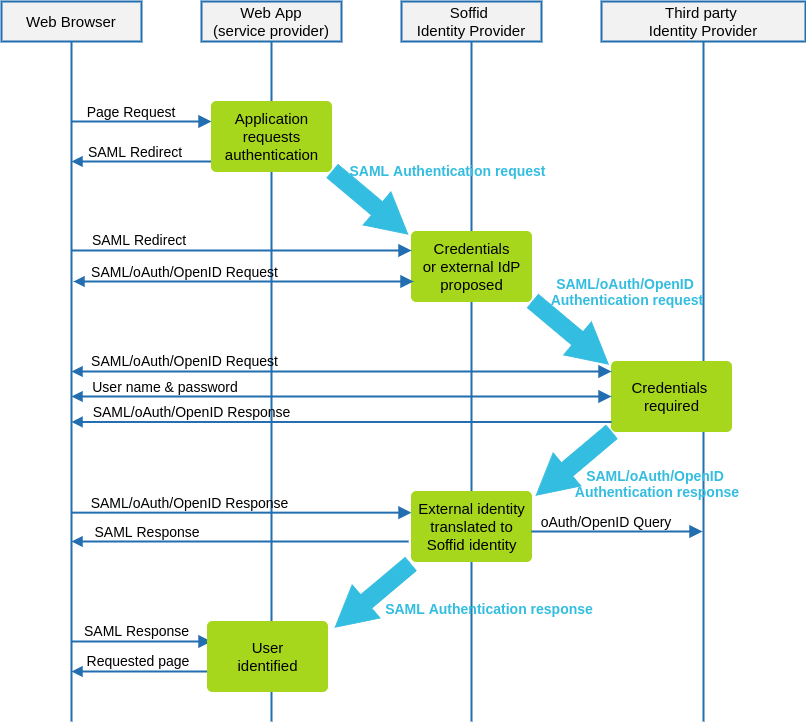
The following diagram, shows the resulting data flow between the end user, your application, the identity provider and Soffid web services:
### Data flow steps
1. Web browser requests a protected web application resource.
2. Web application builds a SAML authentication request and forwards it to Soffid IdP.
3. Soffid IdP receives SAML authentication request and validates it. A user name and password page is presented. This page can optionally contain a set of links to third-party identification servers.
If the user clicks on the third party identification server link, or the typed in user name is expected to be authenticated by a third-party IdP. Soffid IdP acts as a Service Provider and an authentication request is forwarded to that IdP. The authentication request format depends on the protocol required by the third-party IdP.
4. Third-party IdP receives the authentication request and presents the user its user name and password page.
5. User fills in the user name and password form.
6. Third-party IdP builds an authentication response that is forwarded to Soffid IdP. This response can contain a SAML Assertion or a oAuth authorization token.
7. Soffid IdP parses and validates the received response:
7.1. For SAML responses, the assertion is validated and identity attributes are extracted.
7.1. For oAuth responses, the authorization token is used to get a session token. Next, session token is used to fetch user attributes from external IdP.
7.1. For OpenID-Connect responses, the authorization token is used to get a session token along the OpenID token received. The OpenID token is parsed as a JWT token, and each claimed attribute is parsed.
8. Soffid IdP finds the identity owner of the external identity. If no identity is found, depending on Soffid IdP configuration, it can automatically create a Soffid Identity based on received attributes.
9. Finally, Soffid IdP issues a SAML assertion containing Soffid identity attributes.
---
[*https://ldapwiki.com/wiki/Identity%20Broker*](https://ldapwiki.com/wiki/Identity%20Broker)
# External oAuth / OpenID Identity Providers
## Introduction
Soffid federation can be composed by a mix of SAML and oAuth / OpenID-connect servers. In such a scenario, Soffid IdP is able to let users be identified by oAuth servers like Linked-in, Google or Facebook, perform all the provision tasks required and send back a SAML assertion to the service provider requiring user authentication.
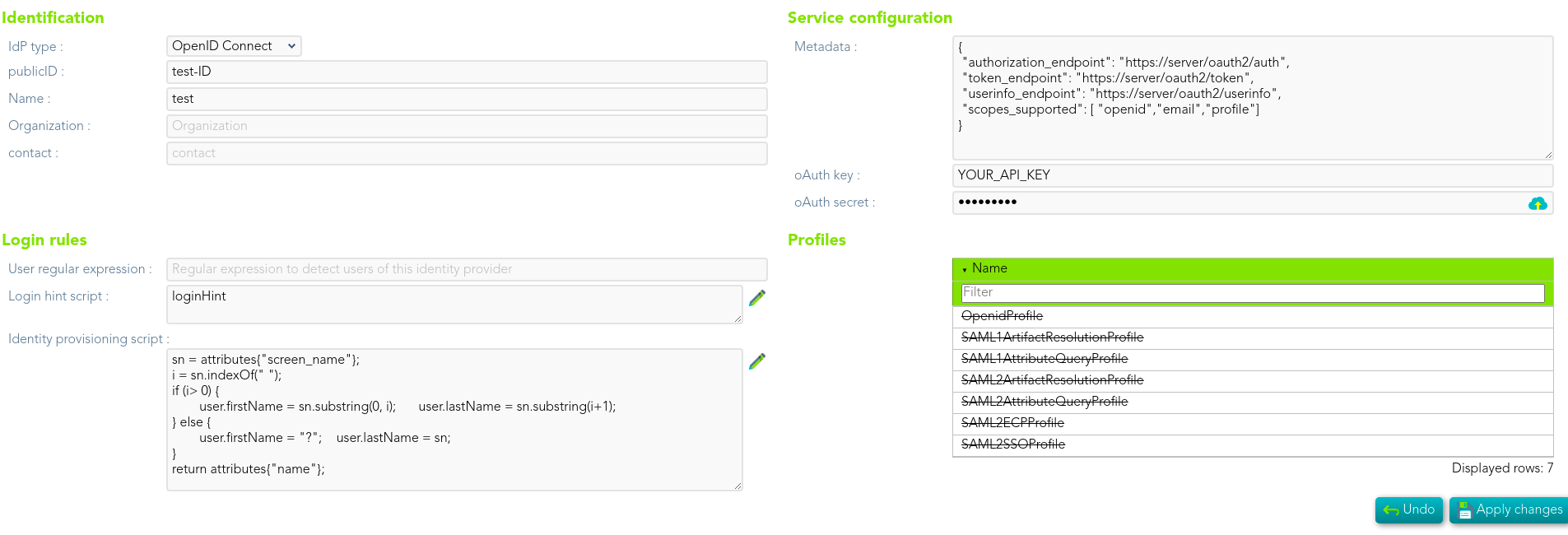
To create an external oAuth identity provider, you can choose the Idp type from a list of popular sites, like Google or Facebook, or write you own descriptor.
The descriptor should follow the OpenID connect discovery JSON document. Most parameters are optional, but these are required:
- **authorization\_endpoint**: contains the oAuth endpoint to forward the user to get the authorization token.
- **token\_endpoint**: contains the oAuth endpoint to get the access token, based on the authorization token got at previous step.
- **userinfo\_endpoint**: if remote IdP is OpenID-connect compliant, the token endpoint should have sent an access token along a JWT OpenID token containing user claims. If this is not the case, Soffid will use this user\_info endpoint to fetch user claims. This mechanism is needed for oAuth2 servers.
- **scopes\_sopported**: The list of scopes specified here will be used at first step, when redirecting the user to the authorization endpoint.
Next, you must register Soffid IdP with your oAuth server. After registering, you will get a oAuthKey (some kind of username) and an oAuthSecret (some kind of password). To register Soffid IdP, your oAuth server will require you to specify the redirection endpoint. This redirection endpoint refers to your Soffid IdP and will receive the authorization token generated by the oAuth server.
If your Soffid IdP is listening to https://idp.yourdomain.com:2443/, your redirection endpoint will be https://idp.yourdomain.com:2443/**oauthResponse**
As an example, here you have some links to get your oAuth keys and secrets for [Google](https://console.developers.google.com/), [Facebook](https://developers.facebook.com/apps/) and [Linkedin](https://www.linkedin.com/secure/developer?newapp=).