# AD Integration flows - Update user

## Update

### Introduction

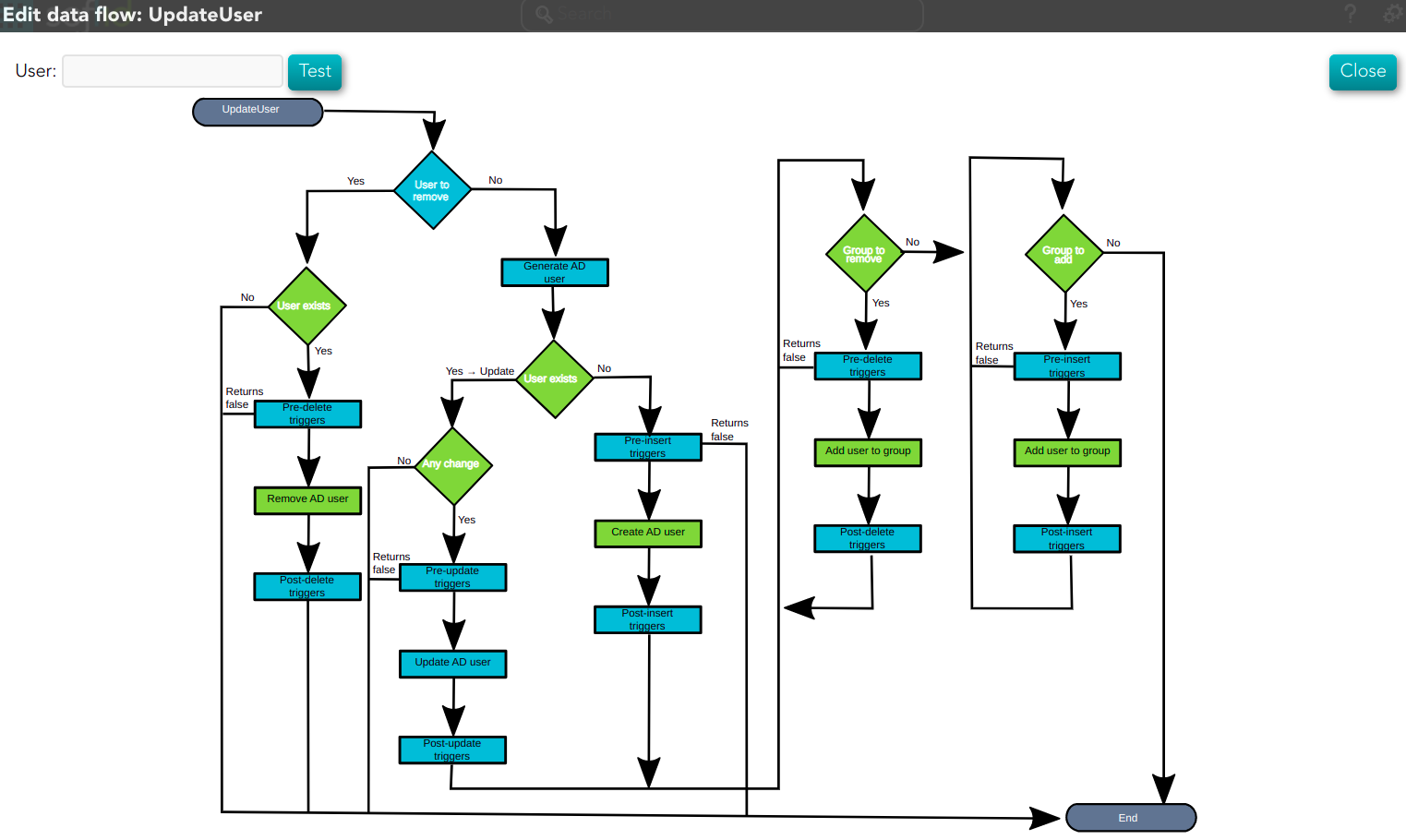
Soffid provides a workflow to modify and/or delete a user in the final system. In it, we can see each of the steps of which this process is composed.

### Diagram

[![image-1661426896997.png](https://bookstack.soffid.com/uploads/images/gallery/2022-08/scaled-1680-/image-1661426896997.png)](https://bookstack.soffid.com/uploads/images/gallery/2022-08/image-1661426896997.png)

### Step by Step

In this document, we will explain the process that Soffid performs to modify a user for the AD connector.

#### 1. Initial step

First of all, Soffid checks if the user exists in Soffid and then checks the operation to perform, update or delete.

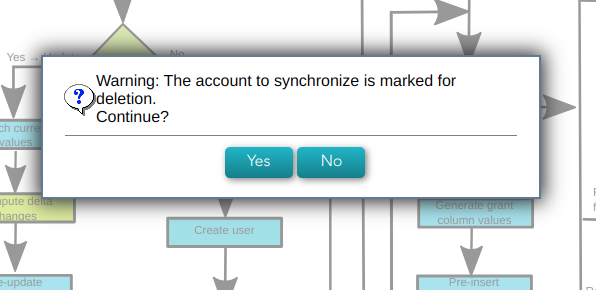
**1.1.** If the **user does not exist in Soffid**, then Soffid asks to delete the user in the target System.

<details id="bkmrk-%E2%9D%93-warning-message"><summary>❓ Warning message</summary>

![image-1659534714096.png](https://bookstack.soffid.com/uploads/images/gallery/2022-08/scaled-1680-/image-1659534714096.png)</details>**1.1.1. Yes**: If the answer is Yes, the process follows through the Yes branch,[ \[3. Delete branch\]](#bkmrk-4.-delete-branch).

**1.1.2. No**: If the answer is Yes, the process finishes <span style="background-color: #c2e0f4;">[\[10. End\]](#bkmrk-x.-end)</span>.

**1.2.** If the **user exists in Soffid**, the process continues through <span style="background-color: #c2e0f4;">\[[2. User to remove?\]](#bkmrk-2.-user-to-remove)</span>. to check if the

#### 2. User to remove?

<details id="bkmrk-%F0%9F%93%8C-by-clicking-on-the"><summary>📌 By clicking on the User to remove? step,...</summary>

 You can configure all the properties related to the user object for this step

[![image-1661421084985.png](https://bookstack.soffid.com/uploads/images/gallery/2022-08/scaled-1680-/image-1661421084985.png)](https://bookstack.soffid.com/uploads/images/gallery/2022-08/image-1661421084985.png)

</details>**2.1.** If the user is **marked for Deletion**, Soffid will ask for user consent to continue with the process or to cancel it. If the answer is Yes, the process follows through the Yes branch, <span style="background-color: #c2e0f4;">[\[3. Delete branch\]](#bkmrk-4.-delete-branch)</span>.

<details id="bkmrk-%E2%9D%93-warning-message-0"><summary>❓ Warning message</summary>

![image-1659534714096.png](https://bookstack.soffid.com/uploads/images/gallery/2022-08/scaled-1680-/image-1659534714096.png)</details>**2.2.** If the user is **marked for Update**, it continues with the flow following through the No branch, <span style="background-color: #c2e0f4;">[\[4. Insert or Update branch\]](#bkmrk--1)</span>.

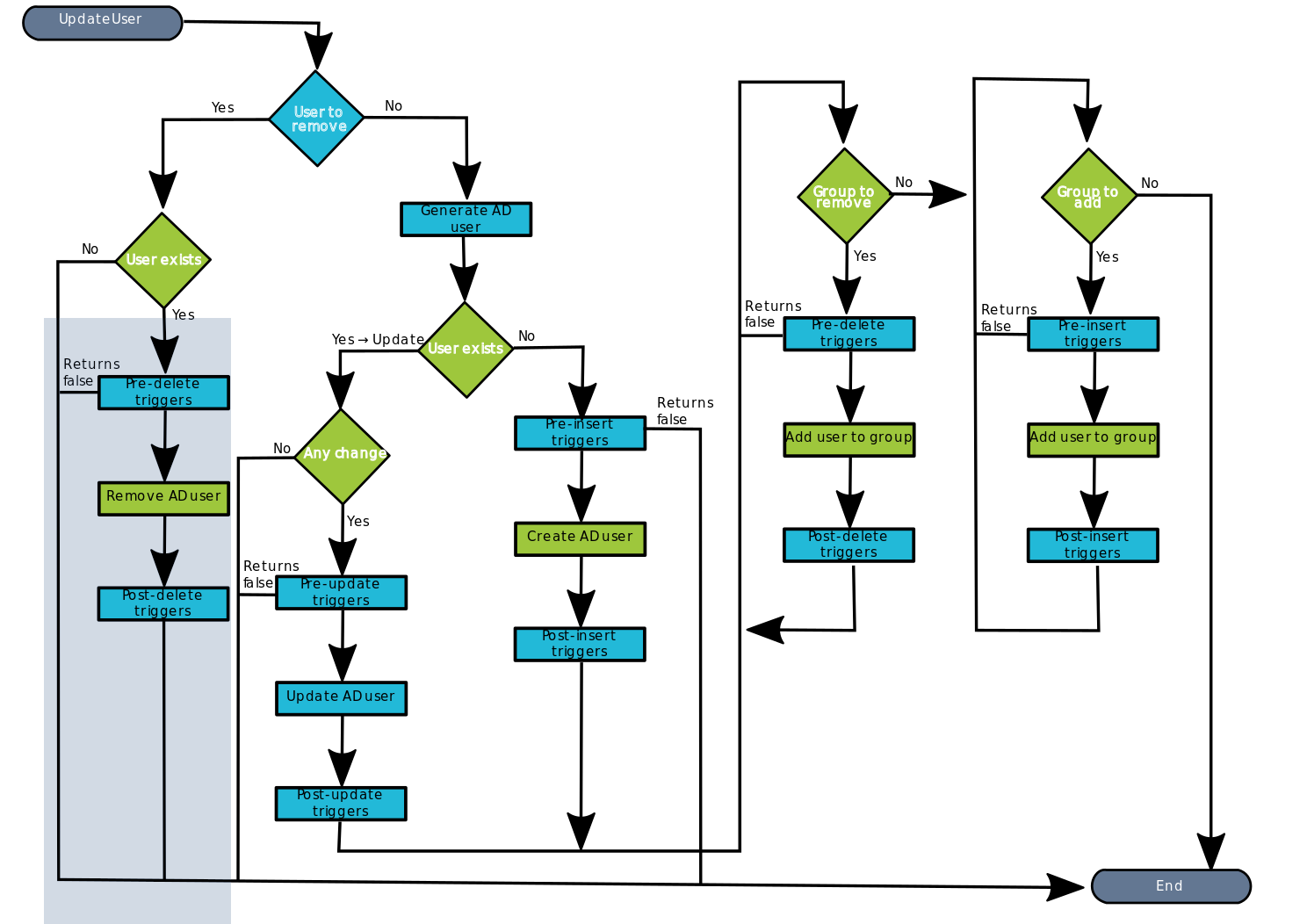
#### 3. Delete branch

<details id="bkmrk-%F0%9F%93%8A-diagram-%26%26todo%26%26-%C2%A0"><summary>📊 Diagram</summary>

[![image-1661440073073.png](https://bookstack.soffid.com/uploads/images/gallery/2022-08/scaled-1680-/image-1661440073073.png)](https://bookstack.soffid.com/uploads/images/gallery/2022-08/image-1661440073073.png)

</details>**3.1.** When the operation to perform is to delete a user, first of all, Soffid has to check if the user exists in the target system.

**3.1.1.** If the **user does not exist**, there are no actions to perform in the target system, so the process finishes <span style="background-color: #c2e0f4;">[\[10. End\]](#bkmrk-x.-end)</span>.

**3.1.2.** If the **user exists**, the flow continues executing the **pre-delete triggers** if there is anyone configured. More than one script can be configured. These scripts are executed just before the main action, user delete, and the result (true or false) determines if the main action will be performed or not.

**3.1.2.1. False**: if the result is false for one or more of these triggers, the process finishes <span style="background-color: #c2e0f4;">[\[10. End\]](#bkmrk-x.-end)</span>.

**3.1.2.2.True**: if the result is true for all of these triggers, Soffid continues to the next step.

<details id="bkmrk-%F0%9F%93%8C-by-clicking-on-the-1"><summary>📌 By clicking on the Pre-delete triggers step,...</summary>

You can configure all the pre-delete triggers related to the user object for this step.

[![image-1661427702845.png](https://bookstack.soffid.com/uploads/images/gallery/2022-08/scaled-1680-/image-1661427702845.png)](https://bookstack.soffid.com/uploads/images/gallery/2022-08/image-1661427702845.png)
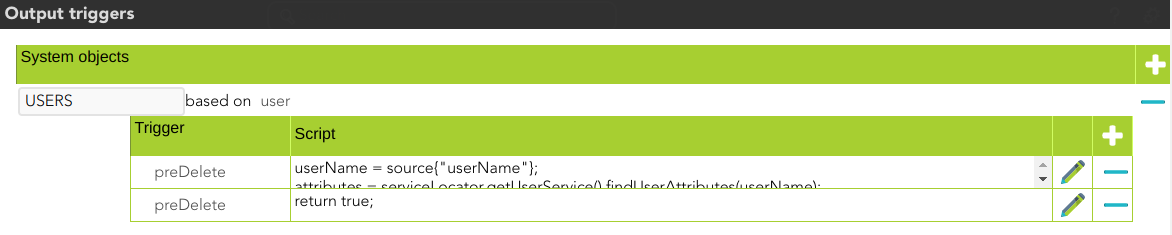
</details>**3.1.3.** Soffid **removes the AD user** in the Active directory.

**3.1.3.**  Then Soffid executes the **post-delete triggers** if any. These triggers can be used to perform a specific action just after performing the remove user operation on the target object.

<details id="bkmrk-%F0%9F%93%8C-by-clicking-on-the-3"><summary>📌 By clicking on the Post-delete triggers step,...</summary>

You can configure the post-delete triggers related to the user object for this step.

[![image-1661427821300.png](https://bookstack.soffid.com/uploads/images/gallery/2022-08/scaled-1680-/image-1661427821300.png)](https://bookstack.soffid.com/uploads/images/gallery/2022-08/image-1661427821300.png)
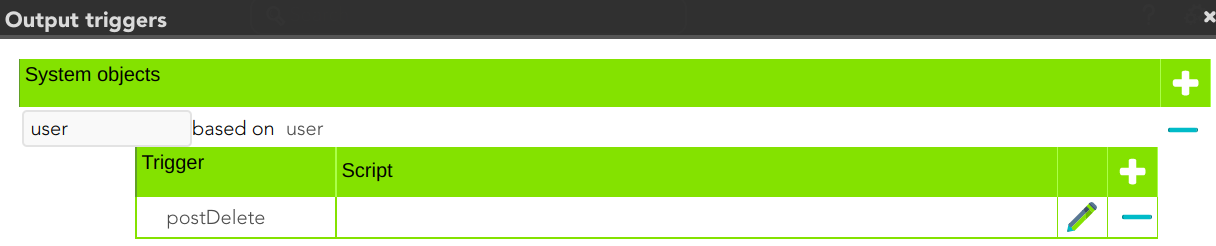
</details>**3.1.3.** Then the process finishes <span style="background-color: #c2e0f4;">[\[10. End\]](#bkmrk-x.-end)</span>.

#### 4. Insert or Update branch


**4.1.** When the operation to perform is to update a user, first of all, Soffid **generates the AD user**. That is, Soffid calculates the values of the AD user object from the original values of Soffid.

<details id="bkmrk-by-clicking-on-the-g"><summary>📌 By clicking on the generate AD user step,...</summary>

You can configure the attributes related to the user object for this step.

[![image-1661430867005.png](https://bookstack.soffid.com/uploads/images/gallery/2022-08/scaled-1680-/image-1661430867005.png)](https://bookstack.soffid.com/uploads/images/gallery/2022-08/image-1661430867005.png)
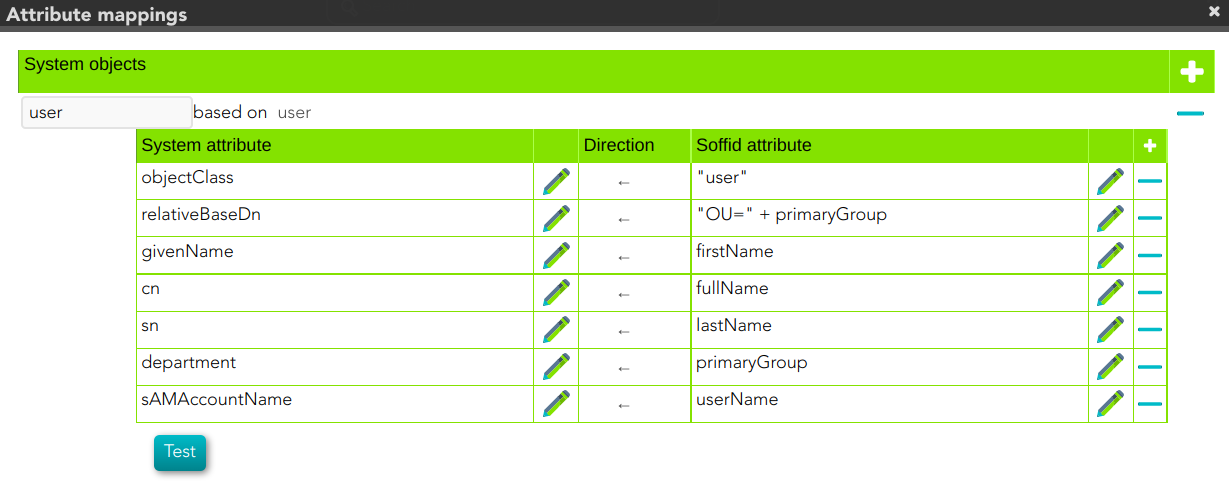
</details>**4.2.**Then Soffid asks if the **user exists** in the target system to decide the action to execute, this action can be an update or an insert.

**4.2.1.** If the **user does not exist** in the target system, the process continues through <span style="background-color: #c2e0f4;">[\[5. Insert user branch\]](#bkmrk-5.-insert-user-branc)</span>.

**4.2.2.** If the **user exists** in the target system, the process continues through [<span style="background-color: #c2e0f4;">\[</span>](#bkmrk-6.-update-user%C2%A0branc)[<span style="background-color: #c2e0f4;">6. Update user branch\]</span>](#bkmrk-6.-update-user%C2%A0branc).


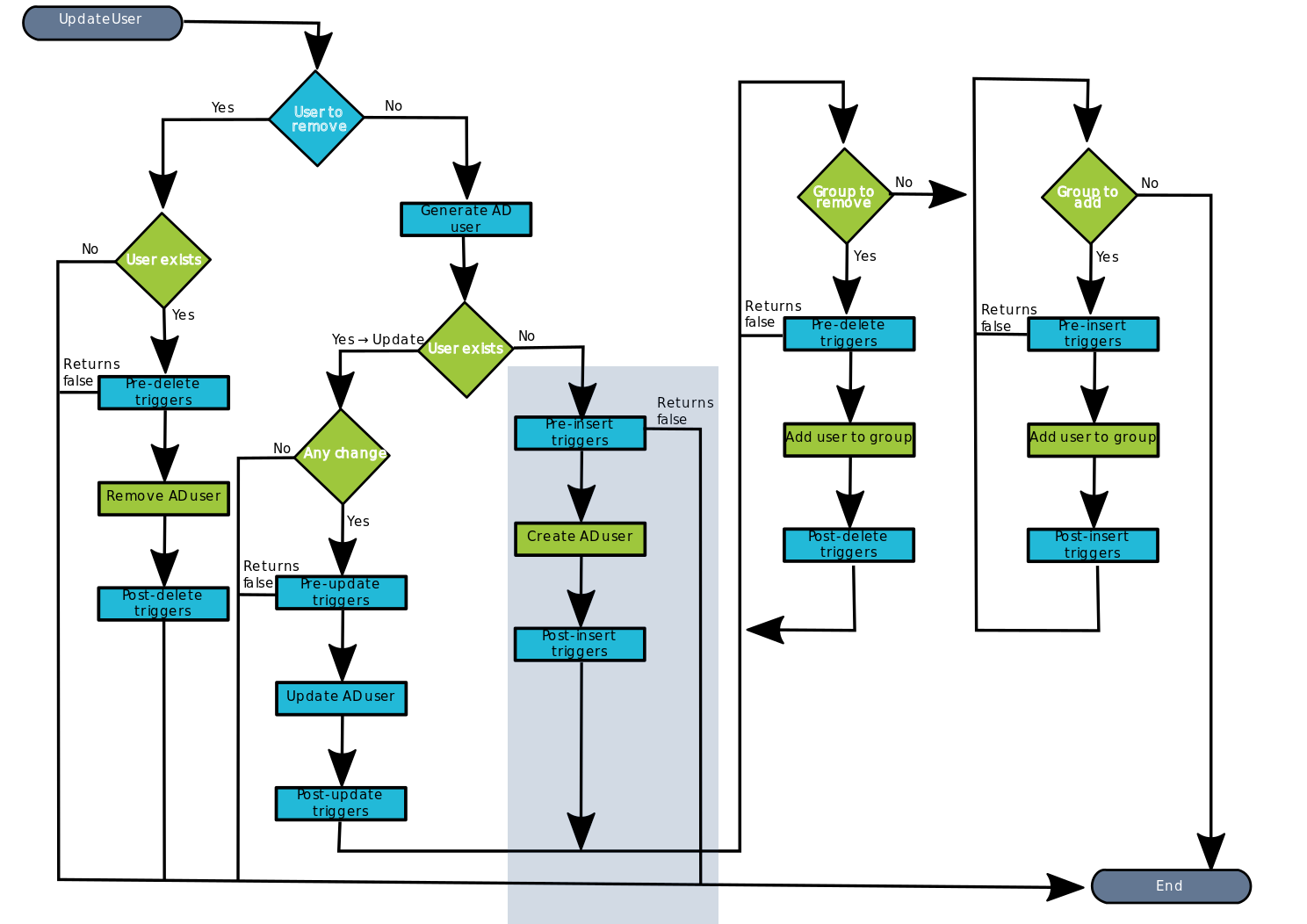
#### 5. Insert user branch

<details id="bkmrk-diagram-1"><summary>📊 Diagram</summary>

[![image-1661440189859.png](https://bookstack.soffid.com/uploads/images/gallery/2022-08/scaled-1680-/image-1661440189859.png)](https://bookstack.soffid.com/uploads/images/gallery/2022-08/image-1661440189859.png)

</details>**5.1.** Soffid executes the **pre-insert triggers** if there is anyone configured. More than one script can be configured. These scripts are executed just before the main action, user creates, and the result (true or false) determines if the main action will be performed or not.

**5.1.1. False**: if the response is false for one or more of these triggers, the process finishes [<span style="background-color: #c2e0f4;">\[10. End\]</span>](#bkmrk-x.-end) and the user is not created in the target system.

**5.1.2. True**: if the response is true for all of these triggers, Soffid continues to the next step.

**5.2.** Soffid **creates AD** **user** in the Active directory

**5.3.** Then Soffid executes **post-insert triggers** if any. These triggers can be used to perform a specific action just after performing the create user operation on the target object.

<details id="bkmrk-%F0%9F%93%8C-by-clicking-on-the-5"><summary>📌 By clicking on the Post-insert triggers step,...</summary>

You can configure the Post-insert triggers related to the user object for this step.

[![image-1660290613568.png](https://bookstack.soffid.com/uploads/images/gallery/2022-08/scaled-1680-/image-1660290613568.png)](https://bookstack.soffid.com/uploads/images/gallery/2022-08/image-1660290613568.png)

</details>**5.4.** Then the process continues through [<span style="background-color: #c2e0f4;">\[7. Groups\]</span>](#bkmrk-5.-xxxx).

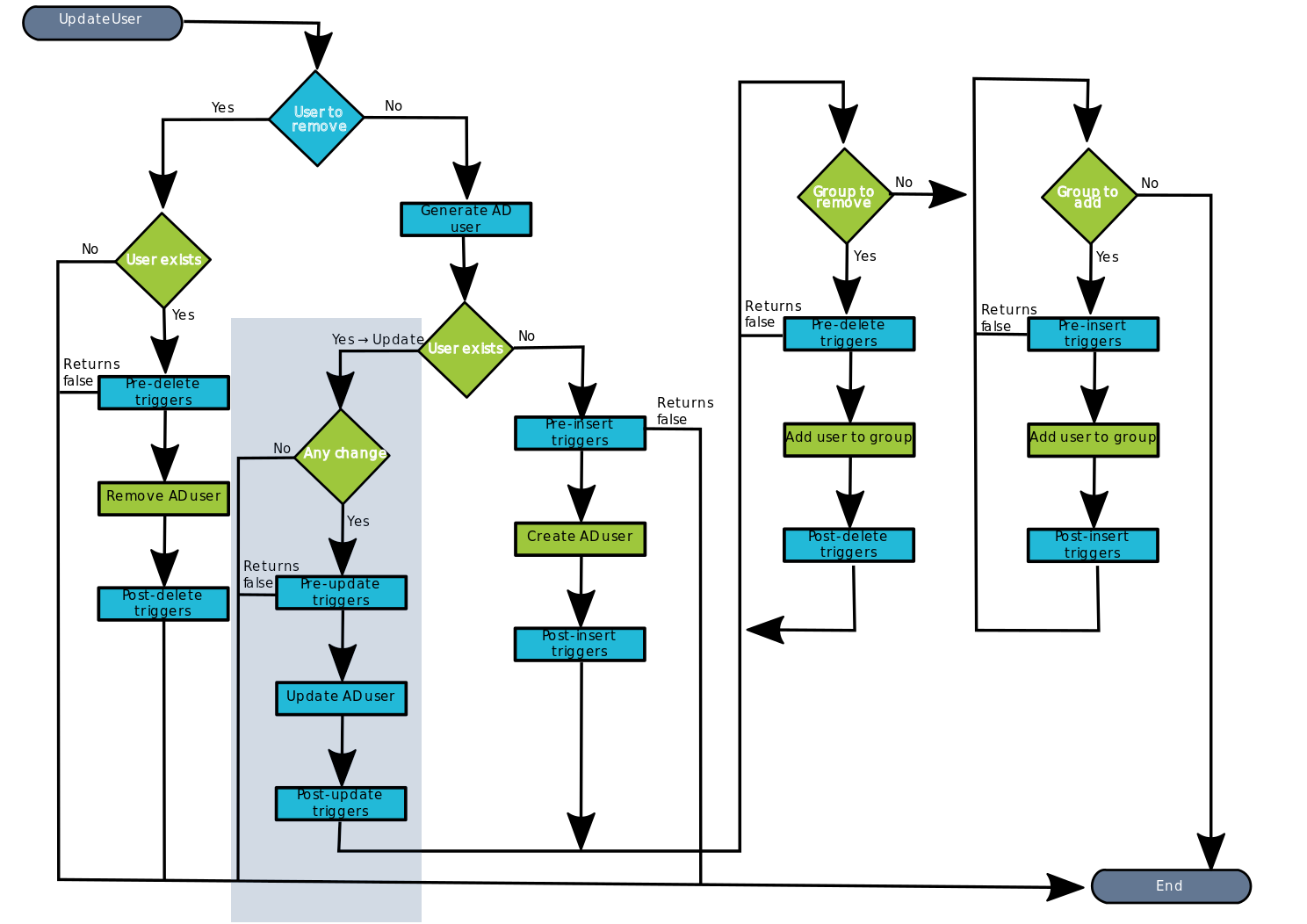
#### 6. Update user branch

<details id="bkmrk-diagram-2"><summary>📊 Diagram</summary>

[![image-1661440155417.png](https://bookstack.soffid.com/uploads/images/gallery/2022-08/scaled-1680-/image-1661440155417.png)](https://bookstack.soffid.com/uploads/images/gallery/2022-08/image-1661440155417.png)

 </details>**6.1.** Soffid checks if there are **any change** between the generated object and the values of the object in the target system.

**6.1.1. False**: if there are no changes, the process finishes [<span style="background-color: #c2e0f4;">\[10. End\]</span>](#bkmrk-x.-end)**.**

**6.1.2. True**: if there are changes to update, Soffid continues to the next step.

**6.2.** Soffid executes the **pre-update triggers** if there is anyone configured. More than one script can be configured. These scripts are executed just before the main action, user update, and the result (true or false) determines if the main action will be performed or not.

**6.2.1. False**: if the response is false for one or more of these triggers, the process finishes <span style="background-color: #c2e0f4;">[\[10. End\]](#bkmrk-x.-end)</span> and the user is not updated in the target system

**6.2.2. True**: if the response is true for all of these triggers, Soffid continues to the next step.

<details id="bkmrk-%F0%9F%93%8C-by-clicking-on-the-6"><summary>📌 By clicking on the Pre-update triggers step,...</summary>

You can configure the Pre-update triggers related to the user object for this step.

[![image-1660305125794.png](https://bookstack.soffid.com/uploads/images/gallery/2022-08/scaled-1680-/image-1660305125794.png)](https://bookstack.soffid.com/uploads/images/gallery/2022-08/image-1660305125794.png)

</details>**6.3.** Soffid **updates the AD user** in the Active directory

<details id="bkmrk-%F0%9F%93%8C-by-clicking-on-the-7"><summary>📌 By clicking on the update user step,...</summary>

 You can configure the properties related to the user object for this step.

[![image-1661431455021.png](https://bookstack.soffid.com/uploads/images/gallery/2022-08/scaled-1680-/image-1661431455021.png)](https://bookstack.soffid.com/uploads/images/gallery/2022-08/image-1661431455021.png)

</details>**6.4.** Then Soffid executes the **post-update triggers** if any. These triggers can be used to perform a specific action just after performing the update user operation on the target object.

<details id="bkmrk-%F0%9F%93%8C-by-clicking-on-the-8"><summary>📌 By clicking on the Post-update triggers step,...</summary>

You can configure the Post-update triggers related to the user object for this step.

[![image-1661500966301.png](https://bookstack.soffid.com/uploads/images/gallery/2022-08/scaled-1680-/image-1661500966301.png)](https://bookstack.soffid.com/uploads/images/gallery/2022-08/image-1661500966301.png)

</details>**6.6.** Then the process continues through [<span style="background-color: #c2e0f4;">\[7. Grants\]</span>](#bkmrk-5.-xxxx).

#### 7. Grants

At this point, Soffid runs the actions relative to the grants. The operations can be to add the user to one or more groups or to remove the user from existing groups.

#### 8**.** Group to remove

This is a loop while there are groups to remove.

<details id="bkmrk-diagram-3"><summary>📊 Diagram</summary>

[![image-1661440287892.png](https://bookstack.soffid.com/uploads/images/gallery/2022-08/scaled-1680-/image-1661440287892.png)](https://bookstack.soffid.com/uploads/images/gallery/2022-08/image-1661440287892.png)

 </details>**8.1.** If there are **No** groups to remove, the process goes to [<span style="background-color: #c2e0f4;">\[9. Group to add\]</span>](#bkmrk-9.-grant-to-remove).

**8.2. Yes,** there are groups to remove:

**8.2.1.** Soffid executes the **pre-delete triggers** if there is anyone configured. More than one script can be configured. These scripts are executed just before the main action, a **Remove user to group**, and the result (true or false) determines if the main action will be performed or not.

**8.2.1.1. False**: if the response is false for one or more of these triggers, the process goes to [<span style="background-color: #c2e0f4;">\[8. Group to remove\]</span>](#bkmrk-6.%C2%A0grant-to-add) and the grant is not created.

**8.2.1.2. True**: if the response is true for all of these triggers, Soffid continues to the next step.

<details id="bkmrk-%F0%9F%93%8C-by-clicking-on-the-13"><summary>📌 By clicking on the Pre-delete triggers step,...</summary>

 You can configure the Pre-delete triggers related to the grant object for this step.

[![image-1661497389637.png](https://bookstack.soffid.com/uploads/images/gallery/2022-08/scaled-1680-/image-1661497389637.png)](https://bookstack.soffid.com/uploads/images/gallery/2022-08/image-1661497389637.png)

</details>**8.2.3.** If the result of the triggers is true, then Soffid **adds the user to a group.**

**8.2.4.** Then Soffid executes the **post-insert triggers** if any. These triggers can be used to perform a specific action just after performing the create grant operation on the target object.

<details id="bkmrk-%F0%9F%93%8C-by-clicking-on-the-15"><summary>📌 By clicking on the Post-delete triggers column values step,...</summary>

 You can configure the Post-Update related to the grant object for this step.

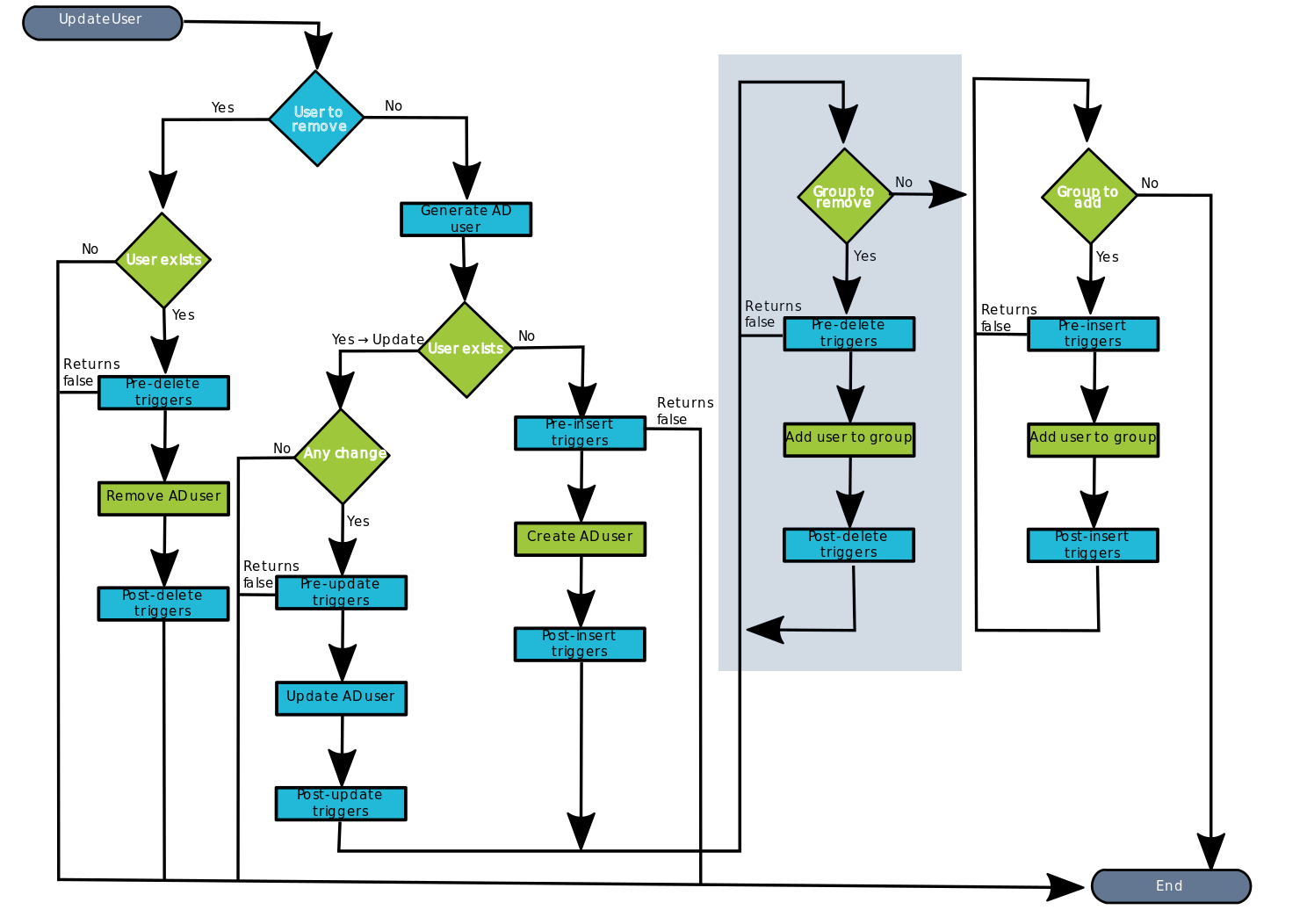
[![image-1661497647604.png](https://bookstack.soffid.com/uploads/images/gallery/2022-08/scaled-1680-/image-1661497647604.png)](https://bookstack.soffid.com/uploads/images/gallery/2022-08/image-1661497647604.png)

</details>**8.2.5.** Then the process continues through  [<span style="background-color: #c2e0f4;">\[8. Grant to add\]</span>](#bkmrk-6.%C2%A0grant-to-add).

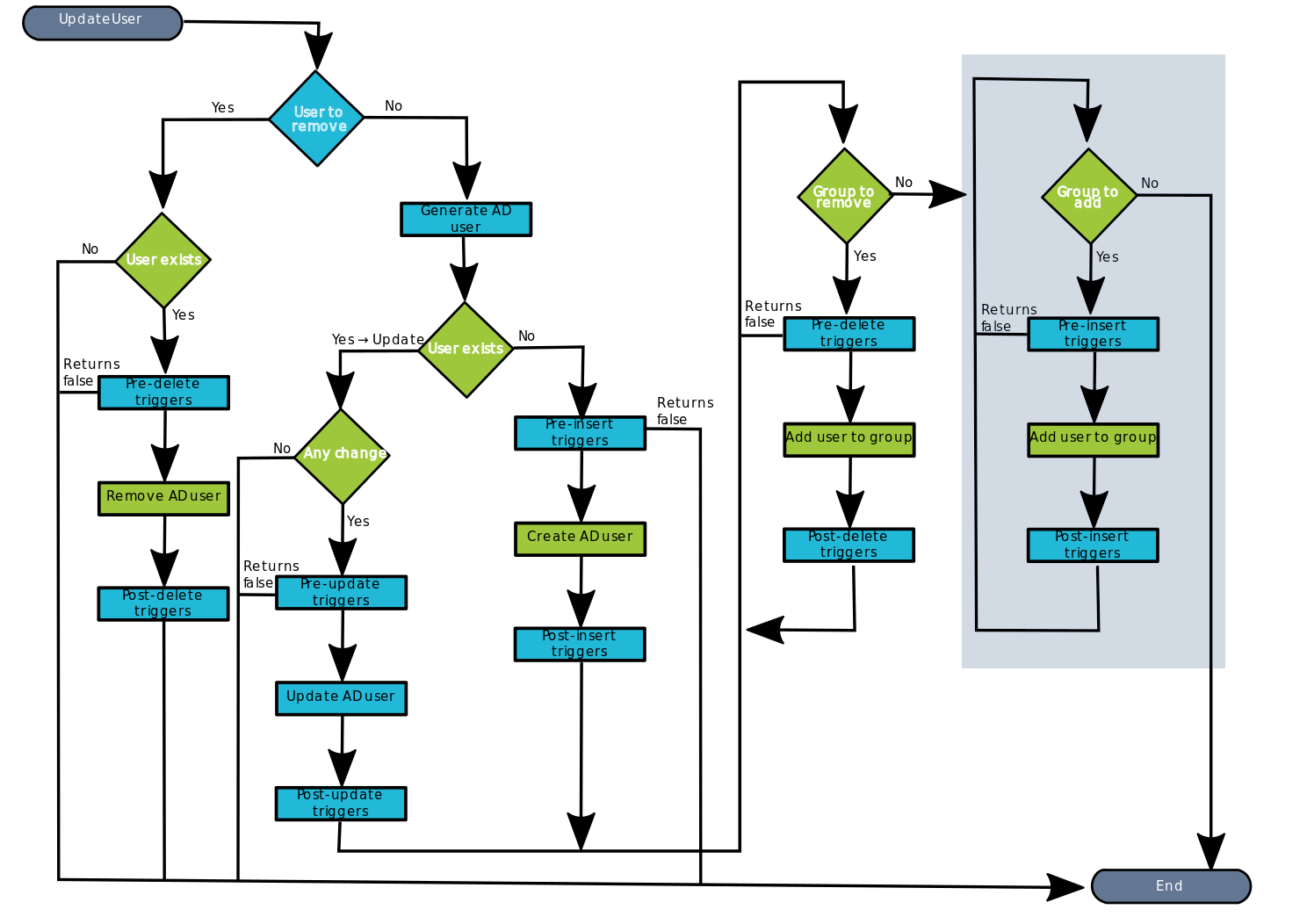
#### 9. Group to add

<details id="bkmrk-diagram-4"><summary>📊 Diagram</summary>

[![image-1661440333930.png](https://bookstack.soffid.com/uploads/images/gallery/2022-08/scaled-1680-/image-1661440333930.png)](https://bookstack.soffid.com/uploads/images/gallery/2022-08/image-1661440333930.png)

</details>This is a loop while there are grants to remove. This grants list comes from the previous step \[7. Grants\].

**9.1 No**: If there are No grants to add, the process goes to <span style="background-color: #c2e0f4;">[\[10. End\]](#bkmrk-x.-end)</span>.

**9.2. Yes,**  there are grants to remove:


**9.2.1.** Soffid executes the **pre-insert triggers** if there is anyone configured. More than one script can be configured. These scripts are executed just before the main action, **Add user to group**, and the result (true or false) determines if the main action will be performed or not.

**9.2.1.1. False**: if the response is false for one or more of these triggers, the process finishes <span style="background-color: #c2e0f4;">[\[10. End\]](#bkmrk-x.-end)</span> and the grant is not deleted.

**9.2.1.2. True**: if the response is true for all of these triggers, Soffid continues to the next step.

<details id="bkmrk-%F0%9F%93%8C-by-clicking-on-the-16"><summary>📌 By clicking on the pre-delete trigger step,...</summary>

 You can configure the Pre-delete triggers related to the grant object for this step.

[![image-1660651495130.png](https://bookstack.soffid.com/uploads/images/gallery/2022-08/scaled-1680-/image-1660651495130.png)](https://bookstack.soffid.com/uploads/images/gallery/2022-08/image-1660651495130.png)

</details>**9.2.2. If the result of the triggers is true, then Soffid **adds the user to the group.** This operation can return a true or false result.

**9.2.2.1. False:** the add action could not be performed and the process check for another grant [<span style="background-color: #c2e0f4;">\[9. Group to add\]</span>](#bkmrk-9.-grant-to-remove).

**9.2.2.2. True:** the add action could be performed properly. Soffid continues to the next step.

**9.2.3.** Then Soffid executes the **post-insert triggers** if any. These triggers can be used to perform a specific action just after performing the add grant operation on the target object.

<details id="bkmrk-%F0%9F%93%8C-by-clicking-on-the-18"><summary>📌 By clicking on the post-insert trigger step,...</summary>

 You can configure the Post-insert triggers related to the grant object for this step.

[![image-1660661955749.png](https://bookstack.soffid.com/uploads/images/gallery/2022-08/scaled-1680-/image-1660661955749.png)](https://bookstack.soffid.com/uploads/images/gallery/2022-08/image-1660661955749.png)

</details>**9.2.4.** Then the process continues through [<span style="background-color: #c2e0f4;">\[9. Group to add\]</span>](#bkmrk-9.-grant-to-remove).

#### 10. End

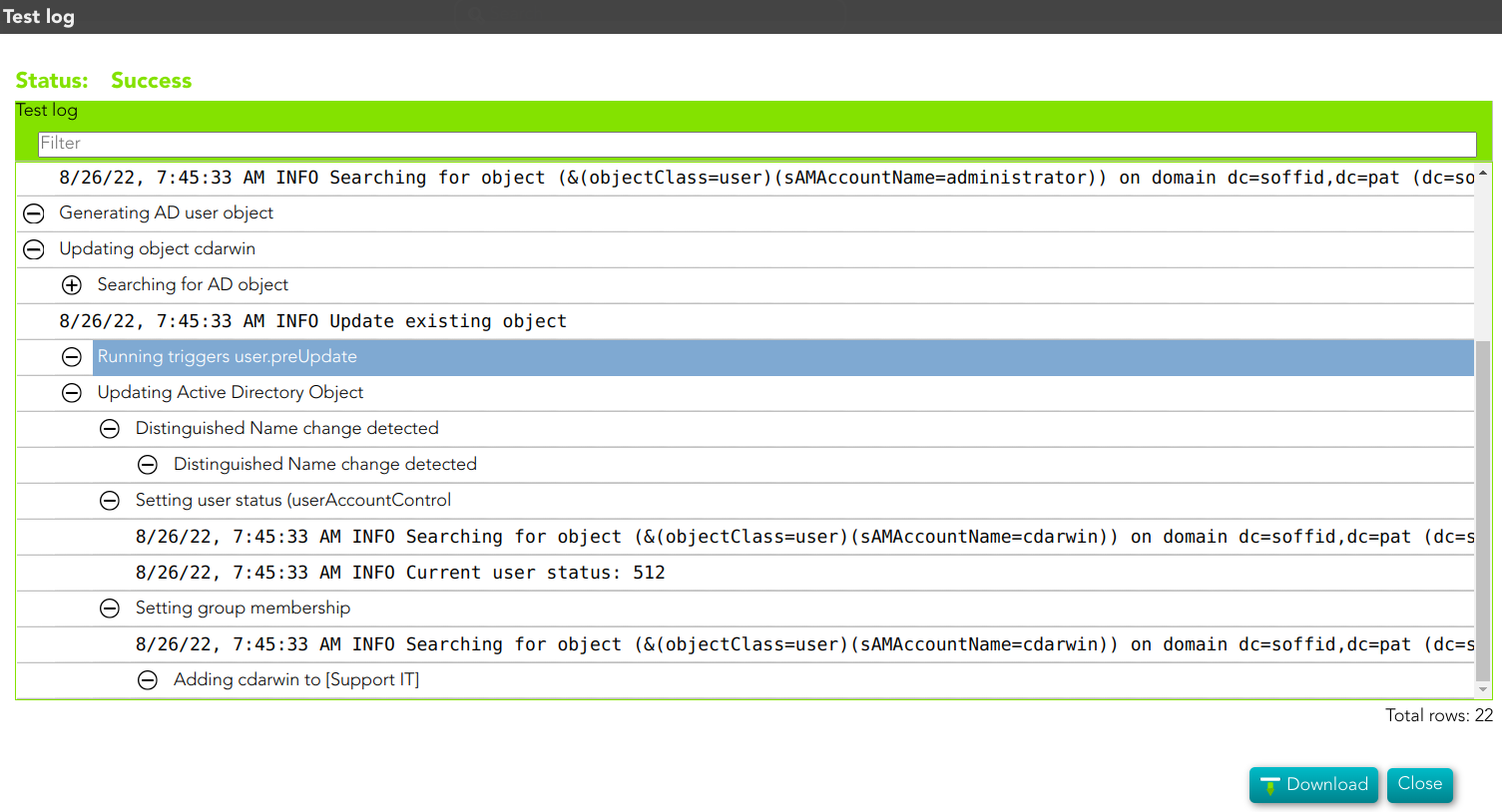
The process finishes and the log is displayed, and you can download it by clicking the *Download* button.

<details id="bkmrk-%F0%9F%93%91-log-detail"><summary>📑 Log detail</summary>

[![image-1661500002798.png](https://bookstack.soffid.com/uploads/images/gallery/2022-08/scaled-1680-/image-1661500002798.png)](https://bookstack.soffid.com/uploads/images/gallery/2022-08/image-1661500002798.png)

</details>