For more information to check if your system may be synchronized with this connector do not hesitate to contact us through our [Contact form](http://www.soffid.com/contactform/)
### Prerequisites To get a service account and a private key, please follow this link: [Creating a service account](https://developers.google.com/identity/protocols/OAuth2ServiceAccount#creatinganaccount). You must: - Register a new project - Enable AdminSDK API - Register a new OAuth service account. Store the JSON generated file in a secure place. Furthermore, you will need to follow [this guide](https://developers.google.com/identity/protocols/OAuth2ServiceAccount#delegatingauthority) to enable the recently created account to use directory API services. The scopes to grant are: - View and manage the provisioning of groups on your domain: [https://www.googleapis.com/auth/admin.directory.group](https://www.googleapis.com/auth/admin.directory.group) - View and manage group subscriptions on your domain: [https://www.googleapis.com/auth/admin.directory.group.member](https://www.googleapis.com/auth/admin.directory.group.member) - View and manage organization units on your domain: [https://www.googleapis.com/auth/admin.directory.orgunit](https://www.googleapis.com/auth/admin.directory.orgunit) - View and manage the provisioning of users on your domain: [https://www.googleapis.com/auth/admin.directory.user](https://www.googleapis.com/auth/admin.directory.user) - View user roles: [https://www.googleapis.com/auth/admin.directory.rolemanagement.readonly](https://www.googleapis.com/auth/admin.directory.rolemanagement) - Optionally, view and manage user roles: [https://www.googleapis.com/auth/admin.directory.rolemanagement](https://www.googleapis.com/auth/admin.directory.rolemanagement) ## Download and Install This addon is located in the Connectors section and its name is **Google Apps plugin**.For more information about the installation process you can visit the [Addons Getting started](https://bookstack.soffid.com/books/addons-getting-started/page/getting-started "Addons installation") page.
## Agent Configuration ### Basic #### Generic parameters After the installation of the addon, you may create and configure agent instances. To configure this Google Apps Connector you must select "GoogleApps" in the attribute "Type" of the generic parameters section in the agents page configuration.For more information about how you may configure the generic parameters of the agent, see the following link: [Agents configuration](https://bookstack.soffid.com/books/soffid-3-reference-guide/page/agents "Agents")
#### Custom parameters Below there are the specific parameters for this agent implementation:**Parameter** | **Description** |
|---|---|
| Admin user | Administrator account name |
| Service account client email | Extract it from generated json file. It is tagged as client\_email |
| Service account private key | Extract it from generated json file. It is tagged as private\_key. As the private key is JSON encoded, mind to replace unicode escape chars by it's ASCII equivalents |
| Google domain | Base google domain |
**Attribute** | **Value** |
|---|---|
| suspended | "True" if the account is disabled. "False" otherwise |
| name{"givenName"} | User given name |
| name{"familyName"} | User last name |
| name{"fullName"} | User full name |
| primaryEmail | Account name |
**Attribute** | **Value** |
|---|---|
| name | Org Unit Name |
For more information about how you may configure attribute mapping, see the following link: [Soffid Attribute Mapping Reference](https://bookstack.soffid.com/link/72#bkmrk-soffid-attributes)
For instance: [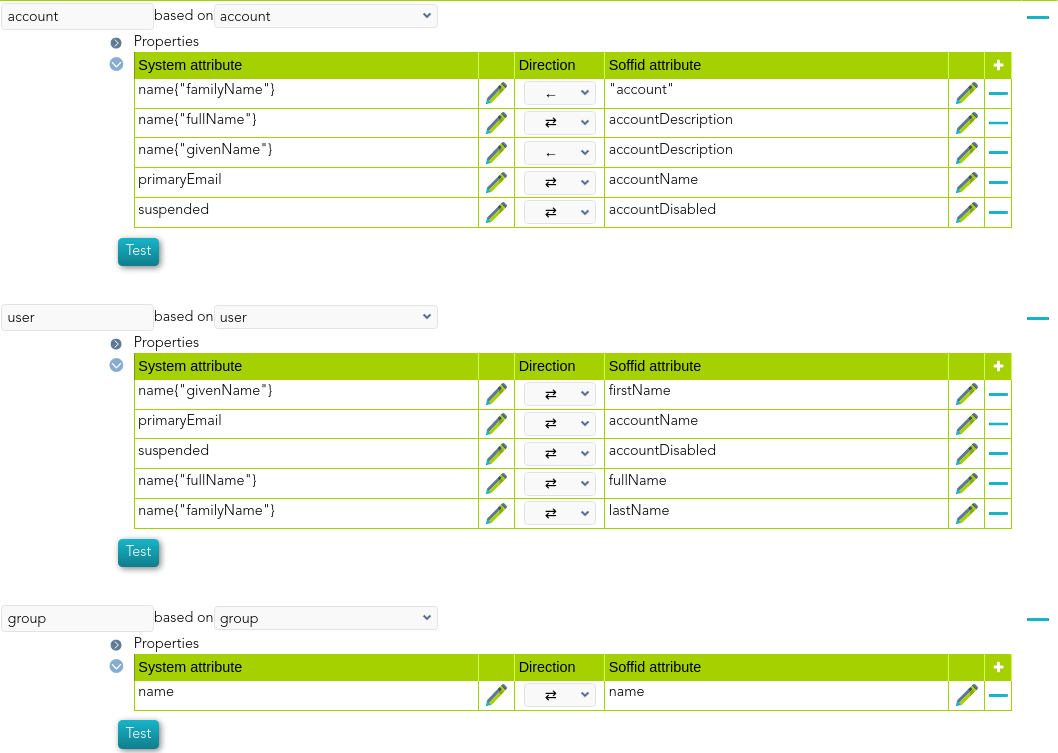](https://bookstack.soffid.com/uploads/images/gallery/2022-01/image-1641828269243.png) #### Triggers Nothing to configure. This option is not available to Google apps connector. ### Load Triggers You can define BeanShell scripts that will be triggered when data is loaded into Soffid (incoming triggers). The trigger result will be a boolean value, true to continue or false to stop. Triggers can be used to validate or perform a specific action just before performing an operation or just after performing an operation into Soffid objects.To view some examples, visit the [Incoming triggers examples page.](https://bookstack.soffid.com/books/connectors/page/incoming-triggers-examples "Incoming triggers examples")
### Account metadata Agents allow you to create additional data, on the "Account metadata" tab, to customize the accounts created for that agent. This additional information will be loaded with the agent's information, or calculated as defined in the mappings. The additional data can be used in both mappings and triggers. The attributes which you define here will be shown when you click on the proper account, on the Accounts Tabs at user page. ## Operational ### Monitoring After the agent configuration you could check in the monitoring page if the service is running in the Synchronization Server, please go to: - Start Menu > Administration > Monitoring and reporting > Syscserver monitoring ### Tasks #### Authoritative If you are checked "Authorized identity source", an automatic task to load identities from the managed system to Soffid is available, please go to: - Start Menu > Administration > Monitoring and reporting > Scheduled tasks And you will something like "Import authoritative data from <AGENT\_NAME>". #### Reconcile If you are configured the "Attribute Mapping" tab with some of our objects: "user or group", an automatic task to synchronize these objects from the managed system to Soffid is available, please go to: - Start Menu > Administration > Monitoring and reporting > Scheduled tasks And you will do something like "Reconcile all accounts from <AGENT\_NAME>". ### Synchronization Regarding the synchronization of the objects, there are two possible options: - If you are checked the generic attribute "Read Only" in the "Basics" tab, only the changes in the managed systems will be updated in Soffid. We recommend these options until the global configuration of Soffid will be tested. - If you are not checked the generic attribute "Read Only" in the "Basics" tab, all the changes in Soffid or the managed system will be updated in the other. Note that this synchronization must be configured in the "Attribute mapping" tab correctly.For more information about how you may configure the generic parameters of the agent, see the following link: [Agents configuration](https://bookstack.soffid.com/books/soffid-3-reference-guide/page/agents "Agents")