Configure Workflow engine
Description
This page groups together several features related to the workflow engine.
Document manager
Soffid can use any document repository to store documents generated by workflows, reporting addon, or any other addon.
The document repository can be either a local directory or a remote one accessed using FTP, SMB, HTTP protocols. Depending on the protocol selected, additional parameters may be needed.
Text index
Soffid console maintains a textual index that allows searching for currently active or finished processes using full text search.
The textual index for searches can be updated from this page. The textual index is not stored in the database but filesystem. From this page, you can set the directory where this textual index will be stored.
Because it is stored in non-transactional storage, it can get occasionally corrupted. In such a case, by pressing the "Rebuild Index" button, the index will be rebuilt from scratch.
Task scheduler
When we are working with workflows, there are parts of the process that need to be managed in the background, and this requires a process that runs regularly. This process executes logic nodes or timers configured to run at a specific time.
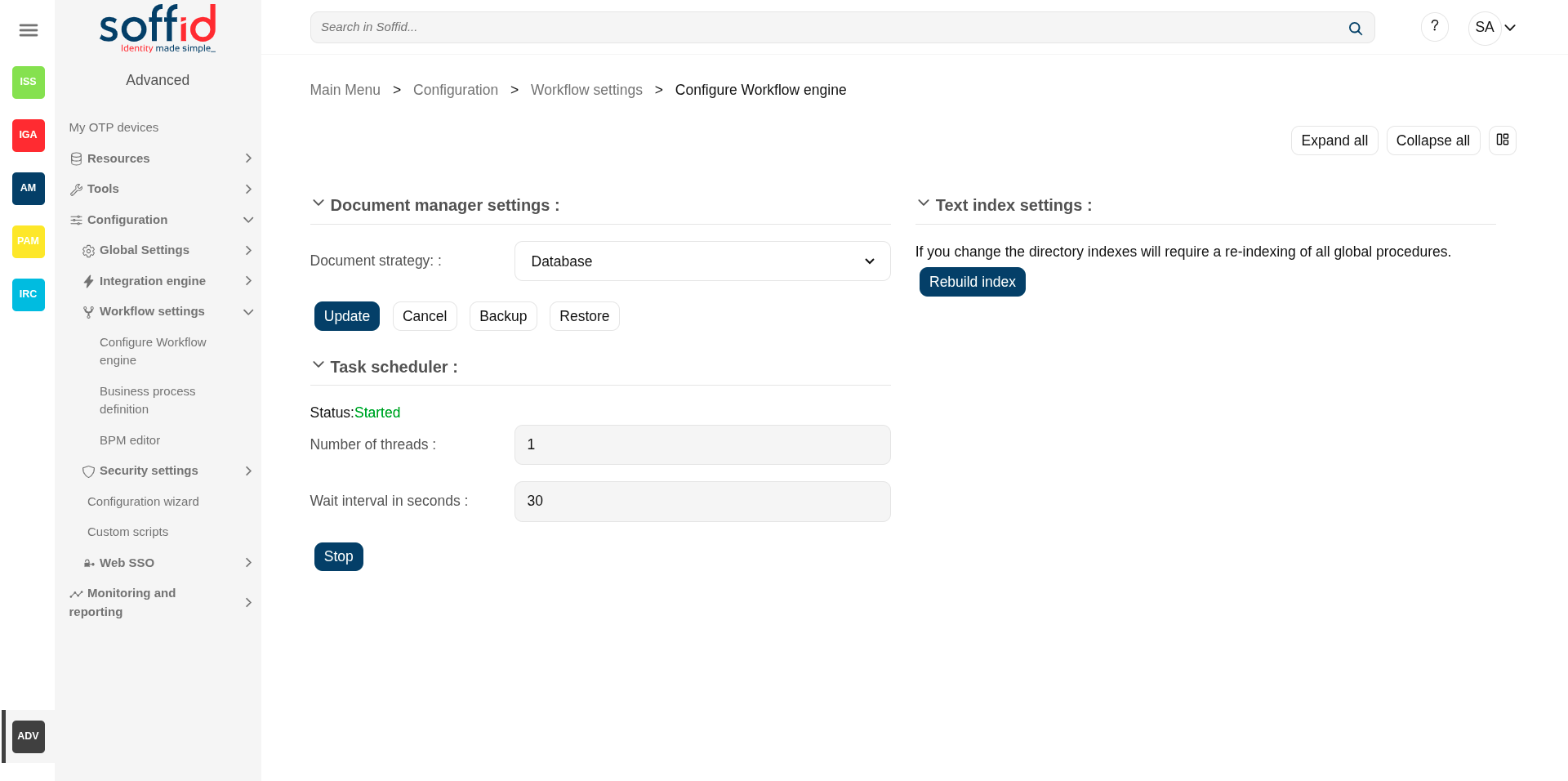
Screen overview
Related objects
- Configure Workflow engine : where the workflow engine is configured
- Business process definition : where workflows are published
- BPM editor : where to create or modify workflows
-
My tasks : pending workflows where the user has to perform an action in order to continue their workflow.
-
My requests : The workflows that the user can initiate are listed here.
-
My requests > Query request status : to search for all processes started by oneself
-
Process Search : to search for all processes
- Metadata : to add attributes to display in the search tables
- Scheduled jobs : shows active workflows pending asynchronous tasks
Standard attributes
- Document strategy: these are the possible configurations
- Database: (by default) stored in Soffid's own database
- Local:
- Temporary local file path:
- CIFS: specific implementation of SMB. Its attributes:
- Server: domain of the server
- File path: file path of the server
- Temporary local file path: folder inside the Soffid home directory
- User name: user
- Password: password
- FTP:
- Server: domain of the server
- File path: file path of the server
- Temporary local file path: folder inside the Soffid home directory
- User name: user
- Password: password
- HTTP:
- Server: URL of the service
- Temporary local file path: folder inside the Soffid home directory
- User name: user
- Password: password
- Server: URL of the service
- Text index settings: If you change the directory indexes will require a re-indexing of all global procedures.
- Task scheduler: attributes in query mode:
Status: Started / Stoped
-
- Number of threads: 1 by default
- Wait interval in seconds: every few seconds the process checks whether it has any pending tasks
Actions
View actions
| Expand all | Displays all the attributes of the different blocks. |
| Collapse all | Hide all attributes of the different blocks. |
| "Types of views" | Change the view type: Classic view, Modern view, Compact design. |
Document manager actions
|
Update |
Allows you to save the changes. |
|
Cancel |
Allows you to undo any changes made. |
|
Backup |
Allows you to download a zip file containing all the files. |
|
Restore |
Allows you to upload a zip file to restore all the files. |
Text index actions
| Rebuild index |
Regenerate from scratch the text index on which workflows are searched, as well as the attributes that have this type of search configured.
Please note that depending on the volume of data on your system, this process may take quite some time. |
Task scheduler actions
| Stop / Start | Stop to shut down the service, start to restart it |