For more information about the process definition you can visit the[ BPM Editor chapter](https://bookstack.soffid.com/books/bpm-editor/page/bpm-editor "BPM Editor").
The users configured like initiators in a User management process or in a Permission management process will be able to launch those processes. Those operations will be able to be performed from My Requests option. ### User management #### Update my data ##### Example Process used to request to update my user data. #### User request Process uses to request to add, delete, modify or disable any user. That kind of process will be able to launch for users with the proper permissions that will be expecified on the process definition. ##### Example Request to update the primary group of a user, and the admin user rejects that request. ##### Example Request to update the primary group of a user, and the admin user approves that request. ##### Example Request to create a new user. That workflow uses the Detect duplicated user funtionality. ### Process management #### Permission request ##### Example Request to assign permissions to a user. ##### Example Users in charge of assigning or denying permissions, could do that from the mail if Soffid is configured in that way. Users will receive an email similar to the following one: [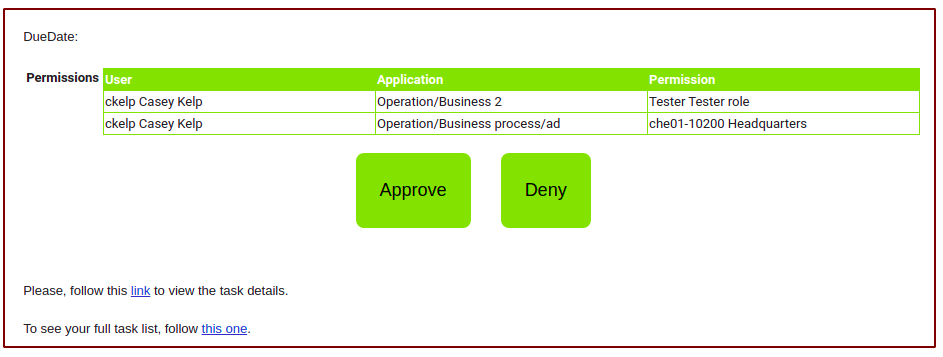](https://bookstack.soffid.com/uploads/images/gallery/2021-06/image-1624959311914.png) [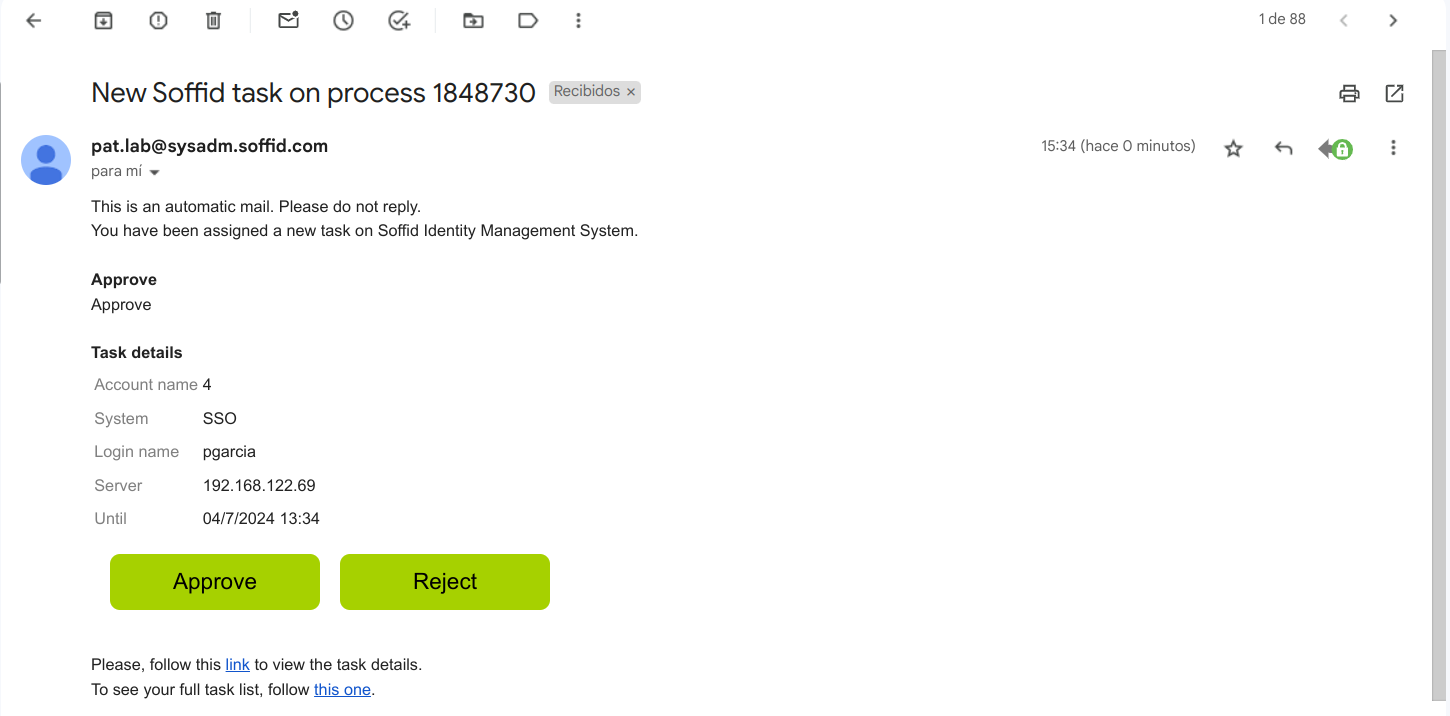](https://bookstack.soffid.com/uploads/images/gallery/2024-07/image-1720013708415.png) # Sample Scripts BPM ## Start Step #### Validations ```JavaScript a = executionContext.getVariable("firstName"); if (a==null || "".equals(a.trim())) throw new Exception("First name is mandatory"); a = executionContext.getVariable("lastName"); if (a==null || "".equals(a.trim())) throw new Exception("Last name is mandatory"); .................. a = executionContext.getVariable("userName"); lu = serviceLocator.getUserService().findUserByJsonQuery("userName eq \""+a+"\" "); if (!lu.isEmpty()) throw new Exception("The user name is in use, please choose another one"); e = executionContext.getVariable("emailAddress"); lu = serviceLocator.getUserService().findUserByJsonQuery("emailAddress eq \""+e+"\" "); if (!lu.isEmpty()) throw new Exception("The email is in use, please choose another one"); ................. return true; ``` #### Trigger onChange Calculate the email when firstName or lastName changes and depending on the userType: ```JavaScript firstName = (inputFields.get("firstName")!=null) ? inputFields.get("firstName").value : null; lastName = (inputFields.get("lastName")!=null) ? inputFields.get("lastName").value : null; userType = (inputFields.get("userType")!=null) ? inputFields.get("userType").value : null; if (firstName!=null && !firstName.trim().isEmpty() && lastName!=null && !lastName.trim().isEmpty() && userType!=null && !userType.trim().isEmpty()) { emailAddress = firstName + "." + lastName; if ("E".equals(userType)) { emailAddress = emailAddress + ".ext@soffid.com"; } else { emailAddress = emailAddress + "@soffid.com"; } inputFields.get("emailAddress").value = emailAddress; } ``` Calculate the user name depending on the first and last name ```JavaScript firstName = (inputFields.get("firstName")!=null) ? inputFields.get("firstName").value : null; lastName = (inputFields.get("lastName")!=null) ? inputFields.get("lastName").value : null; middleName = (inputFields.get("middleName")!=null) ? inputFields.get("middleName").value : null; userType = (inputFields.get("userType")!=null) ? inputFields.get("userType").value : null; primaryGroup = (inputFields.get("primaryGroup")!=null) ? inputFields.get("primaryGroup").value : null; if (firstName!=null && !firstName.trim().isEmpty() && lastName!=null && !lastName.trim().isEmpty()) { // Erase blanck spaces while (firstName.contains(" ")) firstName = firstName.replace(" "," "); fn = firstName.trim().split(" ")[0]; fn = fn.substring(0,1).toUpperCase() + fn.substring(1).toLowerCase(); // Erase blanck spaces while (lastName.contains(" ")) lastName = lastName.replace(" "," "); lna = lastName.trim().split(" "); ln = ""; for (w : lna) { ln = ln + w.substring(0,1).toUpperCase() + w.substring(1).toLowerCase(); } un = fn+"."+ln; // Check, if user exist we will add the first letter of the second name u = serviceLocator.getUserService().findUserByUserName(un); if (u!=null && middleName!=null && !middleName.trim().isEmpty()) { un = un+middleName.substring(0,1).toUpperCase(); } // Max length 20 characters if (un.length()>20) un = un.substring(0,20); inputFields.get("userName").value = un; } ``` #### Outgoing transitions Set values to variables that will be available in the next step. ```JavaScript un = executionContext.getVariable("userName"); executionContext.setVariable("userSelector",un); executionContext.setVariable("action","M"); ``` ## Approve #### Outgoing transitions Remove a previous roles ```JavaScript un = executionContext.getVariable("userName"); t = executionContext.getVariable("title"); lra = serviceLocator.getApplicationService().findUserRolesByUserName(un); for (ra : lra) { if (ra.roleName.equals(t)) { serviceLocator.getApplicationService().delete(ra); break; } } ``` Save new role ```JavaScript p = executionContext.getVariable("newTitle"); if (p==null || "".equals(p.trim())) throw new Exception("El nuevo puesto de trabajo es obligatorio"); executionContext.setVariable("title", p) ``` ## End Step #### Incoming transition Add a role to the user in case the role exists and it is the same that the user title. ```JavaScript SYS = "soffid"; un = executionContext.getVariable("userName"); if (un==null) return true; t = executionContext.getVariable("title"); if (t==null) return true; q = "name eq \""+t+"\" and system eq \""+SYS+"\""; lr = serviceLocator.getApplicationService().findRoleByJsonQuery(q); if (lr==null || lr.isEmpty()) return true; r = lr.get(0); app = r.informationSystemName; ra = new com.soffid.iam.api.RoleAccount(); ra.setRoleName(t); ra.setSystem(SYS); ra.setInformationSystemName(app); ra.setUserCode(un); ra.setDomainValue(new com.soffid.iam.api.DomainValue()); serviceLocator.getApplicationService().create(ra); return true; ```